
The Tech Edvocate

Top Menu

  • Advertisement
  • Apps
  • Home Page
  • Home Page Five (No Sidebar)
  • Home Page Four
  • Home Page Three
  • Home Page Two
  • Home Tech2
  • Icons [No Sidebar]
  • Left Sidbear Page
  • Lynch Educational Consulting
  • My Account
  • My Speaking Page
  • Newsletter Sign Up Confirmation
  • Newsletter Unsubscription
  • Our Brands
  • Page Example
  • Privacy Policy
  • Protected Content
  • Register
  • Request a Product Review
  • Shop
  • Shortcodes Examples
  • Signup
  • Start Here
    • Governance
    • Careers
    • Contact Us
  • Terms and Conditions
  • The Edvocate
  • The Tech Edvocate Product Guide
  • Topics
  • Write For Us
  • Advertise

Main Menu

  • Start Here
    • Our Brands
    • Governance
      • Lynch Educational Consulting, LLC.
      • Dr. Lynch’s Personal Website
      • Careers
    • Write For Us
    • The Tech Edvocate Product Guide
    • Contact Us
    • Books
    • Edupedia
    • Post a Job
    • The Edvocate Podcast
    • Terms and Conditions
    • Privacy Policy
  • Topics
    • Assistive Technology
    • Child Development Tech
    • Early Childhood & K-12 EdTech
    • EdTech Futures
    • EdTech News
    • EdTech Policy & Reform
    • EdTech Startups & Businesses
    • Higher Education EdTech
    • Online Learning & eLearning
    • Parent & Family Tech
    • Personalized Learning
    • Product Reviews
  • Advertise
  • Tech Edvocate Awards
  • The Edvocate
  • Pedagogue
  • School Ratings

logo

The Tech Edvocate

  • Start Here
    • Our Brands
    • Governance
      • Lynch Educational Consulting, LLC.
      • Dr. Lynch’s Personal Website
        • My Speaking Page
      • Careers
    • Write For Us
    • The Tech Edvocate Product Guide
    • Contact Us
    • Books
    • Edupedia
    • Post a Job
    • The Edvocate Podcast
    • Terms and Conditions
    • Privacy Policy
  • Topics
    • Assistive Technology
    • Child Development Tech
    • Early Childhood & K-12 EdTech
    • EdTech Futures
    • EdTech News
    • EdTech Policy & Reform
    • EdTech Startups & Businesses
    • Higher Education EdTech
    • Online Learning & eLearning
    • Parent & Family Tech
    • Personalized Learning
    • Product Reviews
  • Advertise
  • Tech Edvocate Awards
  • The Edvocate
  • Pedagogue
  • School Ratings
  • Your Essential Guide to Navigating Consumer Tech News in 2023

  • Unveiling the Future: Must-Have Gadgets and Innovations Transforming Consumer Tech

  • Revolutionizing Everyday Life: The Must-Have Consumer Tech Innovations of 2026

  • Top Android Phones of 2026: Unveiling the Must-Have Smartphones for Every User

  • Fashion Nova 2026: A Comprehensive Review and Competitor Comparison

  • China and the US Engage in Crucial Economic Talks in Paris

  • Gold Prices in Turmoil: Will They Hold Above $5,200 Amid Geopolitical Tensions?

  • Bank of Japan Set to Maintain Interest Rates Amid Rising Global Uncertainty

  • Oil Prices Surge Amidst Geopolitical Tensions: A Closer Look at March 2026 Trends

  • Bitcoin’s Resilience: How BTC Holds Steady at $70,982 Amid Market Turbulence

Tech Advice
Home›Tech Advice›How to Install the Google Play Store on Any Android Device: A Step-by-Step Guide

How to Install the Google Play Store on Any Android Device: A Step-by-Step Guide
By Matthew Lynch
July 20, 2023
0
Spread the love

The Google Play Store is an essential app marketplace for Android devices, providing access to a vast array of applications, games, and digital content. However, not all Android devices come pre-installed with the Play Store. If you find yourself without this vital app or have accidentally uninstalled it, don’t worry! In this article, we’ll guide you through the steps to install the Google Play Store on any Android device.

1. Check if your device has the Play Store:

Before proceeding with installation methods, ensure that your device doesn’t already have the Google Play Store installed. Look for its icon in your app drawer or search for “Play Store” in your device’s settings menu.

2. Enable Unknown Sources:

To install apps from sources other than the official Google Play Store, you need to enable “Unknown Sources” in your device settings:

• Go to Settings.

• Scroll down and tap on Security (or Privacy).

• Enable/Checkmark “Unknown Sources” or “Install unknown apps.”

Please note that enabling this option may pose security risks if you download apps from unreliable sources. Exercise caution and only download apps from reputable websites.

3. Download APK File:

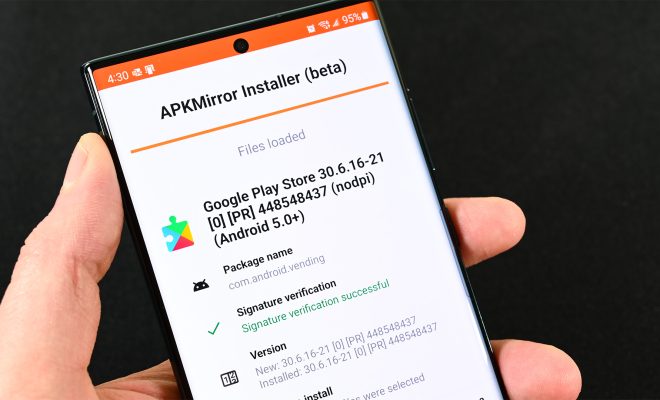
An APK file is an installer package used by Android devices to distribute applications outside of the Google Play ecosystem. You can obtain APK files of various versions of the Google Play Store from trusted sources like

APKMirror or APKPure:

• Visit either website using a browser on your Android device.

• Search for “Google play store apk.”

• Download an appropriate version based on compatibility with your specific Android OS version and architecture (arm64-v8a / armeabi-v7a).

Ensure that you’re downloading from a reliable source to avoid malware or compromised files.

4. Allow Permissions:

Once the APK file is downloaded, locate it in your device’s Downloads folder or wherever you saved it. Tap on the file to begin the installation process.

• You may be prompted to allow certain permissions for the installation to proceed.

• Grant any necessary permissions by tapping “Allow” or “Next.”

5. Install and Update:

Follow the on-screen instructions to install the Google Play Store app onto your Android device:

• Review any permission requests that appear during installation.

• Tap “Install” or “Next.”

• Wait for the installation process to complete.

If you’re installing an older version of Google Play Store, consider updating it immediately after installation by opening the app and following any prompts for updates.

6. Sign In and Enjoy:

After successfully installing or updating the Google Play Store, open it from your app drawer:

• Sign in with your existing Google account credentials (or create a new one if needed).

• Accept terms of service if prompted.

• Once signed in, you’ll have access to a vast library of apps, games, movies, music, books, and more!

Remember always to download apps from trusted sources within the Google Play Store itself. This ensures safety as these apps undergo thorough vetting processes before being made available on this official platform.

Conclusion:

Installing or reinstalling the Google Play Store on your Android device empowers you with access to a wide range of applications and digital content. By following these step-by-step instructions – checking if your device already has Play Store installed, enabling unknown sources, downloading APK files from reliable sources, allowing necessary permissions, installing/updating, and signing in – you can enjoy all that this popular marketplace has to offer. Happy exploring!

Previous Article

Microsoft Windows 10 Review

Next Article

Microsoft Surface Laptop Go 2 Review

Matthew Lynch

Related articles More from author

  • Tech Advice

    Best Credit Cards for Good Credit Scores in 2023

    July 11, 2023
    By Matthew Lynch
  • Tech Advice

    iPhone 9 (aka iPhone SE 2): Apple’s budget iPhone needs to be small and affordable

    July 17, 2023
    By Matthew Lynch
  • Tech Advice

    The Best Hand Soaps to Keep Your Hands Clean and Healthy

    July 7, 2023
    By Matthew Lynch
  • Tech Advice

    Quip Toothbrush Review: A Modern Approach to Oral Hygiene

    July 7, 2023
    By Matthew Lynch
  • Tech Advice

    How to Enable Snapchat Log-In Verification for Enhanced Account Security

    July 17, 2023
    By Matthew Lynch
  • Tech Advice

    Best Gifts Under $500 for 2023

    July 14, 2023
    By Matthew Lynch

Search

Login & Registration

  • Register
  • Log in
  • Entries feed
  • Comments feed
  • WordPress.org

Newsletter

Signup for The Tech Edvocate Newsletter and have the latest in EdTech news and opinion delivered to your email address!

About Us

Since technology is not going anywhere and does more good than harm, adapting is the best course of action. That is where The Tech Edvocate comes in. We plan to cover the PreK-12 and Higher Education EdTech sectors and provide our readers with the latest news and opinion on the subject. From time to time, I will invite other voices to weigh in on important issues in EdTech. We hope to provide a well-rounded, multi-faceted look at the past, present, the future of EdTech in the US and internationally.

We started this journey back in June 2016, and we plan to continue it for many more years to come. I hope that you will join us in this discussion of the past, present and future of EdTech and lend your own insight to the issues that are discussed.

Newsletter

Signup for The Tech Edvocate Newsletter and have the latest in EdTech news and opinion delivered to your email address!

Contact Us

The Tech Edvocate
910 Goddin Street
Richmond, VA 23231
(601) 630-5238
[email protected]

Copyright © 2025 Matthew Lynch. All rights reserved.
