
The Tech Edvocate

Top Menu

  • Advertisement
  • Apps
  • Home Page
  • Home Page Five (No Sidebar)
  • Home Page Four
  • Home Page Three
  • Home Page Two
  • Home Tech2
  • Icons [No Sidebar]
  • Left Sidbear Page
  • Lynch Educational Consulting
  • My Account
  • My Speaking Page
  • Newsletter Sign Up Confirmation
  • Newsletter Unsubscription
  • Our Brands
  • Page Example
  • Privacy Policy
  • Protected Content
  • Register
  • Request a Product Review
  • Shop
  • Shortcodes Examples
  • Signup
  • Start Here
    • Governance
    • Careers
    • Contact Us
  • Terms and Conditions
  • The Edvocate
  • The Tech Edvocate Product Guide
  • Topics
  • Write For Us
  • Advertise

Main Menu

  • Start Here
    • Our Brands
    • Governance
      • Lynch Educational Consulting, LLC.
      • Dr. Lynch’s Personal Website
      • Careers
    • Write For Us
    • The Tech Edvocate Product Guide
    • Contact Us
    • Books
    • Edupedia
    • Post a Job
    • The Edvocate Podcast
    • Terms and Conditions
    • Privacy Policy
  • Topics
    • Assistive Technology
    • Child Development Tech
    • Early Childhood & K-12 EdTech
    • EdTech Futures
    • EdTech News
    • EdTech Policy & Reform
    • EdTech Startups & Businesses
    • Higher Education EdTech
    • Online Learning & eLearning
    • Parent & Family Tech
    • Personalized Learning
    • Product Reviews
  • Advertise
  • Tech Edvocate Awards
  • The Edvocate
  • Pedagogue
  • School Ratings

logo

The Tech Edvocate

  • Start Here
    • Our Brands
    • Governance
      • Lynch Educational Consulting, LLC.
      • Dr. Lynch’s Personal Website
        • My Speaking Page
      • Careers
    • Write For Us
    • The Tech Edvocate Product Guide
    • Contact Us
    • Books
    • Edupedia
    • Post a Job
    • The Edvocate Podcast
    • Terms and Conditions
    • Privacy Policy
  • Topics
    • Assistive Technology
    • Child Development Tech
    • Early Childhood & K-12 EdTech
    • EdTech Futures
    • EdTech News
    • EdTech Policy & Reform
    • EdTech Startups & Businesses
    • Higher Education EdTech
    • Online Learning & eLearning
    • Parent & Family Tech
    • Personalized Learning
    • Product Reviews
  • Advertise
  • Tech Edvocate Awards
  • The Edvocate
  • Pedagogue
  • School Ratings
  • A Visitors Guide to Long Beach (CA), United States

  • A Visitor’s Guide to Fresno (CA), United States

  • A Visitors Guide to New Orleans (LA), United States

  • A Visitors Guide to Sacramento (CA), United States

  • A Visitors Guide to Lyon, France

  • JisuLife Ultra2 Portable Fan: A Powerful Multi-Function Cooling Solution

  • A Visitors Guide to Viña del Mar, Chile

  • A Visitors Guide to Århus, Denmark

  • A Visitors Guide to Bakersfield (CA), United States

  • A Visitors Guide to Aurora (CO), United States

How To
Home›How To›How to Hook up a Crossover: 11 Steps to Enhanced Audio

How to Hook up a Crossover: 11 Steps to Enhanced Audio
By Matthew Lynch
March 20, 2024
0
Spread the love

Introduction:

A crossover is a valuable tool for any audio system, as it allows you to divide your audio signals into different frequencies, so that they can be directed appropriately to your speakers. By using a crossover in your setup, you can drastically improve the audio quality and ensure that each speaker receives the optimal frequency range it was designed for. In this article, we will guide you through 11 straightforward steps to hook up a crossover to your system.

Step 1: Choose the right crossover

Different types of crossovers – active or passive – are available depending on your setup. Active crossovers require an external power source and work with amplifiers and pre-amplifiers. Passive crossovers do not need an external power source and can be directly connected to speaker terminals. Ensure that you select the appropriate type for your needs.

Step 2: Turn off all devices

Before working on any audio equipment, switch off all devices, including amplifiers and pre-amplifiers, to avoid electrical shock and damage.

Step 3: Locate input/output ports

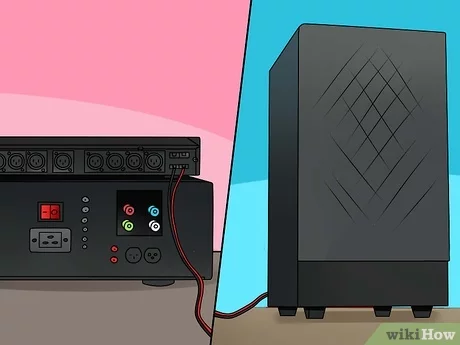
On the crossover device, identify the input ports (usually from pre-amplifier or amplifier) and output ports (linked to speakers).

Step 4: Connect input cables

Connect the input cables from your pre-amplifier or amplifier outputs to the corresponding input ports on the crossover. For a typical stereo setup with left and right channels, be sure to connect them accordingly.

Step 5: Adjust crossover settings

Depending on your specific system and speakers, set the crossover points for low-pass and high-pass filters as recommended by the manufacturer.

Step 6: Connect output cables

Now, connect the output cables from each output port on the crossover device to their respective speaker inputs. This typically includes dividing signals for low-frequency woofers (subwoofers), mid-range drivers, and tweeters (high-frequency).

Step 7: Adjust phase controls

Some crossovers and speakers have phase control settings that help synchronize the audio signals for improved clarity. Double-check your documentation for any specific recommendations and adjust accordingly.

Step 8: Test the system

Before securing everything in their final positions, test your setup to ensure all connections are functioning properly. Start with low volume and gradually increase it, listening for any distortion or issues.

Step 9: Fine-tune settings

After initial testing, fine-tune your crossover settings to achieve a seamless blend of frequencies between your various speakers. You may need several iterations of adjustments to find a perfect balance.

Step 10: Check cable connections

Once you have completed the fine-tuning process, double-check all cable connections to ensure they are secure and away from potential damage.

Step 11: Secure and organize cables

Use cable ties or organizers to keep all wires in order, minimizing potential damage or accidental disconnections. Tidy wires also improve the overall aesthetics of your system.

Conclusion:

By following these 11 steps, you should have successfully hooked up a crossover to enhance your audio system’s performance. Enjoy the improved sound quality and a more immersive listening experience.


Previous Article

20 Bachelor Party Games: Best Ideas for ...

Next Article

How to Diagnose Acid Reflux: 15 Steps

Matthew Lynch

Related articles More from author

  • How To

    3 Ways to Foxtrot

    April 2, 2024
    By Matthew Lynch
  • How To

    3 Ways to Contact Bill Gates

    March 24, 2024
    By Matthew Lynch
  • How To

    6 Ways to Add Captions to Instagram Videos

    January 31, 2024
    By Matthew Lynch
  • How To

    3 Ways to Use Apple Cider Vinegar for Dogs  

    October 3, 2023
    By Matthew Lynch
  • How To

    3 Ways to Cite the Universal Declaration of Human Rights

    December 7, 2023
    By Matthew Lynch
  • How To

    3 Ways to Clean a Suede Purse

    November 4, 2023
    By Matthew Lynch

Search

Login & Registration

  • Register
  • Log in
  • Entries feed
  • Comments feed
  • WordPress.org

Newsletter

Signup for The Tech Edvocate Newsletter and have the latest in EdTech news and opinion delivered to your email address!

About Us

Since technology is not going anywhere and does more good than harm, adapting is the best course of action. That is where The Tech Edvocate comes in. We plan to cover the PreK-12 and Higher Education EdTech sectors and provide our readers with the latest news and opinion on the subject. From time to time, I will invite other voices to weigh in on important issues in EdTech. We hope to provide a well-rounded, multi-faceted look at the past, present, the future of EdTech in the US and internationally.

We started this journey back in June 2016, and we plan to continue it for many more years to come. I hope that you will join us in this discussion of the past, present and future of EdTech and lend your own insight to the issues that are discussed.

Newsletter

Signup for The Tech Edvocate Newsletter and have the latest in EdTech news and opinion delivered to your email address!

Contact Us

The Tech Edvocate
910 Goddin Street
Richmond, VA 23231
(601) 630-5238
[email protected]

Copyright © 2025 Matthew Lynch. All rights reserved.