The Tech Edvocate

Top Menu

  • Advertisement
  • Apps
  • Home Page
  • Home Page Five (No Sidebar)
  • Home Page Four
  • Home Page Three
  • Home Page Two
  • Home Tech2
  • Icons [No Sidebar]
  • Left Sidbear Page
  • Lynch Educational Consulting
  • My Account
  • My Speaking Page
  • Newsletter Sign Up Confirmation
  • Newsletter Unsubscription
  • Our Brands
  • Page Example
  • Privacy Policy
  • Protected Content
  • Register
  • Request a Product Review
  • Shop
  • Shortcodes Examples
  • Signup
  • Start Here
    • Governance
    • Careers
    • Contact Us
  • Terms and Conditions
  • The Edvocate
  • The Tech Edvocate Product Guide
  • Topics
  • Write For Us
  • Advertise

Main Menu

  • Start Here
    • Our Brands
    • Governance
      • Lynch Educational Consulting, LLC.
      • Dr. Lynch’s Personal Website
      • Careers
    • Write For Us
    • The Tech Edvocate Product Guide
    • Contact Us
    • Books
    • Edupedia
    • Post a Job
    • The Edvocate Podcast
    • Terms and Conditions
    • Privacy Policy
  • Topics
    • Assistive Technology
    • Child Development Tech
    • Early Childhood & K-12 EdTech
    • EdTech Futures
    • EdTech News
    • EdTech Policy & Reform
    • EdTech Startups & Businesses
    • Higher Education EdTech
    • Online Learning & eLearning
    • Parent & Family Tech
    • Personalized Learning
    • Product Reviews
  • Advertise
  • Tech Edvocate Awards
  • The Edvocate
  • Pedagogue
  • School Ratings

logo

The Tech Edvocate

  • Start Here
    • Our Brands
    • Governance
      • Lynch Educational Consulting, LLC.
      • Dr. Lynch’s Personal Website
        • My Speaking Page
      • Careers
    • Write For Us
    • The Tech Edvocate Product Guide
    • Contact Us
    • Books
    • Edupedia
    • Post a Job
    • The Edvocate Podcast
    • Terms and Conditions
    • Privacy Policy
  • Topics
    • Assistive Technology
    • Child Development Tech
    • Early Childhood & K-12 EdTech
    • EdTech Futures
    • EdTech News
    • EdTech Policy & Reform
    • EdTech Startups & Businesses
    • Higher Education EdTech
    • Online Learning & eLearning
    • Parent & Family Tech
    • Personalized Learning
    • Product Reviews
  • Advertise
  • Tech Edvocate Awards
  • The Edvocate
  • Pedagogue
  • School Ratings
  • 100 Best Windows Apps

  • 100 Best Mac Apps

  • 100 Best Android Apps

  • 100 Best iOS Apps

  • 100 Best Chrome Extensions

  • 100 Best Slack Integrations

  • 100 Best Shopify Apps

  • 100 Best Apps That Integrate Freshdesk + Slack + Salesforce

  • 100 Best Open Source Alternatives

  • 100 Best SaaS Tools

Assistive Technology
Home›Assistive Technology›How to Fix the “Unhandled Exception Has Occurred in Your Application” Error on Windows

How to Fix the “Unhandled Exception Has Occurred in Your Application” Error on Windows
By Matthew Lynch
June 14, 2023
0
Spread the love

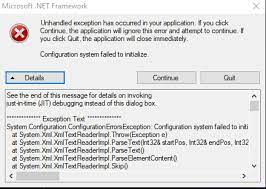
The “Unhandled Exception Has Occurred in Your Application” error is a common issue that can show up when you are using a Windows computer. This error can be caused by a variety of factors, such as a software conflict, missing files, or incompatible drivers. Fortunately, there are several steps you can take to fix this error and get your computer running smoothly again. In this article, we’ll walk you through some of the most effective solutions for the “Unhandled Exception Has Occurred in Your Application” error.

Step 1: Restart Your Computer

The first and simplest step you can take is to restart your computer. Sometimes, the error can be caused by a simple glitch or software conflict that a restart can fix. To restart your computer, click on the Start Menu, then click on the Power button. Select “Restart” from the menu and wait for your computer to restart. Once your computer has restarted, try running the application again and see if the error persists.

Step 2: Update Your Windows and Drivers

Outdated software and drivers can cause conflicts that lead to the “Unhandled Exception Has Occurred in Your Application” error. To prevent this from happening, it is important to keep your Windows and drivers up to date. Go to the Windows Update center and check for any available updates. You can also visit the websites of your device manufacturers to download the latest drivers.

Step 3: Check for Corrupted Files

Sometimes, the error can also be caused by corrupted files. You can use the System File Checker utility to scan for and repair any damaged or missing system files.

To run the System File Checker tool, open the Command Prompt as an administrator. Type “sfc /scannow” and press Enter. The tool will then scan your system files and make any necessary repairs.

Step 4: Disable Antivirus Programs

Sometimes, antivirus programs can interfere with the operation of certain applications and cause the “Unhandled Exception Has Occurred in Your Application” error. To check if this is the case, try disabling your antivirus software temporarily and see if the error persists.

Step 5: Reinstall the Application

If none of the above solutions work, you can try uninstalling and reinstalling the application that is causing the error. This will ensure that any corrupted files or conflicts are removed and that a fresh version of the application is installed.

To uninstall the application, go to the Control Panel, click on Programs, and select the application you want to uninstall. Follow the on-screen instructions to complete the uninstallation process.

To reinstall the application, visit the manufacturer’s website and download the latest version. Install the application and try running it again.


Previous Article

Best CrossFit Exercise Apps for Beginners

Next Article

5 Free iPhone & iPod Touch Texting ...

Matthew Lynch

Related articles More from author

  • Assistive Technology

    How to View a Message in HTML With Express and Live Mail

    June 11, 2023
    By Matthew Lynch
  • Assistive Technology

    How to Get Snapchat Trophies

    June 8, 2023
    By Matthew Lynch
  • Assistive Technology

    How to Use Microsoft Editor: A Beginner’s Guide

    June 6, 2023
    By Matthew Lynch
  • Assistive Technology

    How to Cancel Apple Arcade

    June 22, 2023
    By Matthew Lynch
  • Assistive Technology

    How to Deactivate or Delete Your Quora Account

    June 22, 2023
    By Matthew Lynch
  • Assistive Technology

    How to Make a High-Low-Close Stock Market Chart in Excel

    June 10, 2023
    By Matthew Lynch

Search

Login & Registration

  • Log in
  • Entries feed
  • Comments feed
  • WordPress.org

Newsletter

Signup for The Tech Edvocate Newsletter and have the latest in EdTech news and opinion delivered to your email address!

About Us

Since technology is not going anywhere and does more good than harm, adapting is the best course of action. That is where The Tech Edvocate comes in. We plan to cover the PreK-12 and Higher Education EdTech sectors and provide our readers with the latest news and opinion on the subject. From time to time, I will invite other voices to weigh in on important issues in EdTech. We hope to provide a well-rounded, multi-faceted look at the past, present, the future of EdTech in the US and internationally.

We started this journey back in June 2016, and we plan to continue it for many more years to come. I hope that you will join us in this discussion of the past, present and future of EdTech and lend your own insight to the issues that are discussed.

Newsletter

Signup for The Tech Edvocate Newsletter and have the latest in EdTech news and opinion delivered to your email address!

Contact Us

The Tech Edvocate
910 Goddin Street
Richmond, VA 23231
(601) 630-5238
[email protected]

Copyright © 2026 Matthew Lynch. All rights reserved.