The Tech Edvocate

Top Menu

  • Advertisement
  • Apps
  • Home Page
  • Home Page Five (No Sidebar)
  • Home Page Four
  • Home Page Three
  • Home Page Two
  • Home Tech2
  • Icons [No Sidebar]
  • Left Sidbear Page
  • Lynch Educational Consulting
  • My Account
  • My Speaking Page
  • Newsletter Sign Up Confirmation
  • Newsletter Unsubscription
  • Our Brands
  • Page Example
  • Privacy Policy
  • Protected Content
  • Register
  • Request a Product Review
  • Shop
  • Shortcodes Examples
  • Signup
  • Start Here
    • Governance
    • Careers
    • Contact Us
  • Terms and Conditions
  • The Edvocate
  • The Tech Edvocate Product Guide
  • Topics
  • Write For Us
  • Advertise

Main Menu

  • Start Here
    • Our Brands
    • Governance
      • Lynch Educational Consulting, LLC.
      • Dr. Lynch’s Personal Website
      • Careers
    • Write For Us
    • The Tech Edvocate Product Guide
    • Contact Us
    • Books
    • Edupedia
    • Post a Job
    • The Edvocate Podcast
    • Terms and Conditions
    • Privacy Policy
  • Topics
    • Assistive Technology
    • Child Development Tech
    • Early Childhood & K-12 EdTech
    • EdTech Futures
    • EdTech News
    • EdTech Policy & Reform
    • EdTech Startups & Businesses
    • Higher Education EdTech
    • Online Learning & eLearning
    • Parent & Family Tech
    • Personalized Learning
    • Product Reviews
  • Advertise
  • Tech Edvocate Awards
  • The Edvocate
  • Pedagogue
  • School Ratings

logo

The Tech Edvocate

  • Start Here
    • Our Brands
    • Governance
      • Lynch Educational Consulting, LLC.
      • Dr. Lynch’s Personal Website
        • My Speaking Page
      • Careers
    • Write For Us
    • The Tech Edvocate Product Guide
    • Contact Us
    • Books
    • Edupedia
    • Post a Job
    • The Edvocate Podcast
    • Terms and Conditions
    • Privacy Policy
  • Topics
    • Assistive Technology
    • Child Development Tech
    • Early Childhood & K-12 EdTech
    • EdTech Futures
    • EdTech News
    • EdTech Policy & Reform
    • EdTech Startups & Businesses
    • Higher Education EdTech
    • Online Learning & eLearning
    • Parent & Family Tech
    • Personalized Learning
    • Product Reviews
  • Advertise
  • Tech Edvocate Awards
  • The Edvocate
  • Pedagogue
  • School Ratings
  • Viaim Opennote Review: The AI Note-Taker That Disappears Into Your Daily Routine

  • A Visitors Guide to Long Beach (CA), United States

  • A Visitor’s Guide to Fresno (CA), United States

  • A Visitors Guide to New Orleans (LA), United States

  • A Visitors Guide to Sacramento (CA), United States

  • A Visitors Guide to Lyon, France

  • JisuLife Ultra2 Portable Fan: A Powerful Multi-Function Cooling Solution

  • A Visitors Guide to Viña del Mar, Chile

  • A Visitors Guide to Århus, Denmark

  • A Visitors Guide to Bakersfield (CA), United States

Assistive Technology
Home›Assistive Technology›How to Fix STOP 0x0000007B Errors

How to Fix STOP 0x0000007B Errors
By Matthew Lynch
June 10, 2023
0
Spread the love

If you’ve ever experienced a STOP 0x0000007B error, you know how frustrating it can be. This particular error is often caused by issues with the hard drive or storage controllers, and can prevent your computer from booting up properly. Fortunately, there are several steps you can take to fix this error and get your computer up and running again.

Step 1: Check Your Cables

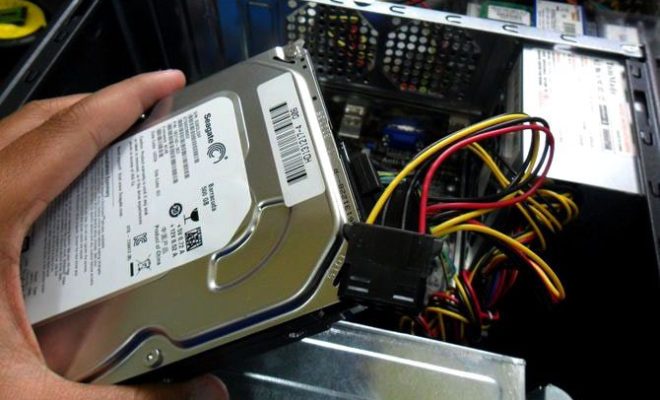
The first step in fixing a STOP 0x0000007B error is to check your cables. Ensure that all cables, including SATA and power cables, are properly connected to both your hard drive and your motherboard. Loose or disconnected cables can prevent your computer from properly communicating with your hard drive, which can result in the STOP 0x0000007B error.

Step 2: Check Your Boot Order

Your computer’s boot order determines which device it will attempt to boot from first. If your hard drive isn’t in the boot order, your computer won’t be able to boot properly. To check your boot order, access your computer’s BIOS settings by pressing the appropriate key during startup (usually F2, F10, or Delete). Check that your hard drive is listed as the first boot device.

Step 3: Run CHKDSK

CHKDSK (short for “check disk”) is a built-in Windows utility that checks for errors on your hard drive. Running CHKDSK can help identify and solve any issues that may be causing the STOP 0x0000007B error. To run CHKDSK, open a command prompt and type “chkdsk /f /r” (without quotes). This will check for and fix any errors on your hard drive.

Step 4: Update Your Drivers

Outdated or incorrect storage controller drivers can also cause the STOP 0x0000007B error. Updating your drivers can help resolve this issue. To update your drivers, visit your computer manufacturer’s website or the website of your storage controller manufacturer and download the latest drivers for your device.

Step 5: Fix Your Master Boot Record

Your Master Boot Record (MBR) is a vital component of your computer’s boot process. If your MBR is damaged or corrupted, it can cause the STOP 0x0000007B error. To fix your MBR, you’ll need to use the “bootrec” command in the Windows Recovery Environment. To access this environment, restart your computer and repeatedly press F8 until you see the Advanced Boot Options menu. From here, select “Repair Your Computer” and follow the prompts to access the Recovery Environment.

Once you’re in the Recovery Environment, type “bootrec /fixmbr” (without quotes) and press Enter. This will fix your MBR and may resolve the STOP 0x0000007B error.

Conclusion

STOP 0x0000007B errors can be frustrating and disruptive, but by following these steps, you can identify and fix the underlying issues that are causing the error. Whether it’s loose cables, outdated drivers, or a damaged MBR, there are solutions available to get your computer back up and running quickly and effectively.

Previous Article

Passive Polarized vs Active Shutter: Which 3D ...

Next Article

The Definition of a Photo Credit Line

Matthew Lynch

Related articles More from author

  • Assistive Technology

    How to Install Ubuntu on a USB Drive

    June 6, 2023
    By Matthew Lynch
  • Assistive Technology

    How to Search a Specific Subreddit

    June 8, 2023
    By Matthew Lynch
  • Assistive Technology

    How to Find Network Printer Name by IP Address

    June 10, 2023
    By Matthew Lynch
  • Assistive Technology

    How to Open Windows PowerShell as an Administrator in Windows 11

    June 23, 2023
    By Matthew Lynch
  • Assistive Technology

    How to Fix It When Your Computer Is Making a Buzzing Noise

    June 8, 2023
    By Matthew Lynch
  • Assistive Technology

    How to Fix D3d11.dll Not Found or Missing Errors

    June 23, 2023
    By Matthew Lynch

Search

Login & Registration

  • Register
  • Log in
  • Entries feed
  • Comments feed
  • WordPress.org

Newsletter

Signup for The Tech Edvocate Newsletter and have the latest in EdTech news and opinion delivered to your email address!

About Us

Since technology is not going anywhere and does more good than harm, adapting is the best course of action. That is where The Tech Edvocate comes in. We plan to cover the PreK-12 and Higher Education EdTech sectors and provide our readers with the latest news and opinion on the subject. From time to time, I will invite other voices to weigh in on important issues in EdTech. We hope to provide a well-rounded, multi-faceted look at the past, present, the future of EdTech in the US and internationally.

We started this journey back in June 2016, and we plan to continue it for many more years to come. I hope that you will join us in this discussion of the past, present and future of EdTech and lend your own insight to the issues that are discussed.

Newsletter

Signup for The Tech Edvocate Newsletter and have the latest in EdTech news and opinion delivered to your email address!

Contact Us

The Tech Edvocate
910 Goddin Street
Richmond, VA 23231
(601) 630-5238
[email protected]

Copyright © 2025 Matthew Lynch. All rights reserved.