The Tech Edvocate

Top Menu

  • Advertisement
  • Apps
  • Home Page
  • Home Page Five (No Sidebar)
  • Home Page Four
  • Home Page Three
  • Home Page Two
  • Home Tech2
  • Icons [No Sidebar]
  • Left Sidbear Page
  • Lynch Educational Consulting
  • My Account
  • My Speaking Page
  • Newsletter Sign Up Confirmation
  • Newsletter Unsubscription
  • Our Brands
  • Page Example
  • Privacy Policy
  • Protected Content
  • Register
  • Request a Product Review
  • Shop
  • Shortcodes Examples
  • Signup
  • Start Here
    • Governance
    • Careers
    • Contact Us
  • Terms and Conditions
  • The Edvocate
  • The Tech Edvocate Product Guide
  • Topics
  • Write For Us
  • Advertise

Main Menu

  • Start Here
    • Our Brands
    • Governance
      • Lynch Educational Consulting, LLC.
      • Dr. Lynch’s Personal Website
      • Careers
    • Write For Us
    • The Tech Edvocate Product Guide
    • Contact Us
    • Books
    • Edupedia
    • Post a Job
    • The Edvocate Podcast
    • Terms and Conditions
    • Privacy Policy
  • Topics
    • Assistive Technology
    • Child Development Tech
    • Early Childhood & K-12 EdTech
    • EdTech Futures
    • EdTech News
    • EdTech Policy & Reform
    • EdTech Startups & Businesses
    • Higher Education EdTech
    • Online Learning & eLearning
    • Parent & Family Tech
    • Personalized Learning
    • Product Reviews
  • Advertise
  • Tech Edvocate Awards
  • The Edvocate
  • Pedagogue
  • School Ratings

logo

The Tech Edvocate

  • Start Here
    • Our Brands
    • Governance
      • Lynch Educational Consulting, LLC.
      • Dr. Lynch’s Personal Website
        • My Speaking Page
      • Careers
    • Write For Us
    • The Tech Edvocate Product Guide
    • Contact Us
    • Books
    • Edupedia
    • Post a Job
    • The Edvocate Podcast
    • Terms and Conditions
    • Privacy Policy
  • Topics
    • Assistive Technology
    • Child Development Tech
    • Early Childhood & K-12 EdTech
    • EdTech Futures
    • EdTech News
    • EdTech Policy & Reform
    • EdTech Startups & Businesses
    • Higher Education EdTech
    • Online Learning & eLearning
    • Parent & Family Tech
    • Personalized Learning
    • Product Reviews
  • Advertise
  • Tech Edvocate Awards
  • The Edvocate
  • Pedagogue
  • School Ratings
  • US Economic Growth Faces Significant Downgrade Amidst Challenging Conditions

  • Navigating Economic Turbulence: The Impact of Oil Prices on Consumer Spending and Markets

  • Market Volatility as Oil Prices Surge Amid Iran Conflict

  • Emerging Markets Face Headwinds Amid Global Economic Shifts

  • Qura Secures €1.5 Million in Pre-Seed Funding, Signaling Growth in Health-Tech Investments

  • Microsoft’s Copilot Health: A Game Changer in Organizing Medical Data

  • ByteDance Secures Major Nvidia AI Chip Deal in Malaysia: A Step Towards Enhanced AI Infrastructure

  • Origa Secures $450K Funding, Elevating Voice AI Innovation in India

  • The Rise of AI: How Venture Capital is Shaping the Future of Startups

  • Faith and Family: Insights from Catholic Parenting in Daily Mass

Assistive Technology
Home›Assistive Technology›How to Fix It When Paramount+ Not Working on a Fire Stick

How to Fix It When Paramount+ Not Working on a Fire Stick
By Matthew Lynch
June 23, 2023
0
Spread the love

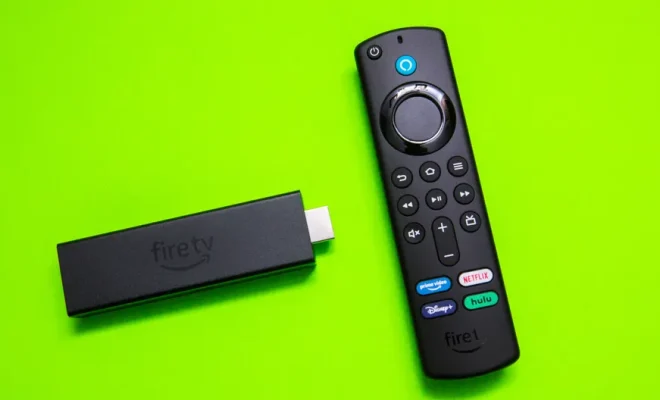
Paramount+ is a popular streaming service that offers a wide range of TV shows, movies, and live events. However, sometimes users face issues with the service, especially when it’s not working on their Fire Stick. In this article, we will guide you on how to fix it when Paramount+ is not working on a Fire Stick.

Check Your Internet Connection

The first thing to do when Paramount+ is not working on your Fire Stick is to check your internet connection. Make sure that your Fire Stick is connected to a stable and reliable internet connection. You can do this by checking your network settings on the Fire Stick. If the network connection is unstable, try resetting your modem or router.

Check for Updates

Another reason why Paramount+ may not be working on your Fire Stick is due to outdated software. Make sure that both your Fire Stick and the Paramount+ app are updated to their latest versions. To check for updates, go to the App Store on your Fire Stick and look for updates for the Paramount+ app.

Clear Cache and Data

If the app is still not working, try clearing the cache and data of the Paramount+ app. To do this, go to Settings on your Fire Stick, then select Applications, and finally select Manage Installed Applications. Find the Paramount+ app and select it. From there, select Clear Cache and Clear Data.

Uninstall and Reinstall the App

If none of the above solutions work, try uninstalling and reinstalling the Paramount+ app. To do this, go to Settings on your Fire Stick, then select Applications, and finally select Manage Installed Applications. Find the Paramount+ app and select it. From there, select Uninstall. Once the app is uninstalled, go to the App Store and reinstall the app.

Contact Customer Support

If you have tried all of the above solutions and the app is still not working, it may be time to contact customer support. Paramount+ has a dedicated support team that can help you resolve any issues you may be facing. You can contact them through their website or by phone.

In conclusion, when Paramount+ is not working on your Fire Stick, there are several steps you can take to resolve the issue. Try checking your internet connection, updating the app, clearing cache and data, uninstalling and reinstalling the app, or contacting customer support. With these solutions, you can enjoy streaming your favorite TV shows and movies on Paramount+ without any interruptions.


Previous Article

How to Change Icon Sizes in Windows ...

Next Article

Free Space Combat, Exploration, and Simulation Games ...

Matthew Lynch

Related articles More from author

  • Assistive Technology

    How to Check How Much Screen Time You Spend on Windows 11

    June 14, 2023
    By Matthew Lynch
  • Assistive Technology

    How to Insert a Text Box in Google Docs

    June 12, 2023
    By Matthew Lynch
  • Assistive Technology

    How to Wirelessly Connect a PS3 DualShock Controller to Windows

    June 15, 2023
    By Matthew Lynch
  • Assistive Technology

    How to Enable Phishing Email Protection in Outlook

    June 15, 2023
    By Matthew Lynch
  • Assistive Technology

    How to Scan Songs on Spotify Using a Scan Code

    June 8, 2023
    By Matthew Lynch
  • Assistive Technology

    How to Install Kali Linux on Windows

    September 7, 2023
    By Matthew Lynch

Search

Login & Registration

  • Register
  • Log in
  • Entries feed
  • Comments feed
  • WordPress.org

Newsletter

Signup for The Tech Edvocate Newsletter and have the latest in EdTech news and opinion delivered to your email address!

About Us

Since technology is not going anywhere and does more good than harm, adapting is the best course of action. That is where The Tech Edvocate comes in. We plan to cover the PreK-12 and Higher Education EdTech sectors and provide our readers with the latest news and opinion on the subject. From time to time, I will invite other voices to weigh in on important issues in EdTech. We hope to provide a well-rounded, multi-faceted look at the past, present, the future of EdTech in the US and internationally.

We started this journey back in June 2016, and we plan to continue it for many more years to come. I hope that you will join us in this discussion of the past, present and future of EdTech and lend your own insight to the issues that are discussed.

Newsletter

Signup for The Tech Edvocate Newsletter and have the latest in EdTech news and opinion delivered to your email address!

Contact Us

The Tech Edvocate
910 Goddin Street
Richmond, VA 23231
(601) 630-5238
[email protected]

Copyright © 2025 Matthew Lynch. All rights reserved.