The Tech Edvocate

Top Menu

  • Advertisement
  • Apps
  • Home Page
  • Home Page Five (No Sidebar)
  • Home Page Four
  • Home Page Three
  • Home Page Two
  • Home Tech2
  • Icons [No Sidebar]
  • Left Sidbear Page
  • Lynch Educational Consulting
  • My Account
  • My Speaking Page
  • Newsletter Sign Up Confirmation
  • Newsletter Unsubscription
  • Our Brands
  • Page Example
  • Privacy Policy
  • Protected Content
  • Register
  • Request a Product Review
  • Shop
  • Shortcodes Examples
  • Signup
  • Start Here
    • Governance
    • Careers
    • Contact Us
  • Terms and Conditions
  • The Edvocate
  • The Tech Edvocate Product Guide
  • Topics
  • Write For Us
  • Advertise

Main Menu

  • Start Here
    • Our Brands
    • Governance
      • Lynch Educational Consulting, LLC.
      • Dr. Lynch’s Personal Website
      • Careers
    • Write For Us
    • The Tech Edvocate Product Guide
    • Contact Us
    • Books
    • Edupedia
    • Post a Job
    • The Edvocate Podcast
    • Terms and Conditions
    • Privacy Policy
  • Topics
    • Assistive Technology
    • Child Development Tech
    • Early Childhood & K-12 EdTech
    • EdTech Futures
    • EdTech News
    • EdTech Policy & Reform
    • EdTech Startups & Businesses
    • Higher Education EdTech
    • Online Learning & eLearning
    • Parent & Family Tech
    • Personalized Learning
    • Product Reviews
  • Advertise
  • Tech Edvocate Awards
  • The Edvocate
  • Pedagogue
  • School Ratings

logo

The Tech Edvocate

  • Start Here
    • Our Brands
    • Governance
      • Lynch Educational Consulting, LLC.
      • Dr. Lynch’s Personal Website
        • My Speaking Page
      • Careers
    • Write For Us
    • The Tech Edvocate Product Guide
    • Contact Us
    • Books
    • Edupedia
    • Post a Job
    • The Edvocate Podcast
    • Terms and Conditions
    • Privacy Policy
  • Topics
    • Assistive Technology
    • Child Development Tech
    • Early Childhood & K-12 EdTech
    • EdTech Futures
    • EdTech News
    • EdTech Policy & Reform
    • EdTech Startups & Businesses
    • Higher Education EdTech
    • Online Learning & eLearning
    • Parent & Family Tech
    • Personalized Learning
    • Product Reviews
  • Advertise
  • Tech Edvocate Awards
  • The Edvocate
  • Pedagogue
  • School Ratings
  • Big 12 Conference: Latest Highlights and Standings from March 2026

  • March Madness Upsets: Iowa and Tennessee Make Major Moves in 2026 NCAA Tournament

  • St. John’s Shocks Kansas with Last-Second Victory in NCAA Tournament Upset

  • Timberwolves Triumph Over Celtics in a Thrilling Showdown

  • Nuggets Outshine Trail Blazers in Thrilling Showdown

  • Orbán’s Defiant Stance: A Call to Challenge Progressive Policies in Brussels

  • Slovenia’s Elections: Golob’s Freedom Movement Edges Out Janša’s Conservatives in Tight Race

  • Escalating Tensions: Iran Threatens Retaliation Amid Ongoing Conflict

  • Supreme Court Weighs In on Late-Arriving Ballots: A Pivotal Case for Mail Voting

  • DHS Shutdown: A Crisis for National Security and Employee Welfare as Day 37 Approaches

Tech Advice
Home›Tech Advice›How to Deactivate or Delete Your Instagram Account

How to Deactivate or Delete Your Instagram Account
By Matthew Lynch
July 24, 2023
0
Spread the love

In today’s digital age, privacy and personal preferences play an essential role in our online lives. There may come a time when you feel the need to take a break from Instagram or remove your account permanently. In this article, we will walk you through two options: temporarily deactivating your account or permanently deleting it.

Option 1: Temporarily Deactivate Your Instagram Account

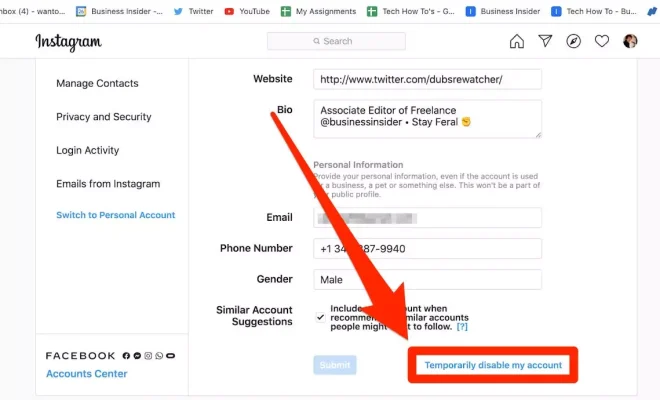
Temporarily deactivating your account can be best if you just need a break. With this process, your profile, photos, and comments are hidden but not deleted. You can easily reactivate your account later by logging back in.

Here’s how to temporarily deactivate your Instagram account:

1. Open a web browser on your computer or mobile device and navigate to instagram.com.

2. Log into the account you want to deactivate.

3. Click on your profile picture in the top right corner and select “Settings” from the dropdown menu.

4. Select “Edit Profile” located beside your username.

5. Scroll down to the bottom of the Edit Profile page, and click on “Temporarily disable my account.”

6. Choose a reason for disabling your account from the dropdown menu and enter your password when prompted.

7. Click on “Temporarily Disable Account” to confirm.

Your account is now temporarily deactivated! To reactivate it, simply log into Instagram with your username and password.

Option 2: Permanently Delete Your Instagram Account

If you’ve decided to part ways with Instagram for good, follow these steps to permanently delete your account:
Warning: Permanent deletion means that all photos, videos, comments, and other data will be removed from Instagram completely. There is no recovery option for deleted accounts.

1. Open a web browser on your computer or mobile device and navigate to instagram.com/accounts/remove/request/permanent/.

2. Log into the account you want to delete, if you haven’t already.

3. Choose a reason for deleting your account from the dropdown menu.

4. Enter your password when prompted.

5. Click on “Permanently delete my account.”

6. Confirm the action by clicking on “OK.”

Your account will now be permanently removed from Instagram.

Conclusion:

Regardless of whether you choose to temporarily deactivate or permanently delete your Instagram account, taking control of your online presence is essential in maintaining your privacy and wellbeing. Remember, even if you delete your Instagram account, you always have the option to start anew with a fresh profile in the future.

Previous Article

How to Edit Photos and Videos on ...

Next Article

How to Delete TikTok

Matthew Lynch

Related articles More from author

  • Tech Advice

    UE Megaboom 3 is more durable, has better bass and a magic button

    July 14, 2023
    By Matthew Lynch
  • Tech Advice

    Huawei P30 Review – Ridiculous Photos at a Reasonable Price

    July 12, 2023
    By Matthew Lynch
  • Tech Advice

    Top Microwaves to Upgrade Your Kitchen Experience

    July 9, 2023
    By Matthew Lynch
  • Tech Advice

    How Much Credit Card Debt Is Too Much?

    September 7, 2023
    By Matthew Lynch
  • Tech Advice

    What is an NFT? Exploring the World of Non-Fungible Tokens

    September 7, 2023
    By Matthew Lynch
  • Tech Advice

    The Best Wi-Fi Routers To Get Lightning-Fast Gaming, Streaming And More

    August 9, 2023
    By Matthew Lynch

Search

Login & Registration

  • Register
  • Log in
  • Entries feed
  • Comments feed
  • WordPress.org

Newsletter

Signup for The Tech Edvocate Newsletter and have the latest in EdTech news and opinion delivered to your email address!

About Us

Since technology is not going anywhere and does more good than harm, adapting is the best course of action. That is where The Tech Edvocate comes in. We plan to cover the PreK-12 and Higher Education EdTech sectors and provide our readers with the latest news and opinion on the subject. From time to time, I will invite other voices to weigh in on important issues in EdTech. We hope to provide a well-rounded, multi-faceted look at the past, present, the future of EdTech in the US and internationally.

We started this journey back in June 2016, and we plan to continue it for many more years to come. I hope that you will join us in this discussion of the past, present and future of EdTech and lend your own insight to the issues that are discussed.

Newsletter

Signup for The Tech Edvocate Newsletter and have the latest in EdTech news and opinion delivered to your email address!

Contact Us

The Tech Edvocate
910 Goddin Street
Richmond, VA 23231
(601) 630-5238
[email protected]

Copyright © 2025 Matthew Lynch. All rights reserved.