The Tech Edvocate

Top Menu

  • Advertisement
  • Apps
  • Home Page
  • Home Page Five (No Sidebar)
  • Home Page Four
  • Home Page Three
  • Home Page Two
  • Home Tech2
  • Icons [No Sidebar]
  • Left Sidbear Page
  • Lynch Educational Consulting
  • My Account
  • My Speaking Page
  • Newsletter Sign Up Confirmation
  • Newsletter Unsubscription
  • Our Brands
  • Page Example
  • Privacy Policy
  • Protected Content
  • Register
  • Request a Product Review
  • Shop
  • Shortcodes Examples
  • Signup
  • Start Here
    • Governance
    • Careers
    • Contact Us
  • Terms and Conditions
  • The Edvocate
  • The Tech Edvocate Product Guide
  • Topics
  • Write For Us
  • Advertise

Main Menu

  • Start Here
    • Our Brands
    • Governance
      • Lynch Educational Consulting, LLC.
      • Dr. Lynch’s Personal Website
      • Careers
    • Write For Us
    • The Tech Edvocate Product Guide
    • Contact Us
    • Books
    • Edupedia
    • Post a Job
    • The Edvocate Podcast
    • Terms and Conditions
    • Privacy Policy
  • Topics
    • Assistive Technology
    • Child Development Tech
    • Early Childhood & K-12 EdTech
    • EdTech Futures
    • EdTech News
    • EdTech Policy & Reform
    • EdTech Startups & Businesses
    • Higher Education EdTech
    • Online Learning & eLearning
    • Parent & Family Tech
    • Personalized Learning
    • Product Reviews
  • Advertise
  • Tech Edvocate Awards
  • The Edvocate
  • Pedagogue
  • School Ratings

logo

The Tech Edvocate

  • Start Here
    • Our Brands
    • Governance
      • Lynch Educational Consulting, LLC.
      • Dr. Lynch’s Personal Website
        • My Speaking Page
      • Careers
    • Write For Us
    • The Tech Edvocate Product Guide
    • Contact Us
    • Books
    • Edupedia
    • Post a Job
    • The Edvocate Podcast
    • Terms and Conditions
    • Privacy Policy
  • Topics
    • Assistive Technology
    • Child Development Tech
    • Early Childhood & K-12 EdTech
    • EdTech Futures
    • EdTech News
    • EdTech Policy & Reform
    • EdTech Startups & Businesses
    • Higher Education EdTech
    • Online Learning & eLearning
    • Parent & Family Tech
    • Personalized Learning
    • Product Reviews
  • Advertise
  • Tech Edvocate Awards
  • The Edvocate
  • Pedagogue
  • School Ratings
  • JisuLife Ultra2 Portable Fan: A Powerful Multi-Function Cooling Solution

  • A Visitors Guide to Viña del Mar, Chile

  • A Visitors Guide to Århus, Denmark

  • A Visitors Guide to Bakersfield (CA), United States

  • A Visitors Guide to Aurora (CO), United States

  • A Visitor’s Guide to Toledo (OH), United States

  • A Visitors Guide to Cincinnati (OH), United States

  • The MagicEagle Cam 5: Revolutionizing Wildlife Monitoring with Smart 4G Technology

  • A Visitors Guide to Pittsburgh (PA), United States

  • A Visitors Guide to Colorado Springs (CO), United States

Digital & Mobile Technology
Home›Digital & Mobile Technology›How to Connect Your PS3 Controller to Android

How to Connect Your PS3 Controller to Android
By Matthew Lynch
June 3, 2023
0
Spread the love

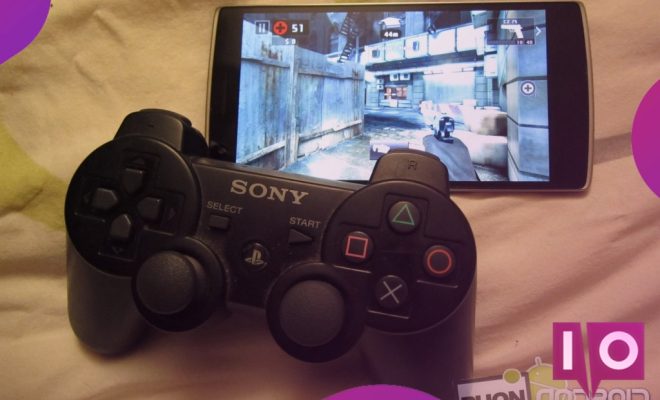
The Sony PlayStation 3 (PS3) has long been a popular gaming console, offering many great features and games. However, there may be times when you want to play your favorite games on a mobile device instead. Thankfully, it is possible to connect a PS3 controller to an Android device, making it easy to play your favorite games on-the-go. In this article, we’ll show you how to do just that.

Step 1: Check Compatibility

Before you start, you’ll need to make sure that your Android device is compatible with your PS3 controller. Most modern Android devices will work, but older devices may have trouble. You’ll also need a third-party app to connect the two, as Android doesn’t natively support PS3 controllers.

Step 2: Download a Third-Party App

There are several third-party apps available that allow you to connect your PS3 controller to your Android device. One of the most popular is Sixaxis Controller, which is available on the Google Play Store for a small fee. Other apps include USB/BT Joystick Center and Bluetooth Auto Connect.

Step 3: Root Your Device (Optional)

If you want to use the Sixaxis Controller app, you’ll need to root your Android device. Rooting means gaining access to the system files and settings, allowing you to make changes that aren’t possible on a non-rooted device. Keep in mind that rooting your device can potentially void your warranty and may cause issues if done incorrectly.

Step 4: Pair Your Devices

Once you’ve installed the third-party app of your choice, you’ll need to pair your PS3 controller with your Android device. You can do this through Bluetooth or USB, depending on your device and app. Follow the on-screen instructions to complete the pairing process.

Step 5: Configure Your Controller

After pairing your devices, you’ll need to configure your PS3 controller to work with your Android device. This may involve mapping buttons to specific functions or adjusting sensitivity settings. The exact process will vary depending on the app you’re using, so be sure to read the instructions carefully.

Step 6: Start Gaming

With your PS3 controller now connected and configured, you’re ready to start gaming on your Android device. Simply launch your favorite game and start playing with your controller. You may need to adjust the settings in the game to recognize your controller properly.

Final Thoughts

Connecting a PS3 controller to an Android device may seem complicated at first, but with the right app and a bit of patience, it’s actually quite simple. Not only does it add a new level of convenience to your mobile gaming experience, it can also breathe new life into old PS3 controllers that may otherwise go unused. So why not give it a try?


Previous Article

Where to Watch Free Videos Online

Next Article

How to Force-Quit or Close an iPad ...

Matthew Lynch

Related articles More from author

  • Digital & Mobile Technology

    How to Insert a Registered Trademark Symbol on a Mac

    April 26, 2023
    By Matthew Lynch
  • Digital & Mobile Technology

    GNOME Explained: A Look at One of Linux’s Most Popular Desktops

    June 21, 2023
    By Matthew Lynch
  • Digital & Mobile Technology

    What Is Ethernet Bridge?

    May 7, 2023
    By Matthew Lynch
  • Digital & Mobile Technology

    The Best Smart Galaxy Projectors

    June 12, 2023
    By Matthew Lynch
  • Digital & Mobile Technology

    Liquid Metal vs. Thermal Paste: What’s the Best CPU Cooling Option?

    June 21, 2023
    By Matthew Lynch
  • Digital & Mobile Technology

    PSPgo Specifications

    June 11, 2023
    By Matthew Lynch

Search

Login & Registration

  • Register
  • Log in
  • Entries feed
  • Comments feed
  • WordPress.org

Newsletter

Signup for The Tech Edvocate Newsletter and have the latest in EdTech news and opinion delivered to your email address!

About Us

Since technology is not going anywhere and does more good than harm, adapting is the best course of action. That is where The Tech Edvocate comes in. We plan to cover the PreK-12 and Higher Education EdTech sectors and provide our readers with the latest news and opinion on the subject. From time to time, I will invite other voices to weigh in on important issues in EdTech. We hope to provide a well-rounded, multi-faceted look at the past, present, the future of EdTech in the US and internationally.

We started this journey back in June 2016, and we plan to continue it for many more years to come. I hope that you will join us in this discussion of the past, present and future of EdTech and lend your own insight to the issues that are discussed.

Newsletter

Signup for The Tech Edvocate Newsletter and have the latest in EdTech news and opinion delivered to your email address!

Contact Us

The Tech Edvocate
910 Goddin Street
Richmond, VA 23231
(601) 630-5238
[email protected]

Copyright © 2025 Matthew Lynch. All rights reserved.