The Tech Edvocate

Top Menu

  • Advertisement
  • Apps
  • Home Page
  • Home Page Five (No Sidebar)
  • Home Page Four
  • Home Page Three
  • Home Page Two
  • Home Tech2
  • Icons [No Sidebar]
  • Left Sidbear Page
  • Lynch Educational Consulting
  • My Account
  • My Speaking Page
  • Newsletter Sign Up Confirmation
  • Newsletter Unsubscription
  • Our Brands
  • Page Example
  • Privacy Policy
  • Protected Content
  • Register
  • Request a Product Review
  • Shop
  • Shortcodes Examples
  • Signup
  • Start Here
    • Governance
    • Careers
    • Contact Us
  • Terms and Conditions
  • The Edvocate
  • The Tech Edvocate Product Guide
  • Topics
  • Write For Us
  • Advertise

Main Menu

  • Start Here
    • Our Brands
    • Governance
      • Lynch Educational Consulting, LLC.
      • Dr. Lynch’s Personal Website
      • Careers
    • Write For Us
    • The Tech Edvocate Product Guide
    • Contact Us
    • Books
    • Edupedia
    • Post a Job
    • The Edvocate Podcast
    • Terms and Conditions
    • Privacy Policy
  • Topics
    • Assistive Technology
    • Child Development Tech
    • Early Childhood & K-12 EdTech
    • EdTech Futures
    • EdTech News
    • EdTech Policy & Reform
    • EdTech Startups & Businesses
    • Higher Education EdTech
    • Online Learning & eLearning
    • Parent & Family Tech
    • Personalized Learning
    • Product Reviews
  • Advertise
  • Tech Edvocate Awards
  • The Edvocate
  • Pedagogue
  • School Ratings

logo

The Tech Edvocate

  • Start Here
    • Our Brands
    • Governance
      • Lynch Educational Consulting, LLC.
      • Dr. Lynch’s Personal Website
        • My Speaking Page
      • Careers
    • Write For Us
    • The Tech Edvocate Product Guide
    • Contact Us
    • Books
    • Edupedia
    • Post a Job
    • The Edvocate Podcast
    • Terms and Conditions
    • Privacy Policy
  • Topics
    • Assistive Technology
    • Child Development Tech
    • Early Childhood & K-12 EdTech
    • EdTech Futures
    • EdTech News
    • EdTech Policy & Reform
    • EdTech Startups & Businesses
    • Higher Education EdTech
    • Online Learning & eLearning
    • Parent & Family Tech
    • Personalized Learning
    • Product Reviews
  • Advertise
  • Tech Edvocate Awards
  • The Edvocate
  • Pedagogue
  • School Ratings
  • Michigan Students Gain Key Insight Through Civic Education Effort

  • The Rise of Day Trips: A New Trend in Travel

  • Navigating AI in Education: Beyond Bans

  • Companies Need a New Playbook to Unlock the Value of AI Agents

  • The New Wave of Soccer Players: Key Habits for Young Athletes

  • BrandPilot AI Expands into European Markets with Performance-Based Advertising

  • The Brutal Truth: Why K-12 Cybersecurity Needs More Than Just Awareness

  • The Unseen Threat: How K-12 Cybersecurity Training Is Quietly Reshaping Education

  • The Staggering Truth: K-12 Cybersecurity Education Is Failing – Here’s How to Fix It

  • Why Millions Are Ditching Degrees For This Career-Boosting Secret

Digital & Mobile Technology
Home›Digital & Mobile Technology›How to Block or Delete Google Update Files in Windows

How to Block or Delete Google Update Files in Windows
By Matthew Lynch
June 30, 2023
0
Spread the love

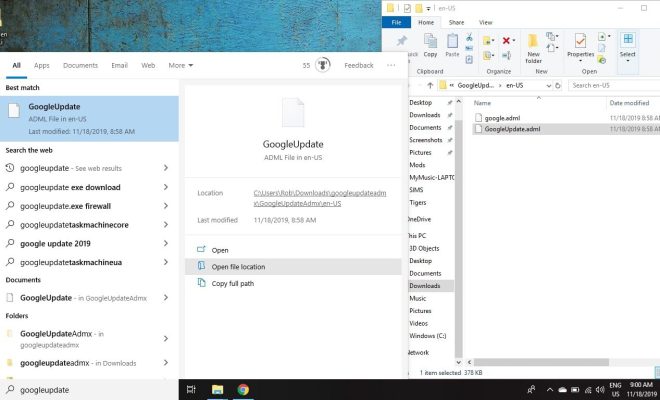
Google Update is a feature that allows Google applications to check for updates automatically. While this feature is useful, some users may want to block or delete Google Update files in Windows for various reasons, such as conserving system resources or preventing automatic updates.

Here are the steps to block or delete Google Update files in Windows:

Block Google Update files

1. Open the Run dialog box by pressing the Windows key + R.

2. Typeregeditand press Enter to open the Registry Editor.

3. Navigate to the following path:HKEY_LOCAL_MACHINE\SOFTWARE\Policies\Google\Update

4. Right-click theUpdatefolder and select New > DWORD (32-bit) Value.

5. Name the new valueDisableAutoUpdateChecksCheckboxValue.

6. Double-click the value and change the data to1.

7. Close the Registry Editor.

This will block Google Update from checking for updates automatically.

Delete Google Update files

1. Open the Run dialog box by pressing the Windows key + R.

2. Type%ProgramData%and press Enter to open the ProgramData folder.

3. Navigate to the following path:Google\Update\Download

4. Delete the contents of the Download folder.

5. Navigate to the following path:Google\Update\Install

6. Delete the contents of the Install folder.

This will delete all Google Update files from your system.

It is important to note that blocking or deleting Google Update files may prevent Google applications from updating properly. If you encounter any issues with Google applications, you may need to re-enable Google Update or manually update the application.

Previous Article

Does Amazon Smart Plug Work With Google ...

Next Article

How to Share Your Location Using Google ...

Matthew Lynch

Related articles More from author

  • Digital & Mobile Technology

    Lenovo Smart Display (10-inch) Review

    July 31, 2023
    By Matthew Lynch
  • Digital & Mobile Technology

    How to Fix Common Zoom Problems and Error Codes

    June 12, 2023
    By Matthew Lynch
  • Digital & Mobile Technology

    Why Isn’t the Apple Watch Called the iWatch?

    June 12, 2023
    By Matthew Lynch
  • Digital & Mobile Technology

    What is Mac OS X?

    May 23, 2023
    By Matthew Lynch
  • Digital & Mobile Technology

    How to Restore an iPhone Without iTunes

    June 26, 2023
    By Matthew Lynch
  • Digital & Mobile Technology

    How to Reset a Google Chromecast: 3 Methods

    August 3, 2023
    By Matthew Lynch

Search

Login & Registration

  • Log in
  • Entries feed
  • Comments feed
  • WordPress.org

Newsletter

Signup for The Tech Edvocate Newsletter and have the latest in EdTech news and opinion delivered to your email address!

About Us

Since technology is not going anywhere and does more good than harm, adapting is the best course of action. That is where The Tech Edvocate comes in. We plan to cover the PreK-12 and Higher Education EdTech sectors and provide our readers with the latest news and opinion on the subject. From time to time, I will invite other voices to weigh in on important issues in EdTech. We hope to provide a well-rounded, multi-faceted look at the past, present, the future of EdTech in the US and internationally.

We started this journey back in June 2016, and we plan to continue it for many more years to come. I hope that you will join us in this discussion of the past, present and future of EdTech and lend your own insight to the issues that are discussed.

Newsletter

Signup for The Tech Edvocate Newsletter and have the latest in EdTech news and opinion delivered to your email address!

Contact Us

The Tech Edvocate
910 Goddin Street
Richmond, VA 23231
(601) 630-5238
[email protected]

Copyright © 2026 Matthew Lynch. All rights reserved.