The Tech Edvocate

Top Menu

  • Advertisement
  • Apps
  • Home Page
  • Home Page Five (No Sidebar)
  • Home Page Four
  • Home Page Three
  • Home Page Two
  • Home Tech2
  • Icons [No Sidebar]
  • Left Sidbear Page
  • Lynch Educational Consulting
  • My Account
  • My Speaking Page
  • Newsletter Sign Up Confirmation
  • Newsletter Unsubscription
  • Our Brands
  • Page Example
  • Privacy Policy
  • Protected Content
  • Register
  • Request a Product Review
  • Shop
  • Shortcodes Examples
  • Signup
  • Start Here
    • Governance
    • Careers
    • Contact Us
  • Terms and Conditions
  • The Edvocate
  • The Tech Edvocate Product Guide
  • Topics
  • Write For Us
  • Advertise

Main Menu

  • Start Here
    • Our Brands
    • Governance
      • Lynch Educational Consulting, LLC.
      • Dr. Lynch’s Personal Website
      • Careers
    • Write For Us
    • The Tech Edvocate Product Guide
    • Contact Us
    • Books
    • Edupedia
    • Post a Job
    • The Edvocate Podcast
    • Terms and Conditions
    • Privacy Policy
  • Topics
    • Assistive Technology
    • Child Development Tech
    • Early Childhood & K-12 EdTech
    • EdTech Futures
    • EdTech News
    • EdTech Policy & Reform
    • EdTech Startups & Businesses
    • Higher Education EdTech
    • Online Learning & eLearning
    • Parent & Family Tech
    • Personalized Learning
    • Product Reviews
  • Advertise
  • Tech Edvocate Awards
  • The Edvocate
  • Pedagogue
  • School Ratings

logo

The Tech Edvocate

  • Start Here
    • Our Brands
    • Governance
      • Lynch Educational Consulting, LLC.
      • Dr. Lynch’s Personal Website
        • My Speaking Page
      • Careers
    • Write For Us
    • The Tech Edvocate Product Guide
    • Contact Us
    • Books
    • Edupedia
    • Post a Job
    • The Edvocate Podcast
    • Terms and Conditions
    • Privacy Policy
  • Topics
    • Assistive Technology
    • Child Development Tech
    • Early Childhood & K-12 EdTech
    • EdTech Futures
    • EdTech News
    • EdTech Policy & Reform
    • EdTech Startups & Businesses
    • Higher Education EdTech
    • Online Learning & eLearning
    • Parent & Family Tech
    • Personalized Learning
    • Product Reviews
  • Advertise
  • Tech Edvocate Awards
  • The Edvocate
  • Pedagogue
  • School Ratings
  • 100 Best Apps for Team Building

  • 100 Best Apps for Performance Reviews

  • 100 Best Apps for Employee Development

  • 100 Best Threat Detection Apps

  • 100 Best Apps for Employee Training

  • 100 Best Data Protection Apps

  • 100 Best Apps for Employee Onboarding

  • 100 Best Apps for Hospital Administrators

  • 100 Best Apps for Bloggers

  • 100 Best Computer Vision Apps

Digital & Mobile Technology
Home›Digital & Mobile Technology›How to Add a Workout to Apple Watch

How to Add a Workout to Apple Watch
By Matthew Lynch
July 31, 2023
0
Spread the love

Apple Watch is one of the most popular and feature-packed smartwatches in the market today. It comes with a host of fitness-tracking features that can help you achieve your fitness goals. The watch provides a comprehensive overview of your daily activity, including your steps, calories burned, distance traveled, and more. But to unleash the full potential of the Apple Watch, you need to know how to add a workout to the device. In this article, we’ll show you how to do that.

Step 1: Open the Workout App

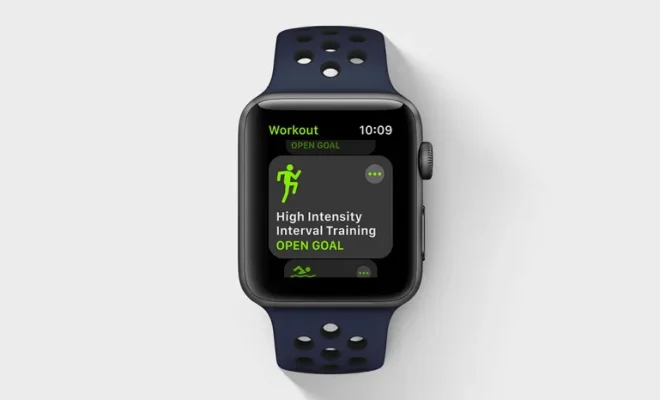
The first step is to open the Workout app on your Apple Watch. You can access the app by pressing the Digital Crown, which is the button on the side of the watch. Once you press the button, it will take you to the app screen. From there, you can scroll down to find the Workout app and tap on it.

Step 2: Choose Your Workout Type

Once you are in the Workout app, you can choose the type of workout you want to do. The app provides a variety of workout options, including running, cycling, swimming, strength training, yoga, and more. You can scroll through the options using the Digital Crown or swipe left and right on the screen.

Step 3: Set Your Goal

After selecting the workout type, you can set your goal. The goal can be the number of calories you want to burn, the distance you want to cover, or the amount of time you want to spend on the workout. You can set the goal by using the Digital Crown or by tapping on the option and entering the values.

Step 4: Start the Workout

Once you have set your goal, you can begin the workout by tapping on the “Start” button. The watch will start tracking your activity and display real-time data such as your heart rate, distance traveled, and calories burned.

Step 5: End the Workout

When you are done with your workout, you can end it by tapping on the “End” button. The watch will then save the data and provide a summary of your workout, including the duration, distance covered, calories burned, and other relevant information.

Conclusion

Adding a workout to your Apple Watch is a great way to track your fitness progress and achieve your fitness goals. With its advanced tracking features and user-friendly interface, the Apple Watch is an excellent tool for anyone looking to stay active and healthy. By following the steps outlined in this article, you can add a workout to your watch in no time and take the first step towards a healthier and more active lifestyle.


Previous Article

How to Create a Wiki With Google ...

Next Article

How to Create a Download Link

Matthew Lynch

Related articles More from author

  • Digital & Mobile Technology

    What Does LTE Mean on My Phone?

    June 8, 2023
    By Matthew Lynch
  • Digital & Mobile Technology

    ExpressVPN vs. IPVanish: Security, speed and price compared

    April 13, 2023
    By Matthew Lynch
  • Digital & Mobile Technology

    What Is Bluetooth? Common Questions, Asked and Answered

    June 12, 2023
    By Matthew Lynch
  • Digital & Mobile Technology

    A Career as a YouTuber: The Pros and Cons

    June 12, 2023
    By Matthew Lynch
  • Digital & Mobile Technology

    What Is a CSR File?

    June 15, 2023
    By Matthew Lynch
  • Digital & Mobile Technology

    The 5 Best Flood Apps of 2023

    July 5, 2023
    By Matthew Lynch

Search

Login & Registration

  • Log in
  • Entries feed
  • Comments feed
  • WordPress.org

Newsletter

Signup for The Tech Edvocate Newsletter and have the latest in EdTech news and opinion delivered to your email address!

About Us

Since technology is not going anywhere and does more good than harm, adapting is the best course of action. That is where The Tech Edvocate comes in. We plan to cover the PreK-12 and Higher Education EdTech sectors and provide our readers with the latest news and opinion on the subject. From time to time, I will invite other voices to weigh in on important issues in EdTech. We hope to provide a well-rounded, multi-faceted look at the past, present, the future of EdTech in the US and internationally.

We started this journey back in June 2016, and we plan to continue it for many more years to come. I hope that you will join us in this discussion of the past, present and future of EdTech and lend your own insight to the issues that are discussed.

Newsletter

Signup for The Tech Edvocate Newsletter and have the latest in EdTech news and opinion delivered to your email address!

Contact Us

The Tech Edvocate
910 Goddin Street
Richmond, VA 23231
(601) 630-5238
[email protected]

Copyright © 2026 Matthew Lynch. All rights reserved.