The Tech Edvocate

Top Menu

  • Advertisement
  • Apps
  • Home Page
  • Home Page Five (No Sidebar)
  • Home Page Four
  • Home Page Three
  • Home Page Two
  • Home Tech2
  • Icons [No Sidebar]
  • Left Sidbear Page
  • Lynch Educational Consulting
  • My Account
  • My Speaking Page
  • Newsletter Sign Up Confirmation
  • Newsletter Unsubscription
  • Our Brands
  • Page Example
  • Privacy Policy
  • Protected Content
  • Register
  • Request a Product Review
  • Shop
  • Shortcodes Examples
  • Signup
  • Start Here
    • Governance
    • Careers
    • Contact Us
  • Terms and Conditions
  • The Edvocate
  • The Tech Edvocate Product Guide
  • Topics
  • Write For Us
  • Advertise

Main Menu

  • Start Here
    • Our Brands
    • Governance
      • Lynch Educational Consulting, LLC.
      • Dr. Lynch’s Personal Website
      • Careers
    • Write For Us
    • The Tech Edvocate Product Guide
    • Contact Us
    • Books
    • Edupedia
    • Post a Job
    • The Edvocate Podcast
    • Terms and Conditions
    • Privacy Policy
  • Topics
    • Assistive Technology
    • Child Development Tech
    • Early Childhood & K-12 EdTech
    • EdTech Futures
    • EdTech News
    • EdTech Policy & Reform
    • EdTech Startups & Businesses
    • Higher Education EdTech
    • Online Learning & eLearning
    • Parent & Family Tech
    • Personalized Learning
    • Product Reviews
  • Advertise
  • Tech Edvocate Awards
  • The Edvocate
  • Pedagogue
  • School Ratings

logo

The Tech Edvocate

  • Start Here
    • Our Brands
    • Governance
      • Lynch Educational Consulting, LLC.
      • Dr. Lynch’s Personal Website
        • My Speaking Page
      • Careers
    • Write For Us
    • The Tech Edvocate Product Guide
    • Contact Us
    • Books
    • Edupedia
    • Post a Job
    • The Edvocate Podcast
    • Terms and Conditions
    • Privacy Policy
  • Topics
    • Assistive Technology
    • Child Development Tech
    • Early Childhood & K-12 EdTech
    • EdTech Futures
    • EdTech News
    • EdTech Policy & Reform
    • EdTech Startups & Businesses
    • Higher Education EdTech
    • Online Learning & eLearning
    • Parent & Family Tech
    • Personalized Learning
    • Product Reviews
  • Advertise
  • Tech Edvocate Awards
  • The Edvocate
  • Pedagogue
  • School Ratings
  • The Chew That Changed My Training: Why Nitraflex Pre-Workout Chews Deliver Unbelievable Pumps

  • The Brutal Truth: Why Your AI Skills Training Is Failing (And How to Fix It)

  • 8 Essential AI Upskilling Programs Your Business Needs to Thrive Now

  • One Critical Mistake Companies Make With AI Skills Training

  • The AI Career Showdown: Which Path Pays More And Fits You Best?

  • The Shocking Truth About the Highest Paying AI Jobs in 2026

  • The Staggering Truth About 5 AI Job Roles That Will Redefine Your Career by 2026

  • Crypto Crackdown: Is the FCA’s Iron Fist Crushing Innovation, or Just Protecting You?

  • 7 Critical Steps to Survive the Crypto Crackdown: How to Navigate FCA Regulations

  • This One Thing Is Quietly Reshaping Illegal Crypto Trading — And Regulators Are Panicking

Digital & Mobile Technology
Home›Digital & Mobile Technology›Can Chromebooks Get Viruses?

Can Chromebooks Get Viruses?
By Matthew Lynch
June 23, 2023
0
Spread the love

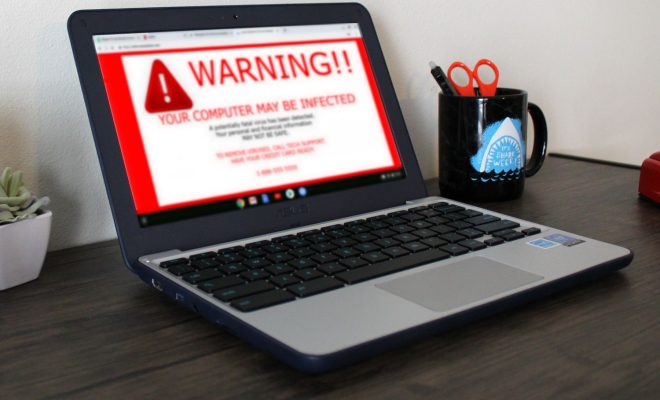
As Chromebooks become increasingly popular among computer users, many people are wondering whether they are susceptible to viruses as other operating systems like Windows and macOS. The short answer is yes, Chromebooks can get viruses, but it’s not as simple as it seems.

To understand how viruses affect Chromebooks, it’s essential first to know how they differ from traditional operating systems. Chromebooks are built around the Google Chrome browser, and unlike other operating systems, they rely heavily on cloud-based computing, which means they don’t have the same vulnerable settings as other systems.

Chromebooks also don’t store data locally, so they are less susceptible to viruses that rely on infecting files and folders stored on the computer. However, Chromebooks are still vulnerable to phishing attacks that trick users into unwittingly giving up their personal or login information.

Additionally, while Chromebooks are inherently more secure than other operating systems, they are not perfect. Hackers and cybercriminals can still create malware that targets vulnerabilities in the Chrome browser. Malware can also come in the form of malicious extensions or apps that users download, so it’s essential to only download software from known and reputable sources.

To mitigate the risk of viruses on Chromebook, Google has implemented several security features, including sandboxing which limits the potential damage that a virus can cause by isolating it from the rest of the system. Chromebooks also receive automatic updates that include security features and patches to known vulnerabilities, making it more difficult for hackers to exploit them.

It’s also important for Chromebook users to practice good computing habits, such as never downloading software from untrusted sources, not clicking on suspicious links, and regularly checking for and installing software updates to ensure their system is up-to-date and secure.

In conclusion, while Chromebooks are less prone to viruses than other operating systems, they are not entirely immune. Cybercriminals can still create malware that targets vulnerabilities in the Chrome browser or trick users into revealing sensitive information. Therefore, Chromebook users must stay vigilant, practice good computing habits, and rely on the inherent security features and regular updates provided by Google.

Previous Article

How to Convert ePub to Mobi

Next Article

How to Connect Steam Deck to a ...

Matthew Lynch

Related articles More from author

  • Digital & Mobile Technology

    How to Use an Elgato Stream Deck on Mac for Productivity

    July 31, 2023
    By Matthew Lynch
  • Digital & Mobile Technology

    What Is Mail Drop? How to Use Mail Drop on iPhone and Mac

    August 3, 2023
    By Matthew Lynch
  • Digital & Mobile Technology

    Geeky Prank Sites to Fool Your Friends

    June 23, 2023
    By Matthew Lynch
  • Digital & Mobile Technology

    How to Use Amiibo on Nintendo Switch

    June 4, 2023
    By Matthew Lynch
  • Digital & Mobile Technology

    How to Turn Off Subtitles (Closed Captions) on Fire Stick

    June 23, 2023
    By Matthew Lynch
  • Digital & Mobile Technology

    How to Post a 3D Photo on Facebook

    July 28, 2023
    By Matthew Lynch

Search

Login & Registration

  • Log in
  • Entries feed
  • Comments feed
  • WordPress.org

Newsletter

Signup for The Tech Edvocate Newsletter and have the latest in EdTech news and opinion delivered to your email address!

About Us

Since technology is not going anywhere and does more good than harm, adapting is the best course of action. That is where The Tech Edvocate comes in. We plan to cover the PreK-12 and Higher Education EdTech sectors and provide our readers with the latest news and opinion on the subject. From time to time, I will invite other voices to weigh in on important issues in EdTech. We hope to provide a well-rounded, multi-faceted look at the past, present, the future of EdTech in the US and internationally.

We started this journey back in June 2016, and we plan to continue it for many more years to come. I hope that you will join us in this discussion of the past, present and future of EdTech and lend your own insight to the issues that are discussed.

Newsletter

Signup for The Tech Edvocate Newsletter and have the latest in EdTech news and opinion delivered to your email address!

Contact Us

The Tech Edvocate
910 Goddin Street
Richmond, VA 23231
(601) 630-5238
[email protected]

Copyright © 2026 Matthew Lynch. All rights reserved.