The Tech Edvocate

Top Menu

  • Advertisement
  • Apps
  • Home Page
  • Home Page Five (No Sidebar)
  • Home Page Four
  • Home Page Three
  • Home Page Two
  • Home Tech2
  • Icons [No Sidebar]
  • Left Sidbear Page
  • Lynch Educational Consulting
  • My Account
  • My Speaking Page
  • Newsletter Sign Up Confirmation
  • Newsletter Unsubscription
  • Our Brands
  • Page Example
  • Privacy Policy
  • Protected Content
  • Register
  • Request a Product Review
  • Shop
  • Shortcodes Examples
  • Signup
  • Start Here
    • Governance
    • Careers
    • Contact Us
  • Terms and Conditions
  • The Edvocate
  • The Tech Edvocate Product Guide
  • Topics
  • Write For Us
  • Advertise

Main Menu

  • Start Here
    • Our Brands
    • Governance
      • Lynch Educational Consulting, LLC.
      • Dr. Lynch’s Personal Website
      • Careers
    • Write For Us
    • The Tech Edvocate Product Guide
    • Contact Us
    • Books
    • Edupedia
    • Post a Job
    • The Edvocate Podcast
    • Terms and Conditions
    • Privacy Policy
  • Topics
    • Assistive Technology
    • Child Development Tech
    • Early Childhood & K-12 EdTech
    • EdTech Futures
    • EdTech News
    • EdTech Policy & Reform
    • EdTech Startups & Businesses
    • Higher Education EdTech
    • Online Learning & eLearning
    • Parent & Family Tech
    • Personalized Learning
    • Product Reviews
  • Advertise
  • Tech Edvocate Awards
  • The Edvocate
  • Pedagogue
  • School Ratings

logo

The Tech Edvocate

  • Start Here
    • Our Brands
    • Governance
      • Lynch Educational Consulting, LLC.
      • Dr. Lynch’s Personal Website
        • My Speaking Page
      • Careers
    • Write For Us
    • The Tech Edvocate Product Guide
    • Contact Us
    • Books
    • Edupedia
    • Post a Job
    • The Edvocate Podcast
    • Terms and Conditions
    • Privacy Policy
  • Topics
    • Assistive Technology
    • Child Development Tech
    • Early Childhood & K-12 EdTech
    • EdTech Futures
    • EdTech News
    • EdTech Policy & Reform
    • EdTech Startups & Businesses
    • Higher Education EdTech
    • Online Learning & eLearning
    • Parent & Family Tech
    • Personalized Learning
    • Product Reviews
  • Advertise
  • Tech Edvocate Awards
  • The Edvocate
  • Pedagogue
  • School Ratings
  • Miro vs Conceptboard for project management

  • How to use Teamwork for resource management

  • How much does Procore cost per month

  • How to organize Microsoft Planner buckets

  • Is Teamwork good for billable hours

  • Procore vs Buildertrend which is better

  • Airtable project management templates

  • Can Miro track project progress

  • How to use Basecamp for client work

  • Can Lucidchart create swimlane diagrams

Android Apps
Home›Android Apps›Best 9 Android Keyboard Apps For Everyday Use

Best 9 Android Keyboard Apps For Everyday Use
By Matthew Lynch
March 29, 2024
0
Spread the love

In the age of digital communication, the keyboard on your mobile device is your bridge to the world. It’s not just about what you type, but how comfortable and efficient you are while typing it. For Android users, the default keyboard app might not always cut it, which is why many turn to third-party apps for a more tailored typing experience. There are a plethora of options available on the Google Play Store, and choosing the right one can be daunting. To make your decision easier, we’ve rounded up the best 9 Android keyboard apps for everyday use.

1. Gboard

Developed by Google, Gboard is a powerhouse of features like glide typing, voice typing, and handwriting input. Its strengths include emoji search, GIFs, and multilingual typing. Gboard also offers Google Translate integration which is super handy for bilingual conversations.

2. SwiftKey

Microsoft’s SwiftKey is known for its artificial intelligence that learns your writing style to better predict your next word. The app supports an impressive number of languages and themes. SwiftKey also offers robust clipboard tools and an emoji prediction feature.

3. Fleksy

With a strong focus on privacy, Fleksy does not collect any personal data or typing behavior. It’s also wildly customizable, with colorful themes and resizable keyboard layouts. The unique gesture system for punctuation and space makes it a fast choice for efficient typists.

4. Chrooma Keyboard

Chrooma stands out with its adaptive color theme feature which changes the keyboard color to match the app you’re using. Apart from this, it has all the smart features like swipe typing, predictive text, and one-handed mode.

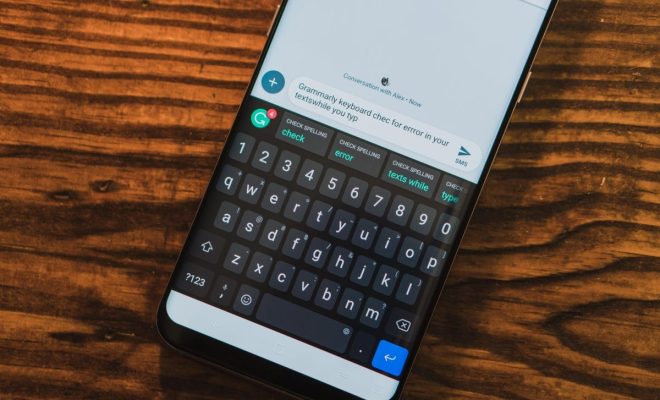
5. Grammarly Keyboard

If writing correctly is as important to you as writing swiftly, then Grammarly’s mobile keyboard could be your go-to app. It integrates the company’s powerful language processing algorithms to check grammar, spelling and punctuation in real-time.

6. GO Keyboard

Offering a fun user experience with various themes, animated effects, and sticker sets, GO Keyboard caters to those looking to personalize their typing experience extensively. It even allows you to use your photos as keyboard background.

7. TouchPal Keyboard

TouchPal blends the traditional with innovative features like curve (swipe) input and predictive text very smoothly. Themes and emojis are abundant in this app too.

8. Hacker’s Keyboard

If you need something more traditional or miss having access to keys usually found on desktop keyboards like Tab/Ctrl/Esc keys especially when using remote desktop or terminal applications – Hacker’s Keyboard may be perfect for you.

9. AnySoftKeyboard

This open-source project prioritizes privacy and customization. Since it doesn’t track what you type while providing multiple language packs, layouts (like QWERTY or Dvorak), themes, and extensions – AnySoftKeyboard appeals to both privacy-conscious users and those wanting tweak their typing interface.

Choosing the right Android keyboard app can heavily influence your productivity and smartphone enjoyment levels – so it’s worth spending some time testing these options out to find which works best for your typing style and needs!


Previous Article

The 20 Best True Crime Documentaries on ...

Next Article

Conquering Time: The 12 Best Pomodoro Timer ...

Matthew Lynch

Related articles More from author

  • Android Apps

    5 Of The Best Keyboard Apps For Android Phones

    March 9, 2024
    By Matthew Lynch
  • Android Apps

    12 Best Free Online YouTube Video Downloader Apps in 2024

    March 25, 2024
    By Matthew Lynch
  • Android Apps

    March 18, 2024
    By Matthew Lynch

Search

Login & Registration

  • Log in
  • Entries feed
  • Comments feed
  • WordPress.org

Newsletter

Signup for The Tech Edvocate Newsletter and have the latest in EdTech news and opinion delivered to your email address!

About Us

Since technology is not going anywhere and does more good than harm, adapting is the best course of action. That is where The Tech Edvocate comes in. We plan to cover the PreK-12 and Higher Education EdTech sectors and provide our readers with the latest news and opinion on the subject. From time to time, I will invite other voices to weigh in on important issues in EdTech. We hope to provide a well-rounded, multi-faceted look at the past, present, the future of EdTech in the US and internationally.

We started this journey back in June 2016, and we plan to continue it for many more years to come. I hope that you will join us in this discussion of the past, present and future of EdTech and lend your own insight to the issues that are discussed.

Newsletter

Signup for The Tech Edvocate Newsletter and have the latest in EdTech news and opinion delivered to your email address!

Contact Us

The Tech Edvocate
910 Goddin Street
Richmond, VA 23231
(601) 630-5238
[email protected]

Copyright © 2026 Matthew Lynch. All rights reserved.