
The Tech Edvocate

Top Menu

  • Advertisement
  • Apps
  • Home Page
  • Home Page Five (No Sidebar)
  • Home Page Four
  • Home Page Three
  • Home Page Two
  • Home Tech2
  • Icons [No Sidebar]
  • Left Sidbear Page
  • Lynch Educational Consulting
  • My Account
  • My Speaking Page
  • Newsletter Sign Up Confirmation
  • Newsletter Unsubscription
  • Our Brands
  • Page Example
  • Privacy Policy
  • Protected Content
  • Register
  • Request a Product Review
  • Shop
  • Shortcodes Examples
  • Signup
  • Start Here
    • Governance
    • Careers
    • Contact Us
  • Terms and Conditions
  • The Edvocate
  • The Tech Edvocate Product Guide
  • Topics
  • Write For Us
  • Advertise

Main Menu

  • Start Here
    • Our Brands
    • Governance
      • Lynch Educational Consulting, LLC.
      • Dr. Lynch’s Personal Website
      • Careers
    • Write For Us
    • The Tech Edvocate Product Guide
    • Contact Us
    • Books
    • Edupedia
    • Post a Job
    • The Edvocate Podcast
    • Terms and Conditions
    • Privacy Policy
  • Topics
    • Assistive Technology
    • Child Development Tech
    • Early Childhood & K-12 EdTech
    • EdTech Futures
    • EdTech News
    • EdTech Policy & Reform
    • EdTech Startups & Businesses
    • Higher Education EdTech
    • Online Learning & eLearning
    • Parent & Family Tech
    • Personalized Learning
    • Product Reviews
  • Advertise
  • Tech Edvocate Awards
  • The Edvocate
  • Pedagogue
  • School Ratings

logo

The Tech Edvocate

  • Start Here
    • Our Brands
    • Governance
      • Lynch Educational Consulting, LLC.
      • Dr. Lynch’s Personal Website
        • My Speaking Page
      • Careers
    • Write For Us
    • The Tech Edvocate Product Guide
    • Contact Us
    • Books
    • Edupedia
    • Post a Job
    • The Edvocate Podcast
    • Terms and Conditions
    • Privacy Policy
  • Topics
    • Assistive Technology
    • Child Development Tech
    • Early Childhood & K-12 EdTech
    • EdTech Futures
    • EdTech News
    • EdTech Policy & Reform
    • EdTech Startups & Businesses
    • Higher Education EdTech
    • Online Learning & eLearning
    • Parent & Family Tech
    • Personalized Learning
    • Product Reviews
  • Advertise
  • Tech Edvocate Awards
  • The Edvocate
  • Pedagogue
  • School Ratings
  • The Silent Revolution: How AI Property Valuation Is Quietly Reshaping Real Estate

  • The Astonishing Truth: Why Your Dream Car Is Now a $52,000 Illusion

  • Toxic Algorithms: Why Your Bank’s AI Could Cost You Everything

  • OpenAI’s GPT-6 Cyber: A Dangerous New AI Threat or Our Ultimate Digital Guardian?

  • This Game-Changing Natural Ozempic Alternative Just Blew Up on Social Media

  • Bónuszösszeg, ingyen pörgetés és befizetési feltétel: üdvözlő és befizetés nélküli kaszinóajánlatok magyar játékosoknak

  • 9 Critical Reasons Why Athexio Might Be The Investment You Need (Or Should Avoid)

  • A Single Breakthrough Could Finally Kill Range Anxiety for Millions of EV Owners

  • Your Money, Their AI: The Secret Agents Invading Bank Accounts

  • US Battery as a Service Market Shifts Toward Fleet-Based Energy

Tech Advice
Home›Tech Advice›Before You Factory Reset Your Nintendo Switch, Do This First

Before You Factory Reset Your Nintendo Switch, Do This First
By Matthew Lynch
July 24, 2023
0
Spread the love

Introduction:

Thinking about factory resetting your Nintendo Switch? There could be a variety of reasons for doing so – perhaps you’re planning to sell or gift your device, or maybe it’s been plagued by glitches and performance issues. But before you take the plunge and erase all data on your console, there are essential steps you should consider first.

1. Backup Save Data

The first and foremost thing you should do is backup your save data for games you care about. Since a factory reset will wipe clean all of your saved progress, ensure that precious data isn’t lost forever. You can do this by investing in a Nintendo Switch Online membership and uploading the save data to the cloud.

2. Deactivate Primary Console

To prevent any future issues while setting up a new Nintendo Switch or attempting to redownload digital purchases, make sure you deactivate the current primary console status for your Nintendo account. To do this, follow these steps:

– Head to the System Settings menu

– Scroll down to Users

– Select Account settings

– Review the status under Primary Console

– If active, choose Deactivate

3. Unlink Associated Accounts

Before factory resetting your Switch, ensure that any linked accounts like Google, Apple, or social media pages are unlinked. This step will simplify setting up new consoles or linking your accounts elsewhere.

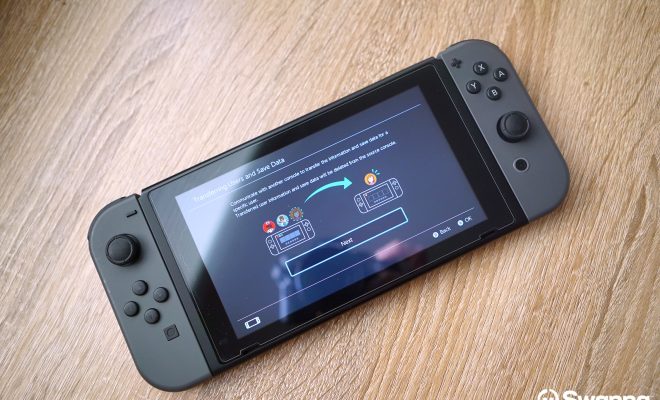
4. Transfer User Data (Optional)

If you are planning to switch over to another Nintendo Switch console, transferring user data makes sense before factory resetting your device. This process ensures all user information is transferred seamlessly to the new device without losing any essential data.

5. Note Down Important Serial Numbers

The serial number of your Nintendo Switch may be useful in the future for warranty claims or customer service assistance. Thus, it’s wise to note down these numbers safetly before resetting the console as they may not be retrievable later.

6. Factory Reset

Finally, after completing the above steps, you are ready to factory reset your Nintendo Switch. Navigate through System Settings > System > Formatting Options > Restore Factory Settings and follow the prompts to complete the reset process.

Conclusion:

Performing a factory reset on your Nintendo Switch should be a thoughtful decision, and it’s crucial to take necessary precautions before diving in. Follow these steps to ensure you don’t lose important game progress, personal data, or face any additional challenges along the way. Happy gaming!


Previous Article

Twitter May Soon Be Irrelevant, Thanks to ...

Next Article

VoIP Bandwidth: How Much Do You Need?

Matthew Lynch

Related articles More from author

  • Tech Advice

    How to Use Google’s Gboard Keyboard on iOS and Android

    July 23, 2023
    By Matthew Lynch
  • Tech Advice

    2024 Ford Ranger Truck: Latest Prices, Reviews, Specs, and Incentives

    August 19, 2023
    By Matthew Lynch
  • Tech Advice

    Updating to iOS 17? You’ll Want to Check Out These Steps First

    February 2, 2024
    By Matthew Lynch
  • Tech Advice

    The Airline Most Likely to Lose Your Luggage

    July 4, 2023
    By Matthew Lynch
  • Tech Advice

    Top 5 Fixes for Roblox Cursor Going Off Screen on Windows

    February 20, 2024
    By Matthew Lynch
  • Tech Advice

    The Best Organic Mattresses For Every Type Of Sleeper

    August 8, 2023
    By Matthew Lynch

Search

Login & Registration

  • Log in
  • Entries feed
  • Comments feed
  • WordPress.org

Newsletter

Signup for The Tech Edvocate Newsletter and have the latest in EdTech news and opinion delivered to your email address!

About Us

Since technology is not going anywhere and does more good than harm, adapting is the best course of action. That is where The Tech Edvocate comes in. We plan to cover the PreK-12 and Higher Education EdTech sectors and provide our readers with the latest news and opinion on the subject. From time to time, I will invite other voices to weigh in on important issues in EdTech. We hope to provide a well-rounded, multi-faceted look at the past, present, the future of EdTech in the US and internationally.

We started this journey back in June 2016, and we plan to continue it for many more years to come. I hope that you will join us in this discussion of the past, present and future of EdTech and lend your own insight to the issues that are discussed.

Newsletter

Signup for The Tech Edvocate Newsletter and have the latest in EdTech news and opinion delivered to your email address!

Contact Us

The Tech Edvocate
910 Goddin Street
Richmond, VA 23231
(601) 630-5238
[email protected]

Copyright © 2026 Matthew Lynch. All rights reserved.
