The Tech Edvocate

Top Menu

  • Advertisement
  • Apps
  • Home Page
  • Home Page Five (No Sidebar)
  • Home Page Four
  • Home Page Three
  • Home Page Two
  • Home Tech2
  • Icons [No Sidebar]
  • Left Sidbear Page
  • Lynch Educational Consulting
  • My Account
  • My Speaking Page
  • Newsletter Sign Up Confirmation
  • Newsletter Unsubscription
  • Our Brands
  • Page Example
  • Privacy Policy
  • Protected Content
  • Register
  • Request a Product Review
  • Shop
  • Shortcodes Examples
  • Signup
  • Start Here
    • Governance
    • Careers
    • Contact Us
  • Terms and Conditions
  • The Edvocate
  • The Tech Edvocate Product Guide
  • Topics
  • Write For Us
  • Advertise

Main Menu

  • Start Here
    • Our Brands
    • Governance
      • Lynch Educational Consulting, LLC.
      • Dr. Lynch’s Personal Website
      • Careers
    • Write For Us
    • The Tech Edvocate Product Guide
    • Contact Us
    • Books
    • Edupedia
    • Post a Job
    • The Edvocate Podcast
    • Terms and Conditions
    • Privacy Policy
  • Topics
    • Assistive Technology
    • Child Development Tech
    • Early Childhood & K-12 EdTech
    • EdTech Futures
    • EdTech News
    • EdTech Policy & Reform
    • EdTech Startups & Businesses
    • Higher Education EdTech
    • Online Learning & eLearning
    • Parent & Family Tech
    • Personalized Learning
    • Product Reviews
  • Advertise
  • Tech Edvocate Awards
  • The Edvocate
  • Pedagogue
  • School Ratings

logo

The Tech Edvocate

  • Start Here
    • Our Brands
    • Governance
      • Lynch Educational Consulting, LLC.
      • Dr. Lynch’s Personal Website
        • My Speaking Page
      • Careers
    • Write For Us
    • The Tech Edvocate Product Guide
    • Contact Us
    • Books
    • Edupedia
    • Post a Job
    • The Edvocate Podcast
    • Terms and Conditions
    • Privacy Policy
  • Topics
    • Assistive Technology
    • Child Development Tech
    • Early Childhood & K-12 EdTech
    • EdTech Futures
    • EdTech News
    • EdTech Policy & Reform
    • EdTech Startups & Businesses
    • Higher Education EdTech
    • Online Learning & eLearning
    • Parent & Family Tech
    • Personalized Learning
    • Product Reviews
  • Advertise
  • Tech Edvocate Awards
  • The Edvocate
  • Pedagogue
  • School Ratings
  • Can Clio accept client payments

  • How to dispatch jobs in FieldAware

  • Can ServiceTitan do call booking

  • How to onboard construction workers BambooHR

  • Is FieldAware worth it for contractors

  • How many users in Jobber

  • Can JobNimbus track leads

  • How to create estimates in Housecall Pro

  • How many users in mHelpDesk

  • How to track certifications in BambooHR construction

Digital & Mobile Technology
Home›Digital & Mobile Technology›Awesome hack: Use Google Docs to sign documents

Awesome hack: Use Google Docs to sign documents
By Matthew Lynch
April 4, 2023
0
Spread the love

As the world becomes more and more digital, signing physical documents has become a tedious and time-consuming process. However, the introduction of Google Docs has paved the way for a more efficient method of signature collection. With Google Docs’ sign feature, signing and sharing documents has become easier than ever before.

If you’re not familiar with Google Docs, it’s a free, cloud-based word processing program that allows users to create, edit, and share documents online with others. Once you have a Google account, you can access Google Docs from anywhere and on any device. One of the features of Google Docs is the ability to sign documents electronically.

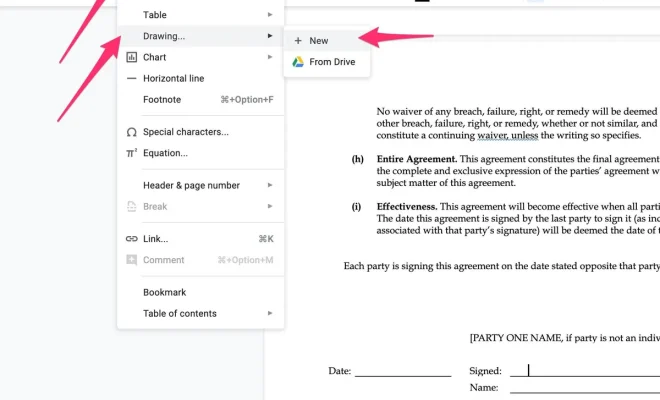
To use the sign feature in Google Docs, open the document you want to sign and go to the “Insert” menu. From there, select “Drawing” and click on “New.” A drawing window will appear, and you can select the “Line” tool to create a line for the signature. Once you’ve created your signature, click “Save and Close” to insert it into the document.

Now you simply share the document with the person who needs to sign it, and they can add their signature by following the same steps. Alternatively, you can also add a text box beneath the line to prompt the recipient to sign, which can then be deleted once the document is signed.

The beauty of using Google Docs to sign documents is that it saves time and money. There’s no need to print out a document, sign it, scan it, and then email it back. Instead, you can sign the document electronically, making the entire process more efficient.

Moreover, Google Docs’ sign feature saves the environment too. By eliminating the need to print out documents, you’re reducing paper waste and helping to reduce your carbon footprint. In conclusion, the sign feature in Google Docs is an awesome hack that everyone should be aware of. It’s a simple yet powerful tool that saves time, money, and the environment. Whether you’re signing a lease, agreement, or any other document, Google Docs’ sign feature is the perfect solution to simplify your life.


Previous Article

Backups vs. Redundancy: What’s the Difference?

Next Article

The Art of Staying Human-centric When You’re ...

Matthew Lynch

Related articles More from author

  • Digital & Mobile Technology

    Most Important TV Connections Explained

    June 21, 2023
    By Matthew Lynch
  • Digital & Mobile Technology

    How to Reset an iPad Without a Password

    June 4, 2023
    By Matthew Lynch
  • Digital & Mobile Technology

    Best Free Video Converter Programs and Online Services

    June 6, 2023
    By Matthew Lynch
  • Digital & Mobile Technology

    macOS Folders You Should Never Touch (And Why)

    June 22, 2023
    By Matthew Lynch
  • Digital & Mobile Technology

    What Does Jailbreaking a Phone Mean?

    June 8, 2023
    By Matthew Lynch
  • Digital & Mobile Technology

    How Many Watts Does a TV Use and How Much Is It Costing to Watch?

    August 3, 2023
    By Matthew Lynch

Search

Login & Registration

  • Log in
  • Entries feed
  • Comments feed
  • WordPress.org

Newsletter

Signup for The Tech Edvocate Newsletter and have the latest in EdTech news and opinion delivered to your email address!

About Us

Since technology is not going anywhere and does more good than harm, adapting is the best course of action. That is where The Tech Edvocate comes in. We plan to cover the PreK-12 and Higher Education EdTech sectors and provide our readers with the latest news and opinion on the subject. From time to time, I will invite other voices to weigh in on important issues in EdTech. We hope to provide a well-rounded, multi-faceted look at the past, present, the future of EdTech in the US and internationally.

We started this journey back in June 2016, and we plan to continue it for many more years to come. I hope that you will join us in this discussion of the past, present and future of EdTech and lend your own insight to the issues that are discussed.

Newsletter

Signup for The Tech Edvocate Newsletter and have the latest in EdTech news and opinion delivered to your email address!

Contact Us

The Tech Edvocate
910 Goddin Street
Richmond, VA 23231
(601) 630-5238
[email protected]

Copyright © 2026 Matthew Lynch. All rights reserved.