The Tech Edvocate

Top Menu

  • Advertisement
  • Apps
  • Home Page
  • Home Page Five (No Sidebar)
  • Home Page Four
  • Home Page Three
  • Home Page Two
  • Home Tech2
  • Icons [No Sidebar]
  • Left Sidbear Page
  • Lynch Educational Consulting
  • My Account
  • My Speaking Page
  • Newsletter Sign Up Confirmation
  • Newsletter Unsubscription
  • Our Brands
  • Page Example
  • Privacy Policy
  • Protected Content
  • Register
  • Request a Product Review
  • Shop
  • Shortcodes Examples
  • Signup
  • Start Here
    • Governance
    • Careers
    • Contact Us
  • Terms and Conditions
  • The Edvocate
  • The Tech Edvocate Product Guide
  • Topics
  • Write For Us
  • Advertise

Main Menu

  • Start Here
    • Our Brands
    • Governance
      • Lynch Educational Consulting, LLC.
      • Dr. Lynch’s Personal Website
      • Careers
    • Write For Us
    • The Tech Edvocate Product Guide
    • Contact Us
    • Books
    • Edupedia
    • Post a Job
    • The Edvocate Podcast
    • Terms and Conditions
    • Privacy Policy
  • Topics
    • Assistive Technology
    • Child Development Tech
    • Early Childhood & K-12 EdTech
    • EdTech Futures
    • EdTech News
    • EdTech Policy & Reform
    • EdTech Startups & Businesses
    • Higher Education EdTech
    • Online Learning & eLearning
    • Parent & Family Tech
    • Personalized Learning
    • Product Reviews
  • Advertise
  • Tech Edvocate Awards
  • The Edvocate
  • Pedagogue
  • School Ratings

logo

The Tech Edvocate

  • Start Here
    • Our Brands
    • Governance
      • Lynch Educational Consulting, LLC.
      • Dr. Lynch’s Personal Website
        • My Speaking Page
      • Careers
    • Write For Us
    • The Tech Edvocate Product Guide
    • Contact Us
    • Books
    • Edupedia
    • Post a Job
    • The Edvocate Podcast
    • Terms and Conditions
    • Privacy Policy
  • Topics
    • Assistive Technology
    • Child Development Tech
    • Early Childhood & K-12 EdTech
    • EdTech Futures
    • EdTech News
    • EdTech Policy & Reform
    • EdTech Startups & Businesses
    • Higher Education EdTech
    • Online Learning & eLearning
    • Parent & Family Tech
    • Personalized Learning
    • Product Reviews
  • Advertise
  • Tech Edvocate Awards
  • The Edvocate
  • Pedagogue
  • School Ratings
  • The Brutal Truth: 8 Lies Scammers Tell About Your Student Loans

  • New Student Loan Rules: The Shocking Truth About 2026 Relief Programs

  • New Repayment Plan Changes Trigger Student Loan Scam Epidemic

  • Why Millions Are Ditching Degrees for This One Skill-Boosting Secret

  • The Quiet Revolution: How Micro-Credentials Are Reshaping Tech Careers

  • Why 96% of Employers Are Now Demanding Micro-Credentials

  • This One Incident Exposed How Vulnerable Your Student Data Really Is

  • The Brutal Truth About EdTech Security: 10 Solutions to Prevent Another Canvas LMS Disaster

  • The Billion-User Data Heist: Why Your Child’s School Data Is Under Attack

  • This Crucial Mistake Is Killing Your Tech Career (It’s Not What You Think)

Wearables
Home›Wearables›Apple Watch Tips: Change These Settings to Get the Most Out of It

Apple Watch Tips: Change These Settings to Get the Most Out of It

By Matthew Lynch
January 30, 2024
0
Spread the love

The Apple Watch is a marvel of modern technology, packing smartphone-like capabilities into a tiny wrist-worn device. However, it’s not just about having a fancy piece of tech on your arm; it’s about how you use it. By tweaking a few settings, you can enhance your Apple Watch experience significantly. Here are some tips to help you get the most out of your device.

1. Streamline Your Notifications: Your iPhone lets you manage notifications on an app-by-app basis, and so does the Apple Watch. Go to the Watch app on your iPhone, tap ‘Notifications’ and adjust your preferences for each application. This way, you’re only alerted to what’s truly important, preventing unnecessary distractions.

2. Optimize Your Watch Face: With multiple watch face options and complications, customize the watch face to fit your needs. Prioritize complications for apps you use frequently. Whether it’s your activity rings, calendar events, or weather updates—you get to choose what information is a glance away.

3. Increase Text Size: If you’re finding it hard to read text on the small screen, go to Settings > Brightness & Text Size on your Apple Watch and adjust accordingly. Larger text can make all the difference for readability.

4. Adjust Haptic Strength: You might miss notifications if the haptic feedback isn’t strong enough or prefer a gentler nudge for less disturbance. Customize this by going into Sounds & Haptics in the Settings app on the watch and set your preferred intensity.

5. Set Up Medical ID: In case of an emergency, having your Medical ID accessible can be lifesaving. Set up your Medical ID in the Health app on your iPhone, which then syncs with your Apple Watch.

6. Tweak ‘Do Not Disturb’: The ‘Do Not Disturb’ feature is perfect when you don’t want any interruptions during meetings or at night. You can mirror your iPhone’s ‘Do Not Disturb’ settings or set up custom rules directly on your watch through the Control Center.

7. Optimize Workout Settings: For fitness enthusiasts, customizing workout metrics is crucial. When starting a workout on Apple Watch, swipe right and tap on the three dots to select ‘Edit’ – this lets you choose which stats you want to see during exercise.

8. Conserve Battery Life: Use Power Reserve mode when battery life is waning by swiping up to open Control Center and tapping on the battery percentage. Moreover, reduce brightness, minimize use of animations and graphics-intensive watch faces to save more power throughout the day.

9. Enable Fall Detection: A feature mainly aimed at older adults but useful for everyone—fall detection can call emergency services if it senses a heavy fall followed by inactivity. Turn it on in the Emergency SOS section of the Watch app on your iPhone.

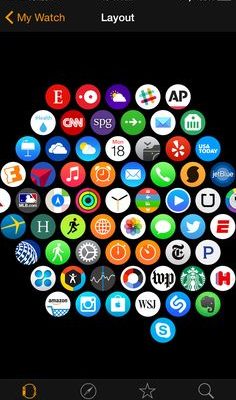
10. Manage Apps: Not all iPhone apps need to be mirrored on your Apple Watch. Manage installations through the Watch app on iPhone under ‘Installed on Apple Watch’. Remove apps that don’t add value to de-clutter and streamline functionality.

By personalizing these settings according to your daily routine and preferences, you can improve not only functionality but also overall satisfaction with your smart accessory – making every tap, swipe and press that much more effective for an optimized user experience with Apple Watch.


Previous Article

3 Ways to Train a Doberman Pinscher

Next Article

Give Your iPhone a Gift: Clear Your ...

Matthew Lynch

Related articles More from author

  • Wearables

    Stock Up on Official Apple Watch Bands With Up to 50% Off Regular Prices

    February 1, 2024
    By Matthew Lynch
  • Wearables

    The Best Watches Of 2024: A Glimpse into Timeless Elegance and Innovation

    March 12, 2024
    By Matthew Lynch
  • Wearables

    Apple Watch Series 9 Upgrade Guide: How It Compares to 5 Years of Apple Watches

    February 1, 2024
    By Matthew Lynch
  • Wearables

    Withings’ $599 ScanWatch Nova Classes Up the ScanWatch 2’s Temperature Tracking

    February 2, 2024
    By Matthew Lynch
  • Wearables

    Han The New Baltic Hermétique Tourer Is A Late Entry For One Of The Year’s Best Affordable Watches

    March 5, 2024
    By Matthew Lynch
  • Wearables

    The 7 Best Apple Watch Apps for Golfers

    March 2, 2024
    By Matthew Lynch

Search

Login & Registration

  • Log in
  • Entries feed
  • Comments feed
  • WordPress.org

Newsletter

Signup for The Tech Edvocate Newsletter and have the latest in EdTech news and opinion delivered to your email address!

About Us

Since technology is not going anywhere and does more good than harm, adapting is the best course of action. That is where The Tech Edvocate comes in. We plan to cover the PreK-12 and Higher Education EdTech sectors and provide our readers with the latest news and opinion on the subject. From time to time, I will invite other voices to weigh in on important issues in EdTech. We hope to provide a well-rounded, multi-faceted look at the past, present, the future of EdTech in the US and internationally.

We started this journey back in June 2016, and we plan to continue it for many more years to come. I hope that you will join us in this discussion of the past, present and future of EdTech and lend your own insight to the issues that are discussed.

Newsletter

Signup for The Tech Edvocate Newsletter and have the latest in EdTech news and opinion delivered to your email address!

Contact Us

The Tech Edvocate
910 Goddin Street
Richmond, VA 23231
(601) 630-5238
[email protected]

Copyright © 2026 Matthew Lynch. All rights reserved.