The Tech Edvocate

Top Menu

  • Advertisement
  • Apps
  • Home Page
  • Home Page Five (No Sidebar)
  • Home Page Four
  • Home Page Three
  • Home Page Two
  • Home Tech2
  • Icons [No Sidebar]
  • Left Sidbear Page
  • Lynch Educational Consulting
  • My Account
  • My Speaking Page
  • Newsletter Sign Up Confirmation
  • Newsletter Unsubscription
  • Our Brands
  • Page Example
  • Privacy Policy
  • Protected Content
  • Register
  • Request a Product Review
  • Shop
  • Shortcodes Examples
  • Signup
  • Start Here
    • Governance
    • Careers
    • Contact Us
  • Terms and Conditions
  • The Edvocate
  • The Tech Edvocate Product Guide
  • Topics
  • Write For Us
  • Advertise

Main Menu

  • Start Here
    • Our Brands
    • Governance
      • Lynch Educational Consulting, LLC.
      • Dr. Lynch’s Personal Website
      • Careers
    • Write For Us
    • The Tech Edvocate Product Guide
    • Contact Us
    • Books
    • Edupedia
    • Post a Job
    • The Edvocate Podcast
    • Terms and Conditions
    • Privacy Policy
  • Topics
    • Assistive Technology
    • Child Development Tech
    • Early Childhood & K-12 EdTech
    • EdTech Futures
    • EdTech News
    • EdTech Policy & Reform
    • EdTech Startups & Businesses
    • Higher Education EdTech
    • Online Learning & eLearning
    • Parent & Family Tech
    • Personalized Learning
    • Product Reviews
  • Advertise
  • Tech Edvocate Awards
  • The Edvocate
  • Pedagogue
  • School Ratings

logo

The Tech Edvocate

  • Start Here
    • Our Brands
    • Governance
      • Lynch Educational Consulting, LLC.
      • Dr. Lynch’s Personal Website
        • My Speaking Page
      • Careers
    • Write For Us
    • The Tech Edvocate Product Guide
    • Contact Us
    • Books
    • Edupedia
    • Post a Job
    • The Edvocate Podcast
    • Terms and Conditions
    • Privacy Policy
  • Topics
    • Assistive Technology
    • Child Development Tech
    • Early Childhood & K-12 EdTech
    • EdTech Futures
    • EdTech News
    • EdTech Policy & Reform
    • EdTech Startups & Businesses
    • Higher Education EdTech
    • Online Learning & eLearning
    • Parent & Family Tech
    • Personalized Learning
    • Product Reviews
  • Advertise
  • Tech Edvocate Awards
  • The Edvocate
  • Pedagogue
  • School Ratings
  • A Visitors Guide to Pittsburgh (PA), United States

  • A Visitors Guide to Colorado Springs (CO), United States

  • 5 Pairs of Shoes That Will Instantly Step Your Shoe Game Up

  • Radiant Youthful Skin is the Perfect Christmas Gift

  • Give Your Loved One the Gift of Youthful, Radiant Skin this Christmas

  • Give Your Loved One the Gift of a Restful Night Sleep this Christmas

  • Nex Playground’s Holiday Sales Bring Active Play Indoors This Seaso

  • A Visitors Guide to Louisville (KY), United States

  • A Visitor’s Guide to Nashville-Davidson (TN), United States

  • A Visitors Guide to Portland (OR), United States

Assistive Technology
Home›Assistive Technology›Apple TV+ Error Codes (and How to Fix Them)

Apple TV+ Error Codes (and How to Fix Them)
By Matthew Lynch
June 22, 2023
0
Spread the love

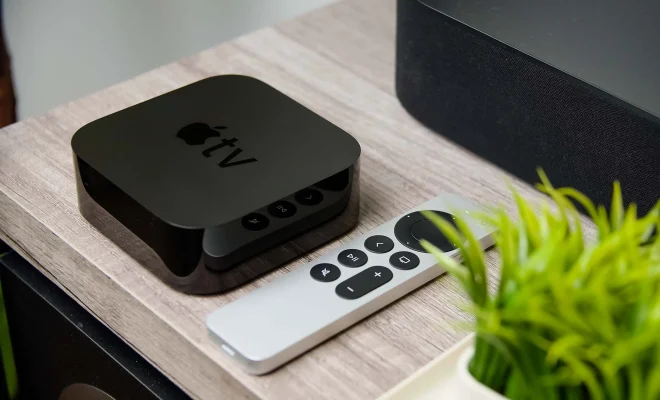
Apple TV+ has been making waves in the streaming world with its original content and user-friendly interface. However, like any streaming service, it is not immune to errors. So, if you are an avid user of Apple TV+ and are experiencing error codes, don’t worry, you are not alone. In this article, we will discuss some of the common error codes that you may encounter and how to fix them.

Error Code: 1001

This error indicates a problem with your internet connection. It could be due to slow speed or poor signal strength. To fix this issue, try restarting your modem or router. If that doesn’t work, try using a wired connection instead of Wi-Fi. You can also contact your internet service provider for assistance.

Error Code: 4001

This error can occur if the Apple TV+ server is temporarily down or if there is a problem with your account. To fix this issue, try logging out of your account and then logging back in. If that doesn’t work, wait a few minutes and try again. If the error persists, contact Apple support for further assistance.

Error Code: 5000

This error code indicates a problem with the content you are trying to stream. It could be due to a corrupt file or an issue with the server. To fix this issue, try clearing the cache and data of the Apple TV+ app or restarting your device. If that doesn’t work, try streaming a different content to see if the error persists. If the issue persists, contact Apple support for further assistance.

Error Code: 10008

This error code is related to HDCP (High-bandwidth Digital Content Protection) which is a copy protection protocol that is used to prevent unauthorized copying of digital content. It could be due to a faulty HDMI cable or an issue with the hardware. To fix this issue, try using a different HDMI cable or connecting your device to a different TV. If that doesn’t work, contact Apple support for further assistance.

Error Code: 102002

This error code indicates that your device is not compatible with the content you are trying to stream. Check the system requirements of the content and make sure your device meets them. If it does, try clearing the cache and data of the Apple TV+ app or restarting your device. If the error persists, contact Apple support for further assistance.

Previous Article

The Best Newsletters for Finance Professionals

Next Article

Diagrams to Base Your Home Network On ...

Matthew Lynch

Related articles More from author

  • Assistive Technology

    iPhone Navigation Basics: How to Go Back, Get to the Home Screen, and More

    June 15, 2023
    By Matthew Lynch
  • Assistive Technology

    How to Change Your Unix Password

    June 12, 2023
    By Matthew Lynch
  • Assistive Technology

    How to Auto-Forward Emails to Multiple Addresses in Gmail

    June 12, 2023
    By Matthew Lynch
  • Assistive Technology

    How to Add Python to the Windows PATH variable

    June 22, 2023
    By Matthew Lynch
  • Assistive Technology

    Tips for Using YouTube Groups

    June 10, 2023
    By Matthew Lynch
  • Assistive Technology

    How to Turn Off Your Phone’s Bluetooth Permanently

    June 8, 2023
    By Matthew Lynch

Search

Login & Registration

  • Register
  • Log in
  • Entries feed
  • Comments feed
  • WordPress.org

Newsletter

Signup for The Tech Edvocate Newsletter and have the latest in EdTech news and opinion delivered to your email address!

About Us

Since technology is not going anywhere and does more good than harm, adapting is the best course of action. That is where The Tech Edvocate comes in. We plan to cover the PreK-12 and Higher Education EdTech sectors and provide our readers with the latest news and opinion on the subject. From time to time, I will invite other voices to weigh in on important issues in EdTech. We hope to provide a well-rounded, multi-faceted look at the past, present, the future of EdTech in the US and internationally.

We started this journey back in June 2016, and we plan to continue it for many more years to come. I hope that you will join us in this discussion of the past, present and future of EdTech and lend your own insight to the issues that are discussed.

Newsletter

Signup for The Tech Edvocate Newsletter and have the latest in EdTech news and opinion delivered to your email address!

Contact Us

The Tech Edvocate
910 Goddin Street
Richmond, VA 23231
(601) 630-5238
[email protected]

Copyright © 2025 Matthew Lynch. All rights reserved.