The Tech Edvocate

Top Menu

  • Advertisement
  • Apps
  • Home Page
  • Home Page Five (No Sidebar)
  • Home Page Four
  • Home Page Three
  • Home Page Two
  • Home Tech2
  • Icons [No Sidebar]
  • Left Sidbear Page
  • Lynch Educational Consulting
  • My Account
  • My Speaking Page
  • Newsletter Sign Up Confirmation
  • Newsletter Unsubscription
  • Our Brands
  • Page Example
  • Privacy Policy
  • Protected Content
  • Register
  • Request a Product Review
  • Shop
  • Shortcodes Examples
  • Signup
  • Start Here
    • Governance
    • Careers
    • Contact Us
  • Terms and Conditions
  • The Edvocate
  • The Tech Edvocate Product Guide
  • Topics
  • Write For Us
  • Advertise

Main Menu

  • Start Here
    • Our Brands
    • Governance
      • Lynch Educational Consulting, LLC.
      • Dr. Lynch’s Personal Website
      • Careers
    • Write For Us
    • The Tech Edvocate Product Guide
    • Contact Us
    • Books
    • Edupedia
    • Post a Job
    • The Edvocate Podcast
    • Terms and Conditions
    • Privacy Policy
  • Topics
    • Assistive Technology
    • Child Development Tech
    • Early Childhood & K-12 EdTech
    • EdTech Futures
    • EdTech News
    • EdTech Policy & Reform
    • EdTech Startups & Businesses
    • Higher Education EdTech
    • Online Learning & eLearning
    • Parent & Family Tech
    • Personalized Learning
    • Product Reviews
  • Advertise
  • Tech Edvocate Awards
  • The Edvocate
  • Pedagogue
  • School Ratings

logo

The Tech Edvocate

  • Start Here
    • Our Brands
    • Governance
      • Lynch Educational Consulting, LLC.
      • Dr. Lynch’s Personal Website
        • My Speaking Page
      • Careers
    • Write For Us
    • The Tech Edvocate Product Guide
    • Contact Us
    • Books
    • Edupedia
    • Post a Job
    • The Edvocate Podcast
    • Terms and Conditions
    • Privacy Policy
  • Topics
    • Assistive Technology
    • Child Development Tech
    • Early Childhood & K-12 EdTech
    • EdTech Futures
    • EdTech News
    • EdTech Policy & Reform
    • EdTech Startups & Businesses
    • Higher Education EdTech
    • Online Learning & eLearning
    • Parent & Family Tech
    • Personalized Learning
    • Product Reviews
  • Advertise
  • Tech Edvocate Awards
  • The Edvocate
  • Pedagogue
  • School Ratings
  • A Visitor’s Guide to Fresno (CA), United States

  • A Visitors Guide to New Orleans (LA), United States

  • A Visitors Guide to Sacramento (CA), United States

  • A Visitors Guide to Lyon, France

  • JisuLife Ultra2 Portable Fan: A Powerful Multi-Function Cooling Solution

  • A Visitors Guide to Viña del Mar, Chile

  • A Visitors Guide to Århus, Denmark

  • A Visitors Guide to Bakersfield (CA), United States

  • A Visitors Guide to Aurora (CO), United States

  • A Visitor’s Guide to Toledo (OH), United States

Assistive Technology
Home›Assistive Technology›Alexa’s Adaptive Volume: What It Is and How to Use It

Alexa’s Adaptive Volume: What It Is and How to Use It
By Matthew Lynch
June 10, 2023
0
Spread the love

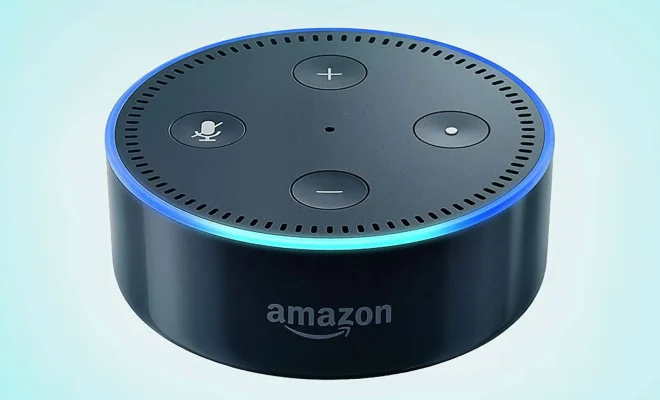
Amazon’s Alexa is a virtual assistant known for its smart capabilities, from answering questions to controlling compatible smart home devices. One of its features is Adaptive Volume, an intelligent feature that adjusts the volume of your Alexa device automatically.

What is Adaptive Volume?

Adaptive Volume is a feature that automatically adjusts the volume of Alexa’s response based on the noise level of its environment. It can detect and adjust the volume of Alexa’s response to match the noise level of the room it is in so that the response is loud enough to hear but not too loud to be overwhelming. This feature was introduced to improve user experience and make conversations with Alexa more natural and effortless.

How to Use Adaptive Volume?

Adaptive Volume is enabled by default for most Alexa devices. However, if you need to turn it on or off, you can do so by following these steps:

1. Open the Alexa app on your smartphone or tablet.

2. Tap on Devices.

3. Select the device you want to modify.

4. Scroll down and tap on Volume.

5. Toggle the Adaptive Volume switch to On or Off.

Once Adaptive Volume is enabled, Alexa will adjust the volume of its response to your voice input and the noise level of the room you are in.

Benefits of Adaptive Volume

Adaptive Volume can help Alexa users in many ways. Here are some benefits of Adaptive Volume:

1. Improved listening experience

Adaptive Volume ensures that Alexa’s responses are not drowned out by other sounds in the room, making it easier to hear and understand what Alexa is saying.

2. No need for manual adjustments

With Adaptive Volume, users do not have to manually control the volume of the Alexa device they are using. It automatically does it for them.

3. Suitable for different situations

Whether in a quiet room or a loud party, Adaptive Volume adapts to the noise level and adjusts the volume of Alexa’s response accordingly.

4. Overall convenience

Adaptive Volume adds an extra level of convenience for users, making it easier and effortless to communicate with Alexa.

In conclusion, Adaptive Volume is one of Alexa’s many features that can help enhance your Smart Home experience. With its ability to adjust the volume of Alexa’s voice, you can be sure of a sleek and effortless conversation, no matter what the noise level is around you. Try out this feature today and get a more natural and effortless user experience.


Previous Article

How to Change a Wi-Fi Network Name

Next Article

Is It Worth Buying or Upgrading to ...

Matthew Lynch

Related articles More from author

  • Assistive Technology

    How to Use Process Lasso to Take Control of Your CPU Threads

    June 6, 2023
    By Matthew Lynch
  • Assistive Technology

    How to Fix a Missing AirPlay Icon on iPhone and Mac

    June 7, 2023
    By Matthew Lynch
  • Assistive Technology

    How to Earn Microsoft Reward Points While Playing Your Xbox Series X|S: Ways

    June 12, 2023
    By Matthew Lynch
  • Assistive Technology

    How to Print Double-Sided on a Mac

    August 5, 2023
    By Matthew Lynch
  • Assistive Technology

    How to Manage and Delete Save Data on Your Nintendo Switch

    June 22, 2023
    By Matthew Lynch
  • Assistive Technology

    How to Create and Use Microsoft Word Templates

    June 10, 2023
    By Matthew Lynch

Search

Login & Registration

  • Register
  • Log in
  • Entries feed
  • Comments feed
  • WordPress.org

Newsletter

Signup for The Tech Edvocate Newsletter and have the latest in EdTech news and opinion delivered to your email address!

About Us

Since technology is not going anywhere and does more good than harm, adapting is the best course of action. That is where The Tech Edvocate comes in. We plan to cover the PreK-12 and Higher Education EdTech sectors and provide our readers with the latest news and opinion on the subject. From time to time, I will invite other voices to weigh in on important issues in EdTech. We hope to provide a well-rounded, multi-faceted look at the past, present, the future of EdTech in the US and internationally.

We started this journey back in June 2016, and we plan to continue it for many more years to come. I hope that you will join us in this discussion of the past, present and future of EdTech and lend your own insight to the issues that are discussed.

Newsletter

Signup for The Tech Edvocate Newsletter and have the latest in EdTech news and opinion delivered to your email address!

Contact Us

The Tech Edvocate
910 Goddin Street
Richmond, VA 23231
(601) 630-5238
[email protected]

Copyright © 2025 Matthew Lynch. All rights reserved.