The Tech Edvocate

Top Menu

  • Advertisement
  • Apps
  • Home Page
  • Home Page Five (No Sidebar)
  • Home Page Four
  • Home Page Three
  • Home Page Two
  • Home Tech2
  • Icons [No Sidebar]
  • Left Sidbear Page
  • Lynch Educational Consulting
  • My Account
  • My Speaking Page
  • Newsletter Sign Up Confirmation
  • Newsletter Unsubscription
  • Our Brands
  • Page Example
  • Privacy Policy
  • Protected Content
  • Register
  • Request a Product Review
  • Shop
  • Shortcodes Examples
  • Signup
  • Start Here
    • Governance
    • Careers
    • Contact Us
  • Terms and Conditions
  • The Edvocate
  • The Tech Edvocate Product Guide
  • Topics
  • Write For Us
  • Advertise

Main Menu

  • Start Here
    • Our Brands
    • Governance
      • Lynch Educational Consulting, LLC.
      • Dr. Lynch’s Personal Website
      • Careers
    • Write For Us
    • The Tech Edvocate Product Guide
    • Contact Us
    • Books
    • Edupedia
    • Post a Job
    • The Edvocate Podcast
    • Terms and Conditions
    • Privacy Policy
  • Topics
    • Assistive Technology
    • Child Development Tech
    • Early Childhood & K-12 EdTech
    • EdTech Futures
    • EdTech News
    • EdTech Policy & Reform
    • EdTech Startups & Businesses
    • Higher Education EdTech
    • Online Learning & eLearning
    • Parent & Family Tech
    • Personalized Learning
    • Product Reviews
  • Advertise
  • Tech Edvocate Awards
  • The Edvocate
  • Pedagogue
  • School Ratings

logo

The Tech Edvocate

  • Start Here
    • Our Brands
    • Governance
      • Lynch Educational Consulting, LLC.
      • Dr. Lynch’s Personal Website
        • My Speaking Page
      • Careers
    • Write For Us
    • The Tech Edvocate Product Guide
    • Contact Us
    • Books
    • Edupedia
    • Post a Job
    • The Edvocate Podcast
    • Terms and Conditions
    • Privacy Policy
  • Topics
    • Assistive Technology
    • Child Development Tech
    • Early Childhood & K-12 EdTech
    • EdTech Futures
    • EdTech News
    • EdTech Policy & Reform
    • EdTech Startups & Businesses
    • Higher Education EdTech
    • Online Learning & eLearning
    • Parent & Family Tech
    • Personalized Learning
    • Product Reviews
  • Advertise
  • Tech Edvocate Awards
  • The Edvocate
  • Pedagogue
  • School Ratings
  • Unbelievable: Waymo’s Freeway Suspension Is Far Worse Than You Think

  • The Brutal Truth About New EU Cybersecurity Rules You Can’t Afford to Miss

  • Cum compari bonusurile de bun venit ale cazinourilor online din România: valoare, rulaj și termene

  • Unbelievable: South Korea’s AI Cheating Scandal Forces Glasses Inspections

  • 7 Disturbing Truths About the Latest AI Data Breach

  • This Ancient Builder’s $150M AI Bet Could Redefine Construction

  • The Astonishing Reason Canada Might Embrace Chinese Automakers

  • This One Week of Cyber Incidents in October 2026 Proves AI Is Our Biggest Threat

  • Amex Reverses Controversial Clawback: What It Means for Your Rewards

  • Mind-Blowing: NHTSA Just Launched a Waymo Recall Query — Here’s Why It Matters

Digital & Mobile Technology
Home›Digital & Mobile Technology›Best SSH Clients for Mac

Best SSH Clients for Mac
By Matthew Lynch
June 22, 2023
0
Spread the love

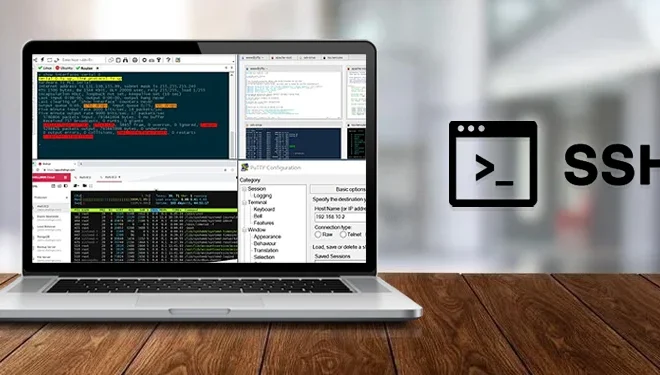
Secure Shell, or SSH, is an essential tool for any system administrator, developer, or power user. SSH is a protocol that allows one to securely communicate with a remote server or computer. It is an alternative to traditional methods, such as Telnet or FTP, which transmit data unencrypted.

For Mac users, there are several SSH clients available in the market. Here, we will discuss the best SSH clients for Mac.

1. Terminal

Terminal is the default SSH client built into macOS. Despite having a barebones interface, the Terminal is a powerhouse, and it can do much more than just SSH. It has various features such as scripting, forwarding, and port forwarding. The Terminal is free and comes preinstalled on Macs.

2. iTerm2

iTerm2 is a powerful terminal emulator that comes with a ton of additional features over the default Terminal app. It allows you to open multiple tabs and panes, has improved search functionality, and can even split windows. It is also customizable with iTerm2’s preferences panel.

Although iTerm2 can be a bit complex for first-time users, it’s an excellent choice for more advanced users.

3. Solar Putty Mac

Solar PuTTY was developed specifically for Mac users who are looking for a Windows PuTTY alternative. This SSH client is free and very easy to use. It offers all the features of PuTTY, including session management, SSH keys, and port forwarding. Solar Putty is ideal for individuals who have experience using PuTTY on Windows.

4. ZOC Terminal

ZOC Terminal is one of the most advanced SSH clients for Mac. It has advanced features such as support for scripting, macros, and triggers, making it ideal for advanced users who need to automate several tasks. ZOC Terminal is also secure and provides support for all SSH versions, including the most recent SSH 2.0.

5. SecureCRT

SecureCRT is one of the most secure SSH clients in the market. It offers powerful features like customizable toolbars, scripts, and session management. It also supports multi-session connectivity, dynamic port forwarding, and X.509 certificate authentication. Although SecureCRT is not free, it is worth investing in for those who require a more secure connection.

Previous Article

How to Make a USB Installation Disk ...

Next Article

How to Change Your Instagram Chat Themes ...

Matthew Lynch

Related articles More from author

  • Digital & Mobile Technology

    How to Delete Temporary Internet Files in Internet Explorer

    July 29, 2023
    By Matthew Lynch
  • Digital & Mobile Technology

    PS4 Streaming Services: What’s Available and How to Download the Apps

    June 11, 2023
    By Matthew Lynch
  • Digital & Mobile Technology

    Installing a CD/DVD Drive

    June 10, 2023
    By Matthew Lynch
  • Digital & Mobile Technology

    What is Identity Management (ID Management)?

    May 22, 2023
    By Matthew Lynch
  • Digital & Mobile Technology

    The Best Short Story Sites to Read Flash Fiction Online

    June 22, 2023
    By Matthew Lynch
  • Digital & Mobile Technology

    How to Fix the NVIDIA Control Panel Not Opening in Windows 11

    September 8, 2023
    By Matthew Lynch

Search

Login & Registration

  • Log in
  • Entries feed
  • Comments feed
  • WordPress.org

Newsletter

Signup for The Tech Edvocate Newsletter and have the latest in EdTech news and opinion delivered to your email address!

About Us

Since technology is not going anywhere and does more good than harm, adapting is the best course of action. That is where The Tech Edvocate comes in. We plan to cover the PreK-12 and Higher Education EdTech sectors and provide our readers with the latest news and opinion on the subject. From time to time, I will invite other voices to weigh in on important issues in EdTech. We hope to provide a well-rounded, multi-faceted look at the past, present, the future of EdTech in the US and internationally.

We started this journey back in June 2016, and we plan to continue it for many more years to come. I hope that you will join us in this discussion of the past, present and future of EdTech and lend your own insight to the issues that are discussed.

Newsletter

Signup for The Tech Edvocate Newsletter and have the latest in EdTech news and opinion delivered to your email address!

Contact Us

The Tech Edvocate
910 Goddin Street
Richmond, VA 23231
(601) 630-5238
[email protected]

Copyright © 2026 Matthew Lynch. All rights reserved.