The Tech Edvocate

Top Menu

  • Advertisement
  • Apps
  • Home Page
  • Home Page Five (No Sidebar)
  • Home Page Four
  • Home Page Three
  • Home Page Two
  • Home Tech2
  • Icons [No Sidebar]
  • Left Sidbear Page
  • Lynch Educational Consulting
  • My Account
  • My Speaking Page
  • Newsletter Sign Up Confirmation
  • Newsletter Unsubscription
  • Our Brands
  • Page Example
  • Privacy Policy
  • Protected Content
  • Register
  • Request a Product Review
  • Shop
  • Shortcodes Examples
  • Signup
  • Start Here
    • Governance
    • Careers
    • Contact Us
  • Terms and Conditions
  • The Edvocate
  • The Tech Edvocate Product Guide
  • Topics
  • Write For Us
  • Advertise

Main Menu

  • Start Here
    • Our Brands
    • Governance
      • Lynch Educational Consulting, LLC.
      • Dr. Lynch’s Personal Website
      • Careers
    • Write For Us
    • The Tech Edvocate Product Guide
    • Contact Us
    • Books
    • Edupedia
    • Post a Job
    • The Edvocate Podcast
    • Terms and Conditions
    • Privacy Policy
  • Topics
    • Assistive Technology
    • Child Development Tech
    • Early Childhood & K-12 EdTech
    • EdTech Futures
    • EdTech News
    • EdTech Policy & Reform
    • EdTech Startups & Businesses
    • Higher Education EdTech
    • Online Learning & eLearning
    • Parent & Family Tech
    • Personalized Learning
    • Product Reviews
  • Advertise
  • Tech Edvocate Awards
  • The Edvocate
  • Pedagogue
  • School Ratings

logo

The Tech Edvocate

  • Start Here
    • Our Brands
    • Governance
      • Lynch Educational Consulting, LLC.
      • Dr. Lynch’s Personal Website
        • My Speaking Page
      • Careers
    • Write For Us
    • The Tech Edvocate Product Guide
    • Contact Us
    • Books
    • Edupedia
    • Post a Job
    • The Edvocate Podcast
    • Terms and Conditions
    • Privacy Policy
  • Topics
    • Assistive Technology
    • Child Development Tech
    • Early Childhood & K-12 EdTech
    • EdTech Futures
    • EdTech News
    • EdTech Policy & Reform
    • EdTech Startups & Businesses
    • Higher Education EdTech
    • Online Learning & eLearning
    • Parent & Family Tech
    • Personalized Learning
    • Product Reviews
  • Advertise
  • Tech Edvocate Awards
  • The Edvocate
  • Pedagogue
  • School Ratings
  • Best GetYourGuide tours in Paris

  • Does Viator offer group discounts?

  • Hotels.com vs Airbnb features

  • What is Regus Business Lounge?

  • What is Couchsurfing verification?

  • How to use Viator gift cards?

  • Klook payment methods accepted

  • Best Notion templates for teams

  • WeWork vs traditional office cost

  • Klook vs GetYourGuide vs Viator

Digital & Mobile Technology
Home›Digital & Mobile Technology›The Pros and Cons of Using a Microsoft Account With Windows

The Pros and Cons of Using a Microsoft Account With Windows
By Matthew Lynch
June 21, 2023
0
Spread the love

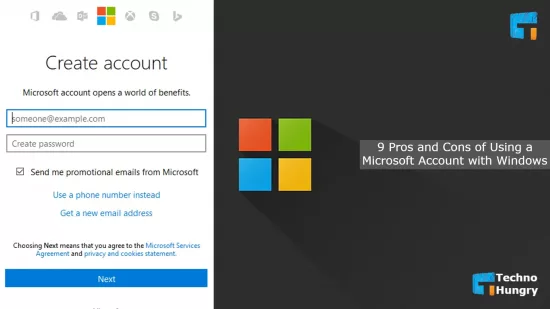
As a Windows user, you have the option of creating a Microsoft account to use with your operating system. A Microsoft account is a sign-in that enables you to access Microsoft services such as Outlook, OneDrive, and Xbox. However, like any other sign-in, using a Microsoft account has its pros and cons. In this article, we will delve into the advantages and disadvantages of creating a Microsoft account with Windows.

Pros of using a Microsoft account with Windows

1. Sync data and settings

One of the main benefits of creating a Microsoft account with Windows is the ability to sync your settings and data across all your devices. With a Microsoft account, you’ll be able to access your personalized settings on multiple devices, saving you time and effort.

2. Access to OneDrive

With a Microsoft account, you’ll get 5GB of free cloud storage space on OneDrive, enabling you to save and access your files from anywhere, at any time. OneDrive automatically backs up your documents, photos and videos, helping you keep your data secure.

3. Easy access to essential apps

By using a Microsoft account with Windows, you’ll gain access to essential applications like Outlook, Skype, and Microsoft Office, which will make your productivity and communication more seamless.

Cons of using a Microsoft account with Windows

1. Privacy concerns

When you create a Microsoft account with Windows, you’ll need to share personal information like your name, address, and email address. This information can be used to track your online activities, leading to privacy concerns.

2. Possible hacking threats

Just like any other sign-in, creating a Microsoft account with Windows puts you at risk of hacking threats. This can lead to unauthorized access to your personal information and data.

3. Limited account control

When you sign up for a Microsoft account, you’ll entrust your data and settings to Microsoft, which may limit your control over them. If you want to customize your system or personal settings beyond the limits that Microsoft has set, you may face difficulties.

Conclusion.

Using a Microsoft account with Windows can be both advantageous and disadvantageous. While it provides you with easy access to essential apps and syncing capabilities, it comes with privacy concerns, hacking threats, and a limited level of control over your settings and data. Ultimately, it’s up to you to weigh the pros and cons of using a Microsoft account with Windows and make an informed decision based on what’s best for you.


Previous Article

Rust WebAssembly Frameworks for Your Next Application

Next Article

The Best Free Online Encyclopedias for Students ...

Matthew Lynch

Related articles More from author

  • Digital & Mobile Technology

    How to Use Adobe Illustrator’s Intertwine Tool for Non-Destructive Layering

    July 31, 2023
    By Matthew Lynch
  • Digital & Mobile Technology

    Is Fast Charging Bad for Battery Life?

    August 5, 2023
    By Matthew Lynch
  • Digital & Mobile Technology

    What is Wireless Internet?

    May 15, 2023
    By Matthew Lynch
  • Digital & Mobile Technology

    How to Install a Second SSD

    June 6, 2023
    By Matthew Lynch
  • Digital & Mobile Technology

    How to Use Tab Groups in Safari With iOS 15

    July 31, 2023
    By Matthew Lynch
  • Digital & Mobile TechnologyEdTech & Innovation

    5 Tech Devices That Should Be Part of All Classrooms

    May 5, 2022
    By Matthew Lynch

Search

Login & Registration

  • Log in
  • Entries feed
  • Comments feed
  • WordPress.org

Newsletter

Signup for The Tech Edvocate Newsletter and have the latest in EdTech news and opinion delivered to your email address!

About Us

Since technology is not going anywhere and does more good than harm, adapting is the best course of action. That is where The Tech Edvocate comes in. We plan to cover the PreK-12 and Higher Education EdTech sectors and provide our readers with the latest news and opinion on the subject. From time to time, I will invite other voices to weigh in on important issues in EdTech. We hope to provide a well-rounded, multi-faceted look at the past, present, the future of EdTech in the US and internationally.

We started this journey back in June 2016, and we plan to continue it for many more years to come. I hope that you will join us in this discussion of the past, present and future of EdTech and lend your own insight to the issues that are discussed.

Newsletter

Signup for The Tech Edvocate Newsletter and have the latest in EdTech news and opinion delivered to your email address!

Contact Us

The Tech Edvocate
910 Goddin Street
Richmond, VA 23231
(601) 630-5238
[email protected]

Copyright © 2026 Matthew Lynch. All rights reserved.