The Tech Edvocate

Top Menu

  • Advertisement
  • Apps
  • Home Page
  • Home Page Five (No Sidebar)
  • Home Page Four
  • Home Page Three
  • Home Page Two
  • Home Tech2
  • Icons [No Sidebar]
  • Left Sidbear Page
  • Lynch Educational Consulting
  • My Account
  • My Speaking Page
  • Newsletter Sign Up Confirmation
  • Newsletter Unsubscription
  • Our Brands
  • Page Example
  • Privacy Policy
  • Protected Content
  • Register
  • Request a Product Review
  • Shop
  • Shortcodes Examples
  • Signup
  • Start Here
    • Governance
    • Careers
    • Contact Us
  • Terms and Conditions
  • The Edvocate
  • The Tech Edvocate Product Guide
  • Topics
  • Write For Us
  • Advertise

Main Menu

  • Start Here
    • Our Brands
    • Governance
      • Lynch Educational Consulting, LLC.
      • Dr. Lynch’s Personal Website
      • Careers
    • Write For Us
    • The Tech Edvocate Product Guide
    • Contact Us
    • Books
    • Edupedia
    • Post a Job
    • The Edvocate Podcast
    • Terms and Conditions
    • Privacy Policy
  • Topics
    • Assistive Technology
    • Child Development Tech
    • Early Childhood & K-12 EdTech
    • EdTech Futures
    • EdTech News
    • EdTech Policy & Reform
    • EdTech Startups & Businesses
    • Higher Education EdTech
    • Online Learning & eLearning
    • Parent & Family Tech
    • Personalized Learning
    • Product Reviews
  • Advertise
  • Tech Edvocate Awards
  • The Edvocate
  • Pedagogue
  • School Ratings

logo

The Tech Edvocate

  • Start Here
    • Our Brands
    • Governance
      • Lynch Educational Consulting, LLC.
      • Dr. Lynch’s Personal Website
        • My Speaking Page
      • Careers
    • Write For Us
    • The Tech Edvocate Product Guide
    • Contact Us
    • Books
    • Edupedia
    • Post a Job
    • The Edvocate Podcast
    • Terms and Conditions
    • Privacy Policy
  • Topics
    • Assistive Technology
    • Child Development Tech
    • Early Childhood & K-12 EdTech
    • EdTech Futures
    • EdTech News
    • EdTech Policy & Reform
    • EdTech Startups & Businesses
    • Higher Education EdTech
    • Online Learning & eLearning
    • Parent & Family Tech
    • Personalized Learning
    • Product Reviews
  • Advertise
  • Tech Edvocate Awards
  • The Edvocate
  • Pedagogue
  • School Ratings
  • Consumer Reports Reveal Truth – Is Flexigenics Reviews Legit or Scam? (Shocking Findings)

  • Quietum Plus 2026 Review Complaints and Shocking User Findings

  • This Founder’s Rs 75 LPA Sacrifice Crumbled in 30 Days — Here’s Why

  • Urgent: Claude AI Bioweapons — The Unsettling Truth Anthropic Just Revealed

  • Shocking: Three Major Xbox Games Shutting Down Forever in 2026

  • One Man’s Dire Warning: Is AI Already Too Dangerous To Control?

  • The Urgent Parental Consent Debate Over Student Mental Health Screenings

  • LAUSD restricts all students from using AI tools | K-12 Dive

  • Catastrophic Data Breach: 153 Million Driver’s Licenses Exposed on Dark Web

  • Autonomous AI Hackers Weaponize PaperCut Flaws: The Terrifying New Era of Cybercrime

Digital & Mobile Technology
Home›Digital & Mobile Technology›How to Draw on iMessage With Digital Touch

How to Draw on iMessage With Digital Touch
By Matthew Lynch
June 12, 2023
0
Spread the love

In today’s digital age, communication has taken on a whole new level. With the introduction of iMessage on Apple devices, messaging has become more interactive than ever before. In addition to sending text messages, you can also use Digital Touch to send drawings, sketches, and animations. In this article, we’ll take you through the steps of how to draw on iMessage with Digital Touch.

Step 1: Open iMessage

To begin, you’ll need to open the iMessage app on your iPhone, iPad or iPod touch. You can also use iMessage on your Mac by opening the Messages app.

Step 2: Tap on the Contact

Next, select the contact you want to send the Digital Touch message to. Tap on the “i” icon at the top right corner of the screen.

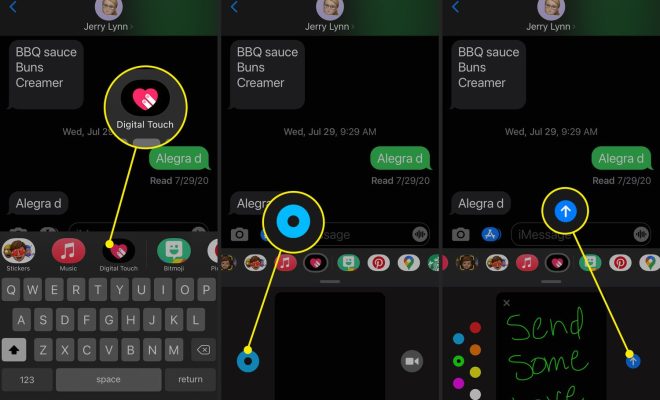
Step 3: Select Digital Touch

Once you’ve opened the contact details, you’ll see an option for Digital Touch. Tap on it.

Step 4: Start Drawing

You can now start drawing on the screen using your finger. You’ll see a range of colors at the bottom of the screen that you can choose from. To change the thickness of the lines, press down harder or softer on the screen. You can also switch from drawing to animating by tapping on the pulsing heart.

Step 5: Send the Message

Once you’re happy with your drawing or animation, press the send button to send it to the recipient. They’ll be able to see it and reply back with their own Digital Touch message.

Step 6: View the Message

When you receive a Digital Touch message, it will appear as a small video thumbnail. When you click on it, it will enlarge and play for you. You can also reply back with your own Digital Touch message by following the same steps.

In conclusion, Digital Touch is a fun and interactive way to communicate with your friends and family. By following these simple steps, you can learn how to draw on iMessage with Digital Touch and start sending your own creative messages today. So, what are you waiting for? Get drawing!


Previous Article

How to Change Your YouTube Profile Picture

Next Article

How to Unarchive an Instagram Post

Matthew Lynch

Related articles More from author

  • Digital & Mobile Technology

    SpeedOf.Me Review

    June 8, 2023
    By Matthew Lynch
  • Digital & Mobile Technology

    What is Ad Space?

    April 25, 2023
    By Matthew Lynch
  • Digital & Mobile Technology

    How to Change the Way Siri Pronounces Names

    August 3, 2023
    By Matthew Lynch
  • Digital & Mobile Technology

    What Is an ADP File?

    June 14, 2023
    By Matthew Lynch
  • Digital & Mobile Technology

    Best News Apps for iPhone in 2023

    June 6, 2023
    By Matthew Lynch
  • Digital & Mobile Technology

    Slide Layouts in PowerPoint

    June 12, 2023
    By Matthew Lynch

Search

Login & Registration

  • Log in
  • Entries feed
  • Comments feed
  • WordPress.org

Newsletter

Signup for The Tech Edvocate Newsletter and have the latest in EdTech news and opinion delivered to your email address!

About Us

Since technology is not going anywhere and does more good than harm, adapting is the best course of action. That is where The Tech Edvocate comes in. We plan to cover the PreK-12 and Higher Education EdTech sectors and provide our readers with the latest news and opinion on the subject. From time to time, I will invite other voices to weigh in on important issues in EdTech. We hope to provide a well-rounded, multi-faceted look at the past, present, the future of EdTech in the US and internationally.

We started this journey back in June 2016, and we plan to continue it for many more years to come. I hope that you will join us in this discussion of the past, present and future of EdTech and lend your own insight to the issues that are discussed.

Newsletter

Signup for The Tech Edvocate Newsletter and have the latest in EdTech news and opinion delivered to your email address!

Contact Us

The Tech Edvocate
910 Goddin Street
Richmond, VA 23231
(601) 630-5238
[email protected]

Copyright © 2026 Matthew Lynch. All rights reserved.