The Tech Edvocate

Top Menu

  • Advertisement
  • Apps
  • Home Page
  • Home Page Five (No Sidebar)
  • Home Page Four
  • Home Page Three
  • Home Page Two
  • Home Tech2
  • Icons [No Sidebar]
  • Left Sidbear Page
  • Lynch Educational Consulting
  • My Account
  • My Speaking Page
  • Newsletter Sign Up Confirmation
  • Newsletter Unsubscription
  • Our Brands
  • Page Example
  • Privacy Policy
  • Protected Content
  • Register
  • Request a Product Review
  • Shop
  • Shortcodes Examples
  • Signup
  • Start Here
    • Governance
    • Careers
    • Contact Us
  • Terms and Conditions
  • The Edvocate
  • The Tech Edvocate Product Guide
  • Topics
  • Write For Us
  • Advertise

Main Menu

  • Start Here
    • Our Brands
    • Governance
      • Lynch Educational Consulting, LLC.
      • Dr. Lynch’s Personal Website
      • Careers
    • Write For Us
    • The Tech Edvocate Product Guide
    • Contact Us
    • Books
    • Edupedia
    • Post a Job
    • The Edvocate Podcast
    • Terms and Conditions
    • Privacy Policy
  • Topics
    • Assistive Technology
    • Child Development Tech
    • Early Childhood & K-12 EdTech
    • EdTech Futures
    • EdTech News
    • EdTech Policy & Reform
    • EdTech Startups & Businesses
    • Higher Education EdTech
    • Online Learning & eLearning
    • Parent & Family Tech
    • Personalized Learning
    • Product Reviews
  • Advertise
  • Tech Edvocate Awards
  • The Edvocate
  • Pedagogue
  • School Ratings

logo

The Tech Edvocate

  • Start Here
    • Our Brands
    • Governance
      • Lynch Educational Consulting, LLC.
      • Dr. Lynch’s Personal Website
        • My Speaking Page
      • Careers
    • Write For Us
    • The Tech Edvocate Product Guide
    • Contact Us
    • Books
    • Edupedia
    • Post a Job
    • The Edvocate Podcast
    • Terms and Conditions
    • Privacy Policy
  • Topics
    • Assistive Technology
    • Child Development Tech
    • Early Childhood & K-12 EdTech
    • EdTech Futures
    • EdTech News
    • EdTech Policy & Reform
    • EdTech Startups & Businesses
    • Higher Education EdTech
    • Online Learning & eLearning
    • Parent & Family Tech
    • Personalized Learning
    • Product Reviews
  • Advertise
  • Tech Edvocate Awards
  • The Edvocate
  • Pedagogue
  • School Ratings
  • Devastating: Why Your Car Insurance Rates Are Skyrocketing in 2026 – And What You Can Do

  • 10,000+ Victims: This Accounting Giant’s Data Breach Just Got Much Worse

  • The Hidden Cost of EVs: Why Your Battery Could Cost More Than Your Car in 2026

  • Jensen Huang’s Shock Exit: This Unbelievable Scandal Just Rocked Nvidia and the AI World

  • Big Walk developer House House Confirms ‘Sparing’ Use of Gen AI – Press Start

  • Baffling: How a Cyber Breach at South Korea’s Top Security Watchdog Exposed Millions

  • Wenn Ordnung den Bildschirm beruhigt: Warum klare Abläufe Casino-Unterhaltung einladender machen

  • Reddit AI Reviews: The Quiet Reshaping of Online Opinion

  • The Chilling Truth: Iran Cyberattacks Europe’s Food and Blood Supplies

  • Anthropic’s $3.4 Billion Bet on Gas: The Unseen Cost of AI’s Future

Digital & Mobile Technology
Home›Digital & Mobile Technology›Every Chromebook Keyboard Shortcut You’ll Ever Need

Every Chromebook Keyboard Shortcut You’ll Ever Need
By Matthew Lynch
June 12, 2023
0
Spread the love

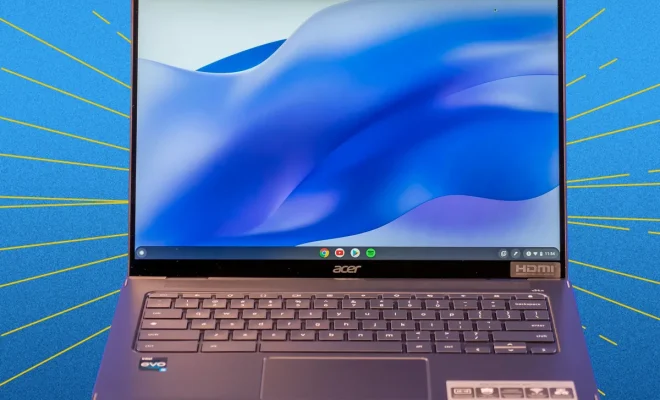
Chromebooks have revolutionized the way we use laptops. They are lightweight, affordable and extremely versatile. They are designed to be used with Google’s Chrome OS and Google Chrome browser. Chromebooks come with several keyboard shortcuts that can make your work much easier and faster. Here are the most useful Chromebook keyboard shortcuts that you should know:

1. Ctrl + N: To open a new browser window

2. Ctrl + T: To open a new browser tab

3. Ctrl + W: To close the current browser tab

4. Ctrl + Shift + T: To reopen the last closed browser tab

5. Ctrl + Shift + N: To open a new browser window in Incognito mode

6. Ctrl + F: To find a word or phrase on a web page

7. Ctrl + Shift + B: To open or close the bookmarks bar

8. Ctrl + Tab: To switch between the open tabs

9. Ctrl + Shift + Tab: To switch between open tabs in reverse order

10. Alt + Tab: To switch between open windows

11. Alt + Shift + Tab: To switch between open windows in reverse order

12. Ctrl + -/+ (minus/plus): To zoom out or zoom in on a web page

13. Ctrl + 0: To reset the zoom level to default

14. Ctrl + D: To bookmark the current web page

15. Ctrl + Shift + D: To bookmark all open tabs in a folder

16. Ctrl + H: To open the Chrome browser history

17. Ctrl + Shift + Delete: To open the Clear Browsing Data menu

18. Alt + F or Alt + E: To open the Chrome menu

19. Ctrl + J: To open the Downloads folder

20. Alt + Shift + S: To open the Chromebook settings menu

These are just a few Chromebook keyboard shortcuts that can make your work faster and more efficient. By using keyboard shortcuts, you can save time and avoid reaching for your mouse or touchpad. With practice, you can master these shortcuts and become a Chromebook power user!


Previous Article

Google Play Store Isn’t Auto-Updating Apps? Try ...

Next Article

How to Stop Your iPhone’s Lock Button ...

Matthew Lynch

Related articles More from author

  • Digital & Mobile Technology

    How to Make an Apple Store Appointment at a Genius Bar

    August 3, 2023
    By Matthew Lynch
  • Digital & Mobile Technology

    The 5 Best Free Puzzle Games for Android in 2023

    June 9, 2023
    By Matthew Lynch
  • Digital & Mobile Technology

    How to Enable or Disable Safari Pop-up Blocker on Mac

    February 20, 2024
    By Matthew Lynch
  • Digital & Mobile Technology

    7 Websites to Find Beautifully Bound Books You Would Love to Own

    August 3, 2023
    By Matthew Lynch
  • Digital & Mobile Technology

    Free Music Sources for iPhone and iTunes

    June 8, 2023
    By Matthew Lynch
  • Digital & Mobile Technology

    Unbiased Independent World News Sources

    August 5, 2023
    By Matthew Lynch

Search

Login & Registration

  • Log in
  • Entries feed
  • Comments feed
  • WordPress.org

Newsletter

Signup for The Tech Edvocate Newsletter and have the latest in EdTech news and opinion delivered to your email address!

About Us

Since technology is not going anywhere and does more good than harm, adapting is the best course of action. That is where The Tech Edvocate comes in. We plan to cover the PreK-12 and Higher Education EdTech sectors and provide our readers with the latest news and opinion on the subject. From time to time, I will invite other voices to weigh in on important issues in EdTech. We hope to provide a well-rounded, multi-faceted look at the past, present, the future of EdTech in the US and internationally.

We started this journey back in June 2016, and we plan to continue it for many more years to come. I hope that you will join us in this discussion of the past, present and future of EdTech and lend your own insight to the issues that are discussed.

Newsletter

Signup for The Tech Edvocate Newsletter and have the latest in EdTech news and opinion delivered to your email address!

Contact Us

The Tech Edvocate
910 Goddin Street
Richmond, VA 23231
(601) 630-5238
[email protected]

Copyright © 2026 Matthew Lynch. All rights reserved.