The Tech Edvocate

Top Menu

  • Advertisement
  • Apps
  • Home Page
  • Home Page Five (No Sidebar)
  • Home Page Four
  • Home Page Three
  • Home Page Two
  • Home Tech2
  • Icons [No Sidebar]
  • Left Sidbear Page
  • Lynch Educational Consulting
  • My Account
  • My Speaking Page
  • Newsletter Sign Up Confirmation
  • Newsletter Unsubscription
  • Our Brands
  • Page Example
  • Privacy Policy
  • Protected Content
  • Register
  • Request a Product Review
  • Shop
  • Shortcodes Examples
  • Signup
  • Start Here
    • Governance
    • Careers
    • Contact Us
  • Terms and Conditions
  • The Edvocate
  • The Tech Edvocate Product Guide
  • Topics
  • Write For Us
  • Advertise

Main Menu

  • Start Here
    • Our Brands
    • Governance
      • Lynch Educational Consulting, LLC.
      • Dr. Lynch’s Personal Website
      • Careers
    • Write For Us
    • The Tech Edvocate Product Guide
    • Contact Us
    • Books
    • Edupedia
    • Post a Job
    • The Edvocate Podcast
    • Terms and Conditions
    • Privacy Policy
  • Topics
    • Assistive Technology
    • Child Development Tech
    • Early Childhood & K-12 EdTech
    • EdTech Futures
    • EdTech News
    • EdTech Policy & Reform
    • EdTech Startups & Businesses
    • Higher Education EdTech
    • Online Learning & eLearning
    • Parent & Family Tech
    • Personalized Learning
    • Product Reviews
  • Advertise
  • Tech Edvocate Awards
  • The Edvocate
  • Pedagogue
  • School Ratings

logo

The Tech Edvocate

  • Start Here
    • Our Brands
    • Governance
      • Lynch Educational Consulting, LLC.
      • Dr. Lynch’s Personal Website
        • My Speaking Page
      • Careers
    • Write For Us
    • The Tech Edvocate Product Guide
    • Contact Us
    • Books
    • Edupedia
    • Post a Job
    • The Edvocate Podcast
    • Terms and Conditions
    • Privacy Policy
  • Topics
    • Assistive Technology
    • Child Development Tech
    • Early Childhood & K-12 EdTech
    • EdTech Futures
    • EdTech News
    • EdTech Policy & Reform
    • EdTech Startups & Businesses
    • Higher Education EdTech
    • Online Learning & eLearning
    • Parent & Family Tech
    • Personalized Learning
    • Product Reviews
  • Advertise
  • Tech Edvocate Awards
  • The Edvocate
  • Pedagogue
  • School Ratings
  • How to create estimates in Buildertrend

  • How to use Bluebeam for punch lists

  • Procore vs Viewpoint features

  • How to submit invoices in Procore

  • How to set up Monday.com for contractors

  • Can PlanGrid track punch lists

  • How to create selections in CoConstruct

  • How to markup drawings in PlanGrid

  • How to use PlanGrid for blueprints

  • How to create custom tools in Bluebeam

Digital & Mobile Technology
Home›Digital & Mobile Technology›How to Use Showtime Streaming Services

How to Use Showtime Streaming Services
By Matthew Lynch
June 9, 2023
0
Spread the love

Are you ready to start streaming your favorite TV shows and movies? Showtime offers a variety of original content, including popular shows like “Billions” and “Homeland” as well as movies and documentaries. Here’s how to use Showtime’s streaming services.

Step 1: Sign up for Showtime

If you don’t already have a Showtime subscription, you’ll need to sign up for one. Showtime offers a 30-day free trial for new subscribers, and after that, it costs $10.99 per month. You can sign up directly through Showtime’s website or through a streaming provider like Hulu or Amazon Prime.

Step 2: Choose your device

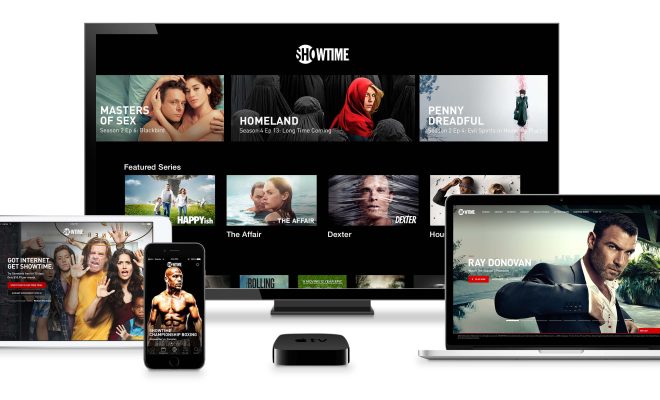
Showtime is available on a variety of devices, including Apple TV, Roku, Amazon Fire TV, Xbox One, and many smart TVs. You can also stream Showtime on your computer or mobile device. Choose the device that works best for you and make sure it’s compatible with Showtime’s streaming service.

Step 3: Download the Showtime app

Once you’ve signed up for Showtime and chosen your device, download the Showtime app from the app store or marketplace. The app is free and you can use it to watch Showtime content on your device.

Step 4: Log in to your Showtime account

After you’ve downloaded the app, open it and log in to your Showtime account. If you signed up through a streaming provider, you may need to log in through that provider instead. Once you’re logged in, you’ll have access to all of Showtime’s content.

Step 5: Browse the content

Now that you’re logged in, you can browse all of Showtime’s content. Use the app’s menu to search for shows and movies or browse through various categories like “New Releases” and “Popular Series.” You can also create a watchlist to keep track of your favorite shows and movies.

Step 6: Enjoy the content

Once you’ve found something you want to watch, simply click on it to start streaming. You can pause, rewind, and fast forward through the content just like you would with a DVR. Showtime also allows you to download content for offline viewing, which is handy if you’re planning to travel.

In conclusion, using Showtime’s streaming service is easy and convenient. With a variety of content available and the ability to watch on multiple devices, it’s a great option for anyone looking to cut the cord and stream their favorite shows and movies. Happy streaming!


Previous Article

How to Enable TPM 2.0 for Windows ...

Next Article

What Is a Hackintosh Computer?

Matthew Lynch

Related articles More from author

  • Digital & Mobile Technology

    What is a Data Feed?

    April 17, 2023
    By Matthew Lynch
  • Digital & Mobile Technology

    Internet 101: Beginner’s Quick Reference Guide

    June 23, 2023
    By Matthew Lynch
  • Digital & Mobile Technology

    Windows 10 Drivers

    June 10, 2023
    By Matthew Lynch
  • Digital & Mobile Technology

    Getting Texts and Calls on iPhone’s Do Not Disturb Mode? Here Are Potential Fixes

    June 7, 2023
    By Matthew Lynch
  • Digital & Mobile Technology

    How to Access and Use Samsung Apps on Samsung Smart TVs

    June 9, 2023
    By Matthew Lynch
  • Digital & Mobile Technology

    Customize Safari Toolbar, Favorites, Tab, and Status Bars

    July 4, 2023
    By Matthew Lynch

Search

Login & Registration

  • Log in
  • Entries feed
  • Comments feed
  • WordPress.org

Newsletter

Signup for The Tech Edvocate Newsletter and have the latest in EdTech news and opinion delivered to your email address!

About Us

Since technology is not going anywhere and does more good than harm, adapting is the best course of action. That is where The Tech Edvocate comes in. We plan to cover the PreK-12 and Higher Education EdTech sectors and provide our readers with the latest news and opinion on the subject. From time to time, I will invite other voices to weigh in on important issues in EdTech. We hope to provide a well-rounded, multi-faceted look at the past, present, the future of EdTech in the US and internationally.

We started this journey back in June 2016, and we plan to continue it for many more years to come. I hope that you will join us in this discussion of the past, present and future of EdTech and lend your own insight to the issues that are discussed.

Newsletter

Signup for The Tech Edvocate Newsletter and have the latest in EdTech news and opinion delivered to your email address!

Contact Us

The Tech Edvocate
910 Goddin Street
Richmond, VA 23231
(601) 630-5238
[email protected]

Copyright © 2026 Matthew Lynch. All rights reserved.