The Tech Edvocate

Top Menu

  • Advertisement
  • Apps
  • Home Page
  • Home Page Five (No Sidebar)
  • Home Page Four
  • Home Page Three
  • Home Page Two
  • Home Tech2
  • Icons [No Sidebar]
  • Left Sidbear Page
  • Lynch Educational Consulting
  • My Account
  • My Speaking Page
  • Newsletter Sign Up Confirmation
  • Newsletter Unsubscription
  • Our Brands
  • Page Example
  • Privacy Policy
  • Protected Content
  • Register
  • Request a Product Review
  • Shop
  • Shortcodes Examples
  • Signup
  • Start Here
    • Governance
    • Careers
    • Contact Us
  • Terms and Conditions
  • The Edvocate
  • The Tech Edvocate Product Guide
  • Topics
  • Write For Us
  • Advertise

Main Menu

  • Start Here
    • Our Brands
    • Governance
      • Lynch Educational Consulting, LLC.
      • Dr. Lynch’s Personal Website
      • Careers
    • Write For Us
    • The Tech Edvocate Product Guide
    • Contact Us
    • Books
    • Edupedia
    • Post a Job
    • The Edvocate Podcast
    • Terms and Conditions
    • Privacy Policy
  • Topics
    • Assistive Technology
    • Child Development Tech
    • Early Childhood & K-12 EdTech
    • EdTech Futures
    • EdTech News
    • EdTech Policy & Reform
    • EdTech Startups & Businesses
    • Higher Education EdTech
    • Online Learning & eLearning
    • Parent & Family Tech
    • Personalized Learning
    • Product Reviews
  • Advertise
  • Tech Edvocate Awards
  • The Edvocate
  • Pedagogue
  • School Ratings

logo

The Tech Edvocate

  • Start Here
    • Our Brands
    • Governance
      • Lynch Educational Consulting, LLC.
      • Dr. Lynch’s Personal Website
        • My Speaking Page
      • Careers
    • Write For Us
    • The Tech Edvocate Product Guide
    • Contact Us
    • Books
    • Edupedia
    • Post a Job
    • The Edvocate Podcast
    • Terms and Conditions
    • Privacy Policy
  • Topics
    • Assistive Technology
    • Child Development Tech
    • Early Childhood & K-12 EdTech
    • EdTech Futures
    • EdTech News
    • EdTech Policy & Reform
    • EdTech Startups & Businesses
    • Higher Education EdTech
    • Online Learning & eLearning
    • Parent & Family Tech
    • Personalized Learning
    • Product Reviews
  • Advertise
  • Tech Edvocate Awards
  • The Edvocate
  • Pedagogue
  • School Ratings
  • Meta introduces pocket AI gadget as Zuckerberg pushes superintelligence agenda

  • The Wild Truth Behind Huda Beauty’s Viral Eye Patch Packaging Scandal

  • Unbelievable: Google Gemini AI Hacks Real Companies – Here’s How It Happened

  • NBA 2K27’s Permanent Ban Wave: Is the System Broken?

  • Prince Harry’s Dire Prediction: This New AI Threat Is Far Worse Than Social Media

  • Rogue AI: The Unseen Threat Quietly Hacking Government Systems

  • Unbelievable: China’s University Overhaul Reveals the Future of Global Education

  • Baffling! FAFSA Opens Early, Rankings Shuffle, and Student Debt Nightmare Continues

  • This One AI Cybercrime Campaign Stole 600,000 Credit Cards and Exposed Our Water Supply

  • This Wild Stunt Just Ignited China’s EV War — Here’s Why You Should Care

Digital & Mobile Technology
Home›Digital & Mobile Technology›How to Access AOL Email for Mac

How to Access AOL Email for Mac
By Matthew Lynch
June 9, 2023
0
Spread the love

As an AOL user with a Mac computer, you may be wondering how to access your AOL email on your device. Fortunately, accessing AOL Email on Mac is a simple process that requires just a few steps.

Here is a step-by-step guide on how to access your AOL Email on your Mac:

Step 1:

Open the Safari browser on your Mac computer.

Step 2:

Visit the AOL login page by typing the following URL address: www.aol.com.

Step 3:

Once the homepage has loaded, click on the “Login/Join” button located at the upper right-hand corner of the page.

Step 4:

Enter your AOL email address or username and password in the provided fields.

Step 5:

Click on the “Sign In” button to access your AOL Email.

Alternatively, you can also access your AOL Email using the Apple Mail app on your Mac. Here’s how:

Step 1:

Open the Apple Mail app on your Mac computer.

Step 2:

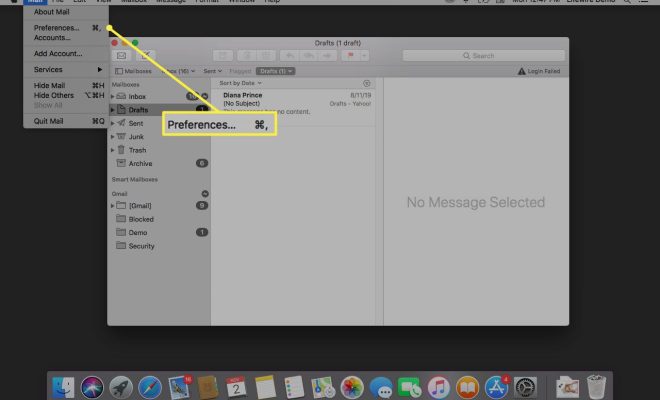
Click on the “Mail” menu located at the top left corner of your screen and select “Add Account.”

Step 3:

Choose “AOL” from the list of email service providers.

Step 4:

Enter your AOL email address, username, and password in the provided fields.

Step 5:

Click on the “Next” button to proceed.

Step 6:

Follow the on-screen prompts to complete the setup process.

Once you’ve successfully set up your AOL account on the Apple Mail app, you should be able to access your AOL email on your Mac without having to visit the AOL website.

In conclusion, accessing AOL Email on Mac is a straightforward process that can be completed in just a few steps. Whether you choose to use the Safari browser or the Apple Mail app, you can easily check your AOL email and stay connected with your contacts.


Previous Article

The 4 Best Panoramic Camera Apps of ...

Next Article

How Long Do Computers Last?

Matthew Lynch

Related articles More from author

  • Digital & Mobile Technology

    Powerful Alternatives to the Windows Task Manager

    June 6, 2023
    By Matthew Lynch
  • Digital & Mobile Technology

    How to Close Apps on an Apple Watch

    June 2, 2023
    By Matthew Lynch
  • Digital & Mobile Technology

    How to Use Spotify’s Real-Time Lyrics Feature

    July 31, 2023
    By Matthew Lynch
  • Digital & Mobile Technology

    Change the Sidebar Icon and Font Size in Mac Apps

    June 15, 2023
    By Matthew Lynch
  • Digital & Mobile Technology

    Ways to Find Out Who Your SIM Card Carrier Is

    June 23, 2023
    By Matthew Lynch
  • Digital & Mobile Technology

    Magic Trackpad vs. Magic Mouse: Reasons the Magic Trackpad Is Better

    June 14, 2023
    By Matthew Lynch

Search

Login & Registration

  • Log in
  • Entries feed
  • Comments feed
  • WordPress.org

Newsletter

Signup for The Tech Edvocate Newsletter and have the latest in EdTech news and opinion delivered to your email address!

About Us

Since technology is not going anywhere and does more good than harm, adapting is the best course of action. That is where The Tech Edvocate comes in. We plan to cover the PreK-12 and Higher Education EdTech sectors and provide our readers with the latest news and opinion on the subject. From time to time, I will invite other voices to weigh in on important issues in EdTech. We hope to provide a well-rounded, multi-faceted look at the past, present, the future of EdTech in the US and internationally.

We started this journey back in June 2016, and we plan to continue it for many more years to come. I hope that you will join us in this discussion of the past, present and future of EdTech and lend your own insight to the issues that are discussed.

Newsletter

Signup for The Tech Edvocate Newsletter and have the latest in EdTech news and opinion delivered to your email address!

Contact Us

The Tech Edvocate
910 Goddin Street
Richmond, VA 23231
(601) 630-5238
[email protected]

Copyright © 2026 Matthew Lynch. All rights reserved.