The Tech Edvocate

Top Menu

  • Advertisement
  • Apps
  • Home Page
  • Home Page Five (No Sidebar)
  • Home Page Four
  • Home Page Three
  • Home Page Two
  • Home Tech2
  • Icons [No Sidebar]
  • Left Sidbear Page
  • Lynch Educational Consulting
  • My Account
  • My Speaking Page
  • Newsletter Sign Up Confirmation
  • Newsletter Unsubscription
  • Our Brands
  • Page Example
  • Privacy Policy
  • Protected Content
  • Register
  • Request a Product Review
  • Shop
  • Shortcodes Examples
  • Signup
  • Start Here
    • Governance
    • Careers
    • Contact Us
  • Terms and Conditions
  • The Edvocate
  • The Tech Edvocate Product Guide
  • Topics
  • Write For Us
  • Advertise

Main Menu

  • Start Here
    • Our Brands
    • Governance
      • Lynch Educational Consulting, LLC.
      • Dr. Lynch’s Personal Website
      • Careers
    • Write For Us
    • The Tech Edvocate Product Guide
    • Contact Us
    • Books
    • Edupedia
    • Post a Job
    • The Edvocate Podcast
    • Terms and Conditions
    • Privacy Policy
  • Topics
    • Assistive Technology
    • Child Development Tech
    • Early Childhood & K-12 EdTech
    • EdTech Futures
    • EdTech News
    • EdTech Policy & Reform
    • EdTech Startups & Businesses
    • Higher Education EdTech
    • Online Learning & eLearning
    • Parent & Family Tech
    • Personalized Learning
    • Product Reviews
  • Advertise
  • Tech Edvocate Awards
  • The Edvocate
  • Pedagogue
  • School Ratings

logo

The Tech Edvocate

  • Start Here
    • Our Brands
    • Governance
      • Lynch Educational Consulting, LLC.
      • Dr. Lynch’s Personal Website
        • My Speaking Page
      • Careers
    • Write For Us
    • The Tech Edvocate Product Guide
    • Contact Us
    • Books
    • Edupedia
    • Post a Job
    • The Edvocate Podcast
    • Terms and Conditions
    • Privacy Policy
  • Topics
    • Assistive Technology
    • Child Development Tech
    • Early Childhood & K-12 EdTech
    • EdTech Futures
    • EdTech News
    • EdTech Policy & Reform
    • EdTech Startups & Businesses
    • Higher Education EdTech
    • Online Learning & eLearning
    • Parent & Family Tech
    • Personalized Learning
    • Product Reviews
  • Advertise
  • Tech Edvocate Awards
  • The Edvocate
  • Pedagogue
  • School Ratings
  • Wenn Ordnung den Bildschirm beruhigt: Warum klare Abläufe Casino-Unterhaltung einladender machen

  • Reddit AI Reviews: The Quiet Reshaping of Online Opinion

  • The Chilling Truth: Iran Cyberattacks Europe’s Food and Blood Supplies

  • Anthropic’s $3.4 Billion Bet on Gas: The Unseen Cost of AI’s Future

  • Tribit FlyBuds C3 Earbuds: Premium Features at a Budget-Friendly Price

  • Is AuraCam Pro’s Emotional AI a Privacy Nightmare or Security Breakthrough?

  • Unprecedented: N-able’s Global Shutdown After 30+ Zero-Days Revealed

  • The Urgent Truth: Your AI Tools for Financial Advisors Could Be a Compliance Nightmare

  • Unmasking the Troubling Truth About EU’s Digital Omnibus and Your Data

  • Outrageous: Your US Car Insurance 2026 Bill Is About to Explode – Here’s Why

Digital & Mobile Technology
Home›Digital & Mobile Technology›How to Schedule an Email in Gmail

How to Schedule an Email in Gmail
By Matthew Lynch
June 9, 2023
0
Spread the love

Gmail, the free email service provided by Google, is one of the most popular email services in the world. One of its many useful features is the ability to schedule an email to be sent at a later time. This feature can come in handy for a variety of reasons, such as sending a message to someone in a different time zone or scheduling a reminder for yourself. Here’s how to schedule an email in Gmail:

Step 1: Compose your email

First, you need to compose your email as you normally would. Enter the recipient’s email address, write your message, and add any attachments you’d like to include.

Step 2: Click the arrow next to the “Send” button

Once you’ve finished composing your email, rather than clicking the “Send” button, click the arrow next to it. This will open a drop-down menu with several options.

Step 3: Choose a date and time to send your email

In the drop-down menu, select “Schedule send.” This will bring up a new window where you can choose a date and time to send your email.

Step 4: Select a date and time

Using the calendar and clock icons, choose the date and time that you’d like your email to be sent. You can schedule your email to be sent up to 14 days in advance.

Step 5: Click “Schedule send”

Once you’ve selected the desired date and time, click “Schedule send.” Your email will now be scheduled to be sent at the selected time.

Step 6: Check your scheduled emails

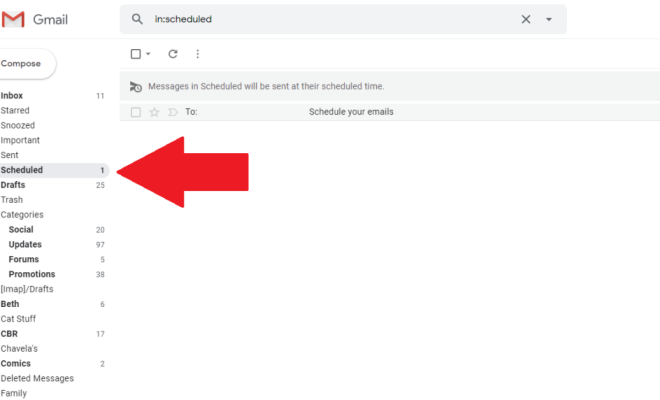
If you want to check on your scheduled emails, go to the “Scheduled” section in Gmail. To do this, click the three lines in the upper left-hand corner of your Gmail inbox, then click “Scheduled.” This will show you a list of all emails you have scheduled to be sent.

In conclusion, scheduling an email in Gmail is a useful feature that allows you to send emails at a later date and time. Using the above steps, you can easily schedule an email in Gmail and have it sent automatically when you want it to be sent.


Previous Article

The Best Phone Adapters (ATAs) of 2023

Next Article

How to Add Music to Snapchat

Matthew Lynch

Related articles More from author

  • Digital & Mobile Technology

    How to Delete Downloads on Mac

    July 6, 2023
    By Matthew Lynch
  • Digital & Mobile Technology

    Ways to Fix the Windows Desktop When It Turns Pink or Purple

    June 4, 2023
    By Matthew Lynch
  • Digital & Mobile Technology

    What is WOFF (Web Open Font Format)?

    June 12, 2023
    By Matthew Lynch
  • Digital & Mobile Technology

    The Benefits of Buying Xbox Live Gold

    June 10, 2023
    By Matthew Lynch
  • Digital & Mobile Technology

    The Pros and Cons of PCI-e Wireless Network Adapters vs. USB Wireless Solutions

    June 15, 2023
    By Matthew Lynch
  • Digital & Mobile Technology

    What Is 802.11g Wi-Fi?

    June 12, 2023
    By Matthew Lynch

Search

Login & Registration

  • Log in
  • Entries feed
  • Comments feed
  • WordPress.org

Newsletter

Signup for The Tech Edvocate Newsletter and have the latest in EdTech news and opinion delivered to your email address!

About Us

Since technology is not going anywhere and does more good than harm, adapting is the best course of action. That is where The Tech Edvocate comes in. We plan to cover the PreK-12 and Higher Education EdTech sectors and provide our readers with the latest news and opinion on the subject. From time to time, I will invite other voices to weigh in on important issues in EdTech. We hope to provide a well-rounded, multi-faceted look at the past, present, the future of EdTech in the US and internationally.

We started this journey back in June 2016, and we plan to continue it for many more years to come. I hope that you will join us in this discussion of the past, present and future of EdTech and lend your own insight to the issues that are discussed.

Newsletter

Signup for The Tech Edvocate Newsletter and have the latest in EdTech news and opinion delivered to your email address!

Contact Us

The Tech Edvocate
910 Goddin Street
Richmond, VA 23231
(601) 630-5238
[email protected]

Copyright © 2026 Matthew Lynch. All rights reserved.