The Tech Edvocate

Top Menu

  • Advertisement
  • Apps
  • Home Page
  • Home Page Five (No Sidebar)
  • Home Page Four
  • Home Page Three
  • Home Page Two
  • Home Tech2
  • Icons [No Sidebar]
  • Left Sidbear Page
  • Lynch Educational Consulting
  • My Account
  • My Speaking Page
  • Newsletter Sign Up Confirmation
  • Newsletter Unsubscription
  • Our Brands
  • Page Example
  • Privacy Policy
  • Protected Content
  • Register
  • Request a Product Review
  • Shop
  • Shortcodes Examples
  • Signup
  • Start Here
    • Governance
    • Careers
    • Contact Us
  • Terms and Conditions
  • The Edvocate
  • The Tech Edvocate Product Guide
  • Topics
  • Write For Us
  • Advertise

Main Menu

  • Start Here
    • Our Brands
    • Governance
      • Lynch Educational Consulting, LLC.
      • Dr. Lynch’s Personal Website
      • Careers
    • Write For Us
    • The Tech Edvocate Product Guide
    • Contact Us
    • Books
    • Edupedia
    • Post a Job
    • The Edvocate Podcast
    • Terms and Conditions
    • Privacy Policy
  • Topics
    • Assistive Technology
    • Child Development Tech
    • Early Childhood & K-12 EdTech
    • EdTech Futures
    • EdTech News
    • EdTech Policy & Reform
    • EdTech Startups & Businesses
    • Higher Education EdTech
    • Online Learning & eLearning
    • Parent & Family Tech
    • Personalized Learning
    • Product Reviews
  • Advertise
  • Tech Edvocate Awards
  • The Edvocate
  • Pedagogue
  • School Ratings

logo

The Tech Edvocate

  • Start Here
    • Our Brands
    • Governance
      • Lynch Educational Consulting, LLC.
      • Dr. Lynch’s Personal Website
        • My Speaking Page
      • Careers
    • Write For Us
    • The Tech Edvocate Product Guide
    • Contact Us
    • Books
    • Edupedia
    • Post a Job
    • The Edvocate Podcast
    • Terms and Conditions
    • Privacy Policy
  • Topics
    • Assistive Technology
    • Child Development Tech
    • Early Childhood & K-12 EdTech
    • EdTech Futures
    • EdTech News
    • EdTech Policy & Reform
    • EdTech Startups & Businesses
    • Higher Education EdTech
    • Online Learning & eLearning
    • Parent & Family Tech
    • Personalized Learning
    • Product Reviews
  • Advertise
  • Tech Edvocate Awards
  • The Edvocate
  • Pedagogue
  • School Ratings
  • Cybersecurity vs. Green Energy: Which Path Will Make You Richer in 2026?

  • Why These 10 Renewable Energy Certifications Are Quietly Reshaping Careers by 2026

  • Why Millions Are Rushing to Online Renewable Energy Certifications Right Now

  • August AI vs. USMLE: The Unsettling Future of Medical Licensing

  • One AI’s Perfect USMLE Score Just Blew Up Medical Education As We Know It

  • This AI Just Aced the USMLE: Why Your Medical Career Might Never Be the Same

  • The Quiet Exodus: Why Senior FinTech Developers Are Abandoning Corporate Life

  • The Quiet Revolution: Where Elite FinTech Developers Are Fleeing in 2026

  • The Quiet Exodus: Why Senior FinTech Developers Are Ditching Corporate Life

  • AI Governance Software: Pricing and Features Comparison

Assistive Technology
Home›Assistive Technology›How to Check RAM and Motherboard Compatibility

How to Check RAM and Motherboard Compatibility
By Matthew Lynch
June 8, 2023
0
Spread the love

RAM and motherboard compatibility is one of the key factors to consider when building a new PC or upgrading your existing system. RAM (Random Access Memory) is responsible for storing temporary data that your computer can access quickly, while the motherboard is the backbone of the system that connects and controls all the hardware components, including the RAM. If your RAM and motherboard are not compatible, your system will not function properly, and you may encounter performance issues or even hardware failures. Here is a guide on how to check RAM and motherboard compatibility:

  1. Determine the RAM Type and Speed:

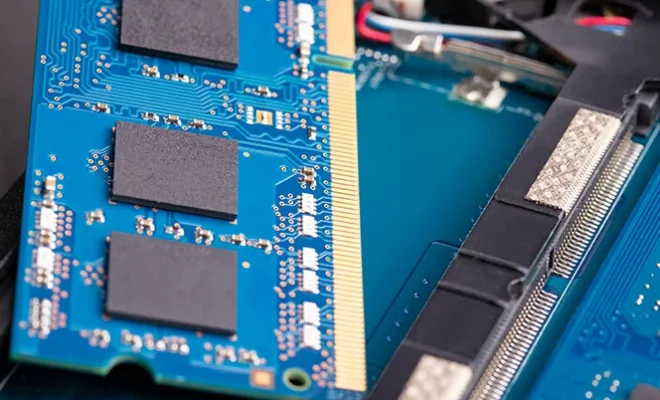
Before you buy RAM, you need to know the type and speed that your motherboard supports. There are several types of RAM, including DDR, DDR2, DDR3, and DDR4, with each having different pin configurations and maximum speeds. You can check your motherboard manual or visit the manufacturer’s website to find the RAM type and speed that it supports.

  1. Check the Number of RAM Slots:

The number of RAM slots on your motherboard is another important factor to consider when checking compatibility. Most motherboards have two or four RAM slots, but some high-end models may have more. You need to make sure that your motherboard has enough RAM slots to accommodate the amount of RAM you want to install.

  1. Check the Maximum RAM Capacity:

The maximum RAM capacity of your motherboard is the amount of RAM it can support. You need to check this limit before you buy RAM to ensure that you do not waste money on a RAM module that your motherboard cannot support. Most modern motherboards can support up to 64GB of RAM, but some older models may have lower limits.

  1. Check the RAM Voltage:

RAM voltage is another crucial factor to consider when checking compatibility. Each type of RAM has a specific voltage range, and if your motherboard does not support the voltage of your RAM, it can cause damage to both the motherboard and the RAM. You can find the RAM voltage in the specifications of the RAM module or on the packaging.

  1. Check the Motherboard BIOS:

Your motherboard BIOS or UEFI firmware contains information about the hardware components that are compatible with your motherboard. You can access the BIOS by pressing a specific key during the boot-up process. Once you are in the BIOS, look for the memory settings or SPD Information tab. This tab will display the RAM speed, capacity, and type that your motherboard can support.

Conclusion:

Checking RAM and motherboard compatibility is a vital step when building or upgrading your PC. Making the wrong choice can lead to significant performance issues or hardware failures. By following the steps outlined in this article, you can ensure that you choose the right RAM modules that are compatible with your motherboard, thereby ensuring optimal performance and stability.


Previous Article

How to Change a Google Docs Background ...

Next Article

How to Rotate Google Maps

Matthew Lynch

Related articles More from author

  • Assistive Technology

    How to Add an Admin to Your Facebook Page

    June 14, 2023
    By Matthew Lynch
  • Assistive Technology

    How to Turn Off Vibration on Android Devices

    June 8, 2023
    By Matthew Lynch
  • Assistive Technology

    How to Print From OneNote for Windows 10

    June 11, 2023
    By Matthew Lynch
  • Assistive Technology

    How to Fix the Error Code “0xc00000e5” on Windows

    June 23, 2023
    By Matthew Lynch
  • Assistive Technology

    How to Leave a Google Classroom

    June 6, 2023
    By Matthew Lynch
  • Assistive Technology

    YouTube Music’s ‘Replay Mix’: What It Is and How to Use It

    June 10, 2023
    By Matthew Lynch

Search

Login & Registration

  • Log in
  • Entries feed
  • Comments feed
  • WordPress.org

Newsletter

Signup for The Tech Edvocate Newsletter and have the latest in EdTech news and opinion delivered to your email address!

About Us

Since technology is not going anywhere and does more good than harm, adapting is the best course of action. That is where The Tech Edvocate comes in. We plan to cover the PreK-12 and Higher Education EdTech sectors and provide our readers with the latest news and opinion on the subject. From time to time, I will invite other voices to weigh in on important issues in EdTech. We hope to provide a well-rounded, multi-faceted look at the past, present, the future of EdTech in the US and internationally.

We started this journey back in June 2016, and we plan to continue it for many more years to come. I hope that you will join us in this discussion of the past, present and future of EdTech and lend your own insight to the issues that are discussed.

Newsletter

Signup for The Tech Edvocate Newsletter and have the latest in EdTech news and opinion delivered to your email address!

Contact Us

The Tech Edvocate
910 Goddin Street
Richmond, VA 23231
(601) 630-5238
[email protected]

Copyright © 2026 Matthew Lynch. All rights reserved.