The Tech Edvocate

Top Menu

  • Advertisement
  • Apps
  • Home Page
  • Home Page Five (No Sidebar)
  • Home Page Four
  • Home Page Three
  • Home Page Two
  • Home Tech2
  • Icons [No Sidebar]
  • Left Sidbear Page
  • Lynch Educational Consulting
  • My Account
  • My Speaking Page
  • Newsletter Sign Up Confirmation
  • Newsletter Unsubscription
  • Our Brands
  • Page Example
  • Privacy Policy
  • Protected Content
  • Register
  • Request a Product Review
  • Shop
  • Shortcodes Examples
  • Signup
  • Start Here
    • Governance
    • Careers
    • Contact Us
  • Terms and Conditions
  • The Edvocate
  • The Tech Edvocate Product Guide
  • Topics
  • Write For Us
  • Advertise

Main Menu

  • Start Here
    • Our Brands
    • Governance
      • Lynch Educational Consulting, LLC.
      • Dr. Lynch’s Personal Website
      • Careers
    • Write For Us
    • The Tech Edvocate Product Guide
    • Contact Us
    • Books
    • Edupedia
    • Post a Job
    • The Edvocate Podcast
    • Terms and Conditions
    • Privacy Policy
  • Topics
    • Assistive Technology
    • Child Development Tech
    • Early Childhood & K-12 EdTech
    • EdTech Futures
    • EdTech News
    • EdTech Policy & Reform
    • EdTech Startups & Businesses
    • Higher Education EdTech
    • Online Learning & eLearning
    • Parent & Family Tech
    • Personalized Learning
    • Product Reviews
  • Advertise
  • Tech Edvocate Awards
  • The Edvocate
  • Pedagogue
  • School Ratings

logo

The Tech Edvocate

  • Start Here
    • Our Brands
    • Governance
      • Lynch Educational Consulting, LLC.
      • Dr. Lynch’s Personal Website
        • My Speaking Page
      • Careers
    • Write For Us
    • The Tech Edvocate Product Guide
    • Contact Us
    • Books
    • Edupedia
    • Post a Job
    • The Edvocate Podcast
    • Terms and Conditions
    • Privacy Policy
  • Topics
    • Assistive Technology
    • Child Development Tech
    • Early Childhood & K-12 EdTech
    • EdTech Futures
    • EdTech News
    • EdTech Policy & Reform
    • EdTech Startups & Businesses
    • Higher Education EdTech
    • Online Learning & eLearning
    • Parent & Family Tech
    • Personalized Learning
    • Product Reviews
  • Advertise
  • Tech Edvocate Awards
  • The Edvocate
  • Pedagogue
  • School Ratings
  • This One Breakthrough Could Finally Unleash Practical Quantum Computing

  • Unsettling: ChatGPT Image Leak Exposes OpenAI’s Growing Control Crisis

  • Your AI Assistant Is A Trojan Horse: 10 Tools To Lock Down Your Digital Life

  • This One Flaw Could Hand Your AI Assistant to Hackers – And Steal Your Data

  • This One Thing About AI Search Will Blow Your Mind — And Empty Your Bank Account

  • The Brutal Truth About AI Search Poisoning: 9 Tools You NEED Now

  • This New AI Cybersecurity Threat Is Quietly Stealing Millions — Are You Safe?

  • Your SSN Exposed by NSE? Here’s Why a Class Action Might Be Your Only Hope

  • Your Private Data EXPOSED: The NSE Insurance Hack Is Worse Than You Think

  • Your SSN Exposed? NSE Insurance Data Breach Uncovers a Terrifying Timeline

Assistive Technology
Home›Assistive Technology›How to Fix It When YouTube Is Not Working on Roku

How to Fix It When YouTube Is Not Working on Roku
By Matthew Lynch
June 8, 2023
0
Spread the love

YouTube is a popular video-sharing platform that is a favorite among many Roku users. However, sometimes the YouTube app on Roku may not work as expected, leaving you frustrated and unable to watch your favorite content. In this guide, we will walk you through some troubleshooting steps to take if you encounter such a problem.

Restart Your Roku Device

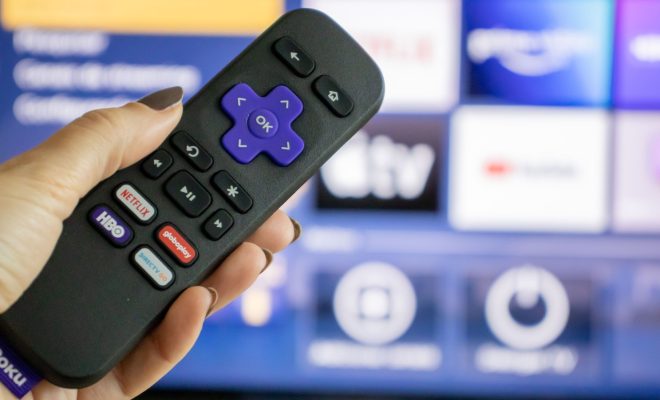
If YouTube is not working on your Roku device, the first thing you should do is restart your device. This will help to clear any temporary issues that may be causing YouTube not to work properly. To restart your Roku, follow these simple steps:

1. Press the Home button on your Roku remote.

2. Highlight the Settings option and press the OK button.

3. Scroll down and select System.

4. Select System restart and press the OK button.

5. Wait for your Roku device to restart.

Check Your Internet Connection

Another common reason why YouTube may not be working on Roku is poor internet connectivity. To determine if this is the case, try opening another app on your Roku device that requires an internet connection. If the app opens and works without any issues, then your internet connection is not the problem. However, if you are unable to launch any app or experience slow internet, you may want to try the following:

1. Restart your home network devices such as the modem and router.

2. Try connecting to a different Wi-Fi network.

3. Contact your internet service provider to check for any service outages or issues.

Update Your YouTube App

If your Roku device’s YouTube app is not updated to the latest version, you may experience problems when trying to watch content on the platform. You can check if there is an update available for the app by following these steps:

1. Press the Home button on your Roku remote.

2. Highlight the YouTube app and press the * button.

3. Select Check for updates and press the OK button.

4. If there is an available update, select Update now and wait for the update to complete.

Uninstall and Reinstall the YouTube App

If none of the above solutions work, you may need to uninstall and reinstall the YouTube app on your Roku device. To do this, follow these steps:

1. Press the Home button on your Roku remote.

2. Highlight the YouTube app and press the * button.

3. Select Remove channel and press the OK button.

4. Wait for the app to uninstall, then press the Home button.

5. Go to the Channel Store and search for the YouTube app.

6. Select Add channel and wait for the installation to complete.

Conclusion

In conclusion, if YouTube is not working on your Roku device, there are a few troubleshooting steps you can take to resolve the issue. These solutions include restarting your device, checking your internet connection, updating your YouTube app, and uninstalling and reinstalling the app. If none of these solutions work, you may want to contact Roku’s customer support or YouTube’s support team for further assistance.


Previous Article

How to Turn Off Auto Caps on ...

Next Article

How to Forward an Email as an ...

Matthew Lynch

Related articles More from author

  • Assistive Technology

    How to Convert PNG to PDF

    June 8, 2023
    By Matthew Lynch
  • Assistive Technology

    How to Install WhatsApp on Mac: Methods You Can Use

    June 10, 2023
    By Matthew Lynch
  • Assistive Technology

    How to Unprotect Excel Sheets and Workbooks

    June 23, 2023
    By Matthew Lynch
  • Assistive Technology

    How to Cook in Zelda: Breath of the Wild

    June 10, 2023
    By Matthew Lynch
  • Assistive TechnologyDigital & Mobile Technology

    How to Fix No Sound in Spotify on a Windows PC

    June 10, 2023
    By Matthew Lynch
  • Assistive Technology

    How to Get a Lenovo Student Discount

    June 9, 2023
    By Matthew Lynch

Search

Login & Registration

  • Log in
  • Entries feed
  • Comments feed
  • WordPress.org

Newsletter

Signup for The Tech Edvocate Newsletter and have the latest in EdTech news and opinion delivered to your email address!

About Us

Since technology is not going anywhere and does more good than harm, adapting is the best course of action. That is where The Tech Edvocate comes in. We plan to cover the PreK-12 and Higher Education EdTech sectors and provide our readers with the latest news and opinion on the subject. From time to time, I will invite other voices to weigh in on important issues in EdTech. We hope to provide a well-rounded, multi-faceted look at the past, present, the future of EdTech in the US and internationally.

We started this journey back in June 2016, and we plan to continue it for many more years to come. I hope that you will join us in this discussion of the past, present and future of EdTech and lend your own insight to the issues that are discussed.

Newsletter

Signup for The Tech Edvocate Newsletter and have the latest in EdTech news and opinion delivered to your email address!

Contact Us

The Tech Edvocate
910 Goddin Street
Richmond, VA 23231
(601) 630-5238
[email protected]

Copyright © 2026 Matthew Lynch. All rights reserved.