The Tech Edvocate

Top Menu

  • Advertisement
  • Apps
  • Home Page
  • Home Page Five (No Sidebar)
  • Home Page Four
  • Home Page Three
  • Home Page Two
  • Home Tech2
  • Icons [No Sidebar]
  • Left Sidbear Page
  • Lynch Educational Consulting
  • My Account
  • My Speaking Page
  • Newsletter Sign Up Confirmation
  • Newsletter Unsubscription
  • Our Brands
  • Page Example
  • Privacy Policy
  • Protected Content
  • Register
  • Request a Product Review
  • Shop
  • Shortcodes Examples
  • Signup
  • Start Here
    • Governance
    • Careers
    • Contact Us
  • Terms and Conditions
  • The Edvocate
  • The Tech Edvocate Product Guide
  • Topics
  • Write For Us
  • Advertise

Main Menu

  • Start Here
    • Our Brands
    • Governance
      • Lynch Educational Consulting, LLC.
      • Dr. Lynch’s Personal Website
      • Careers
    • Write For Us
    • The Tech Edvocate Product Guide
    • Contact Us
    • Books
    • Edupedia
    • Post a Job
    • The Edvocate Podcast
    • Terms and Conditions
    • Privacy Policy
  • Topics
    • Assistive Technology
    • Child Development Tech
    • Early Childhood & K-12 EdTech
    • EdTech Futures
    • EdTech News
    • EdTech Policy & Reform
    • EdTech Startups & Businesses
    • Higher Education EdTech
    • Online Learning & eLearning
    • Parent & Family Tech
    • Personalized Learning
    • Product Reviews
  • Advertise
  • Tech Edvocate Awards
  • The Edvocate
  • Pedagogue
  • School Ratings

logo

The Tech Edvocate

  • Start Here
    • Our Brands
    • Governance
      • Lynch Educational Consulting, LLC.
      • Dr. Lynch’s Personal Website
        • My Speaking Page
      • Careers
    • Write For Us
    • The Tech Edvocate Product Guide
    • Contact Us
    • Books
    • Edupedia
    • Post a Job
    • The Edvocate Podcast
    • Terms and Conditions
    • Privacy Policy
  • Topics
    • Assistive Technology
    • Child Development Tech
    • Early Childhood & K-12 EdTech
    • EdTech Futures
    • EdTech News
    • EdTech Policy & Reform
    • EdTech Startups & Businesses
    • Higher Education EdTech
    • Online Learning & eLearning
    • Parent & Family Tech
    • Personalized Learning
    • Product Reviews
  • Advertise
  • Tech Edvocate Awards
  • The Edvocate
  • Pedagogue
  • School Ratings
  • The Game-Changing September Beauty Products You Need to Try

  • Revelado: El Secreto Detrás de los Productos Más Vendidos de Septiembre que Querrás Tener

  • This Crucial FDA Hearing Could Transform Mental Healthcare Forever

  • WoW’s New Paid Race Sparked Outrage: Here’s Why Gamers Are Furious

  • You Won’t Believe How AI Chatbots Are Quietly Wrecking Mental Health

  • This Is Why Gen Z’s AI Career Concerns Are About to Explode

  • You Won’t Believe This Game-Changing Student Loan Interest Rate Reduction Loophole

  • This Critical Citrix Zero-Day Flaw Could Collapse Your Business

  • Gold Star Mortgage Ransomware: The Shocking Truth About Your ‘Secure’ Data

  • The Brutal Truth About Car Loan Rates: Why Your ‘Cheap’ Deal Won’t Last

Digital & Mobile Technology
Home›Digital & Mobile Technology›How to Use Samsung Find My Mobile

How to Use Samsung Find My Mobile
By Matthew Lynch
June 3, 2023
0
Spread the love

Samsung Find My Mobile is a feature that lets you locate your Samsung phone if it is lost or stolen. This feature is available on almost all Samsung smartphones and can be an incredibly helpful tool for locating your phone. However, many people do not know how to use Find My Mobile. In this article, we will guide you through the process of how to use Samsung Find My Mobile.

Step 1: Set up Find My Mobile on your Samsung phone

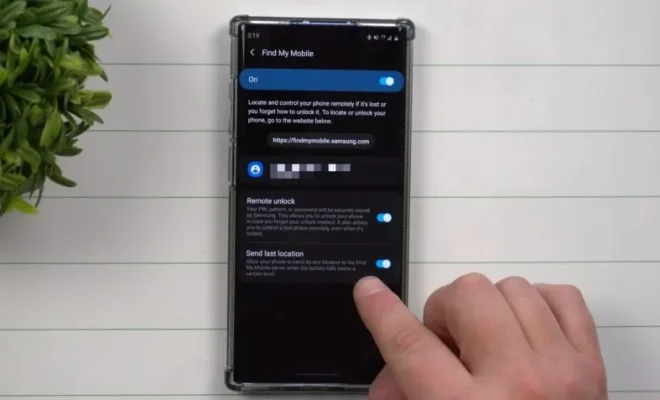
The first step in using Samsung Find My Mobile is to make sure that it is set up on your Samsung phone. To do this, follow these steps:

1. Go to the Settings app on your Samsung phone.
2. Tap the biometrics and security option.
3. Scroll down until you see the Find My Mobile option.
4. Tap on it and sign in with your Samsung account.

Once you have completed these steps, you have successfully set up Find My Mobile on your Samsung phone.

Step 2: Locate your Samsung phone using Find My Mobile

If you lose your Samsung phone, you can use Find My Mobile to locate it. Here’s how:

1. On any device with internet access, go to the Find My Mobile website (findmymobile.samsung.com).
2. Sign in using the same Samsung account credentials that you used to set up Find My Mobile on your phone.
3. Once you are signed in, you will see a map with your phone’s location marked.
4. You can also remotely ring your phone, lock your phone, or even wipe your phone’s data if necessary.

Step 3: Register an alternate contact

In case you lose your phone and are unable to recover it, you can enter an alternate contact in the Find My Mobile settings. This alternate contact will be able to locate your phone and assist in finding it. To register an alternate contact, follow these steps:

1. Go to the Find My Mobile website.
2. Click on the three horizontal lines in the top left corner of the screen.
3. Click on settings, then on security and privacy.
4. Scroll down and click on emergency contact information.
5. Enter the name and phone number of the alternate contact you wish to register.

Conclusion:

Samsung Find My Mobile is an excellent feature that every Samsung phone user should know how to use. It can be crucial in the event of losing or theft of your phone. By following the guide we have provided, you can set up Find My Mobile on your phone, locate your phone using it, and even register an alternate contact in case you lose your phone. With these steps, you can rest assured that your phone is always secure and easily traceable.


Previous Article

Linksys WRT3200ACM Router Review

Next Article

How to Reset Android Lock Screen Password ...

Matthew Lynch

Related articles More from author

  • Digital & Mobile Technology

    What Is DNS (Domain Name System)?

    June 23, 2023
    By Matthew Lynch
  • Digital & Mobile Technology

    What Is a Serial Number?

    June 1, 2023
    By Matthew Lynch
  • Digital & Mobile Technology

    What’s the Difference Between Halogen and Xenon Headlights?

    June 13, 2023
    By Matthew Lynch
  • Digital & Mobile Technology

    How to Remove Your Birthday From Facebook

    July 5, 2023
    By Matthew Lynch
  • Digital & Mobile Technology

    What Is Reddit Karma and How Do You Earn It?

    June 8, 2023
    By Matthew Lynch
  • Digital & Mobile Technology

    How to Make Your First Ever YouTube Video: A Step-by-Step Guide

    August 5, 2023
    By Matthew Lynch

Search

Login & Registration

  • Log in
  • Entries feed
  • Comments feed
  • WordPress.org

Newsletter

Signup for The Tech Edvocate Newsletter and have the latest in EdTech news and opinion delivered to your email address!

About Us

Since technology is not going anywhere and does more good than harm, adapting is the best course of action. That is where The Tech Edvocate comes in. We plan to cover the PreK-12 and Higher Education EdTech sectors and provide our readers with the latest news and opinion on the subject. From time to time, I will invite other voices to weigh in on important issues in EdTech. We hope to provide a well-rounded, multi-faceted look at the past, present, the future of EdTech in the US and internationally.

We started this journey back in June 2016, and we plan to continue it for many more years to come. I hope that you will join us in this discussion of the past, present and future of EdTech and lend your own insight to the issues that are discussed.

Newsletter

Signup for The Tech Edvocate Newsletter and have the latest in EdTech news and opinion delivered to your email address!

Contact Us

The Tech Edvocate
910 Goddin Street
Richmond, VA 23231
(601) 630-5238
[email protected]

Copyright © 2026 Matthew Lynch. All rights reserved.