The Tech Edvocate

Top Menu

  • Advertisement
  • Apps
  • Home Page
  • Home Page Five (No Sidebar)
  • Home Page Four
  • Home Page Three
  • Home Page Two
  • Home Tech2
  • Icons [No Sidebar]
  • Left Sidbear Page
  • Lynch Educational Consulting
  • My Account
  • My Speaking Page
  • Newsletter Sign Up Confirmation
  • Newsletter Unsubscription
  • Our Brands
  • Page Example
  • Privacy Policy
  • Protected Content
  • Register
  • Request a Product Review
  • Shop
  • Shortcodes Examples
  • Signup
  • Start Here
    • Governance
    • Careers
    • Contact Us
  • Terms and Conditions
  • The Edvocate
  • The Tech Edvocate Product Guide
  • Topics
  • Write For Us
  • Advertise

Main Menu

  • Start Here
    • Our Brands
    • Governance
      • Lynch Educational Consulting, LLC.
      • Dr. Lynch’s Personal Website
      • Careers
    • Write For Us
    • The Tech Edvocate Product Guide
    • Contact Us
    • Books
    • Edupedia
    • Post a Job
    • The Edvocate Podcast
    • Terms and Conditions
    • Privacy Policy
  • Topics
    • Assistive Technology
    • Child Development Tech
    • Early Childhood & K-12 EdTech
    • EdTech Futures
    • EdTech News
    • EdTech Policy & Reform
    • EdTech Startups & Businesses
    • Higher Education EdTech
    • Online Learning & eLearning
    • Parent & Family Tech
    • Personalized Learning
    • Product Reviews
  • Advertise
  • Tech Edvocate Awards
  • The Edvocate
  • Pedagogue
  • School Ratings

logo

The Tech Edvocate

  • Start Here
    • Our Brands
    • Governance
      • Lynch Educational Consulting, LLC.
      • Dr. Lynch’s Personal Website
        • My Speaking Page
      • Careers
    • Write For Us
    • The Tech Edvocate Product Guide
    • Contact Us
    • Books
    • Edupedia
    • Post a Job
    • The Edvocate Podcast
    • Terms and Conditions
    • Privacy Policy
  • Topics
    • Assistive Technology
    • Child Development Tech
    • Early Childhood & K-12 EdTech
    • EdTech Futures
    • EdTech News
    • EdTech Policy & Reform
    • EdTech Startups & Businesses
    • Higher Education EdTech
    • Online Learning & eLearning
    • Parent & Family Tech
    • Personalized Learning
    • Product Reviews
  • Advertise
  • Tech Edvocate Awards
  • The Edvocate
  • Pedagogue
  • School Ratings
  • 100 Best Apps for Data Backup

  • 100 Best Apps for Data Migration

  • 100 Best Apps for Data Transformation

  • 100 Best Apps for Data Cleaning

  • 100 Best Apps for Data Entry

  • 100 Best Apps for Business Process Automation

  • 100 Best Apps for Operational Efficiency

  • 100 Best Apps for Improving Processes

  • 100 Best Apps for Scaling Operations

  • 100 Best Apps for Community-Led Growth

Digital & Mobile Technology
Home›Digital & Mobile Technology›Where Did the System Control Panel Go on Windows 11?

Where Did the System Control Panel Go on Windows 11?
By Matthew Lynch
May 16, 2023
0
Spread the love

Windows 11 has been out for a while now and has brought with it a range of exciting features and improvements. However, many users have noticed that the System Control Panel is nowhere to be found, leaving them wondering where to go to access vital information about their computer’s hardware and software configurations.

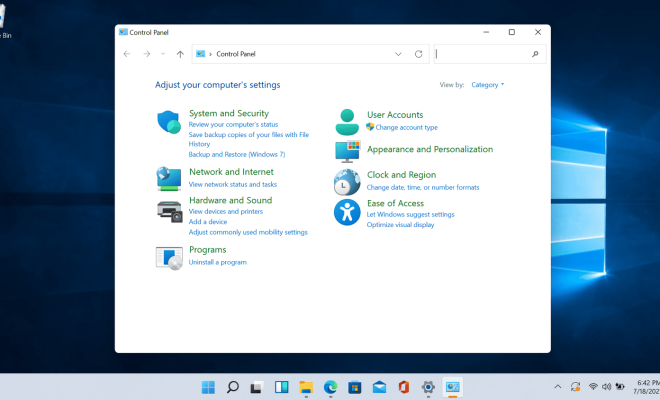
In previous versions of Windows, accessing the System Control Panel was a simple task. All you had to do was click on the start menu, open the Control Panel, and choose the System icon. This allowed users to view system specifications, manage devices, and perform other useful tasks.

With Windows 11, Microsoft has completely overhauled the traditional Control Panel in favor of the Settings app. The Settings app brings a more modern, streamlined interface that is specifically designed to make it easier for users to access vital system information and settings.

So, where did the System Control Panel go on Windows 11?

To access the System settings on Windows 11, users need to click on the Start button and then go to Settings. Once in Settings, click on the System option, and you’ll be taken to a new screen that contains all the relevant information and settings for your device.

While it might take some time to get used to the new interface, the new Settings app isn’t all bad. It has a range of new features that make it more convenient to use than the traditional Control Panel. For instance, it allows users to search for specific settings using the search bar, which is a welcome addition.

Additionally, the new Settings app is far more mobile-friendly, which isn’t surprising given that Windows 11 was designed with mobile devices in mind. The app’s user interface adjusts dynamically to different screen sizes, making it much easier to use on smaller devices like tablets and laptops.

Finally, the System settings in the new Settings app are much more detailed than before. They provide users with all the information they need about their device’s hardware configuration, including the processor, memory, and storage. The app also allows users to manage devices, view and manage updates, configure security and privacy settings, and much more.

Previous Article

What’s the Best Way to Backup My ...

Next Article

Where Is the “Recycle Bin” on a ...

Matthew Lynch

Related articles More from author

  • Digital & Mobile Technology

    How to Install Steam Skins on Windows 11

    April 27, 2023
    By Matthew Lynch
  • Digital & Mobile Technology

    How Do I Position Loudspeakers for My Home Theater System?

    July 31, 2023
    By Matthew Lynch
  • Digital & Mobile Technology

    New Messages App Features iOS 16 Brings to the iPhone

    June 23, 2023
    By Matthew Lynch
  • Digital & Mobile Technology

    What Is HD Voice and How Does It Work?

    June 8, 2023
    By Matthew Lynch
  • Digital & Mobile Technology

    The Best Driving Apps to Make Your Commute More Fun

    July 14, 2023
    By Matthew Lynch
  • Digital & Mobile Technology

    How are Schools Prioritizing Data Backup and Recovery?

    February 1, 2022
    By Matthew Lynch

Search

Login & Registration

  • Log in
  • Entries feed
  • Comments feed
  • WordPress.org

Newsletter

Signup for The Tech Edvocate Newsletter and have the latest in EdTech news and opinion delivered to your email address!

About Us

Since technology is not going anywhere and does more good than harm, adapting is the best course of action. That is where The Tech Edvocate comes in. We plan to cover the PreK-12 and Higher Education EdTech sectors and provide our readers with the latest news and opinion on the subject. From time to time, I will invite other voices to weigh in on important issues in EdTech. We hope to provide a well-rounded, multi-faceted look at the past, present, the future of EdTech in the US and internationally.

We started this journey back in June 2016, and we plan to continue it for many more years to come. I hope that you will join us in this discussion of the past, present and future of EdTech and lend your own insight to the issues that are discussed.

Newsletter

Signup for The Tech Edvocate Newsletter and have the latest in EdTech news and opinion delivered to your email address!

Contact Us

The Tech Edvocate
910 Goddin Street
Richmond, VA 23231
(601) 630-5238
[email protected]

Copyright © 2026 Matthew Lynch. All rights reserved.