The Tech Edvocate

Top Menu

  • Advertisement
  • Apps
  • Home Page
  • Home Page Five (No Sidebar)
  • Home Page Four
  • Home Page Three
  • Home Page Two
  • Home Tech2
  • Icons [No Sidebar]
  • Left Sidbear Page
  • Lynch Educational Consulting
  • My Account
  • My Speaking Page
  • Newsletter Sign Up Confirmation
  • Newsletter Unsubscription
  • Our Brands
  • Page Example
  • Privacy Policy
  • Protected Content
  • Register
  • Request a Product Review
  • Shop
  • Shortcodes Examples
  • Signup
  • Start Here
    • Governance
    • Careers
    • Contact Us
  • Terms and Conditions
  • The Edvocate
  • The Tech Edvocate Product Guide
  • Topics
  • Write For Us
  • Advertise

Main Menu

  • Start Here
    • Our Brands
    • Governance
      • Lynch Educational Consulting, LLC.
      • Dr. Lynch’s Personal Website
      • Careers
    • Write For Us
    • The Tech Edvocate Product Guide
    • Contact Us
    • Books
    • Edupedia
    • Post a Job
    • The Edvocate Podcast
    • Terms and Conditions
    • Privacy Policy
  • Topics
    • Assistive Technology
    • Child Development Tech
    • Early Childhood & K-12 EdTech
    • EdTech Futures
    • EdTech News
    • EdTech Policy & Reform
    • EdTech Startups & Businesses
    • Higher Education EdTech
    • Online Learning & eLearning
    • Parent & Family Tech
    • Personalized Learning
    • Product Reviews
  • Advertise
  • Tech Edvocate Awards
  • The Edvocate
  • Pedagogue
  • School Ratings

logo

The Tech Edvocate

  • Start Here
    • Our Brands
    • Governance
      • Lynch Educational Consulting, LLC.
      • Dr. Lynch’s Personal Website
        • My Speaking Page
      • Careers
    • Write For Us
    • The Tech Edvocate Product Guide
    • Contact Us
    • Books
    • Edupedia
    • Post a Job
    • The Edvocate Podcast
    • Terms and Conditions
    • Privacy Policy
  • Topics
    • Assistive Technology
    • Child Development Tech
    • Early Childhood & K-12 EdTech
    • EdTech Futures
    • EdTech News
    • EdTech Policy & Reform
    • EdTech Startups & Businesses
    • Higher Education EdTech
    • Online Learning & eLearning
    • Parent & Family Tech
    • Personalized Learning
    • Product Reviews
  • Advertise
  • Tech Edvocate Awards
  • The Edvocate
  • Pedagogue
  • School Ratings
  • Miro vs Conceptboard for project management

  • How to use Teamwork for resource management

  • How much does Procore cost per month

  • How to organize Microsoft Planner buckets

  • Is Teamwork good for billable hours

  • Procore vs Buildertrend which is better

  • Airtable project management templates

  • Can Miro track project progress

  • How to use Basecamp for client work

  • Can Lucidchart create swimlane diagrams

Digital & Mobile Technology
Home›Digital & Mobile Technology›Turn a Raspberry Pi into a Steam Machine with Moonlight

Turn a Raspberry Pi into a Steam Machine with Moonlight
By Matthew Lynch
April 25, 2023
0
Spread the love

If you are a gamer, you would know how expensive gaming machines can be. Good gaming laptops and desktops can cost anywhere between $1,000 to $4,000. However, a Raspberry Pi can be an inexpensive solution, but it’s not generally associated with gaming. But, that can be changed with the right software.

Thanks to open source projects, you can turn your Raspberry Pi into a fully functional steam machine. Moonlight is an open source game streaming client that lets you stream your favorite games from your Nvidia-powered gaming PC to a Raspberry Pi (or any other device).

In this article, we will guide you through the process of turning a Raspberry Pi into a steam machine with Moonlight.

What You Need:

– A Raspberry Pi (3 or newer)

– A microSD card (at least 8GB, Class 10)

– A computer running Windows or Linux with an Nvidia GPU (GTX 600 series or newer)

– A controller (Xbox, PlayStation, or generic USB controller)

– An ethernet cable or a WiFi adapter (we suggest a wired connection since latency can be an issue)

Step-by-Step Guide:

1. First, let’s prepare the Raspberry Pi. Download the latest version of Raspbian and flash it to your microSD card using Raspberry Pi Imager. Once the flashing process is complete, insert the microSD card into the Raspberry Pi and connect it to your network (either via ethernet or WiFi) and your monitor.

2. Boot up the Raspberry Pi and open the terminal. Run the following commands to update the system:

“`
sudo apt-get update
sudo apt-get upgrade
“`

3. Next, install Moonlight. Moonlight can be installed from the Raspbian repositories with the following command:

“`
sudo apt-get install moonlight-embedded
“`

4. Once the installation is complete, run Moonlight with the following command:

“`
moonlight pair
“`

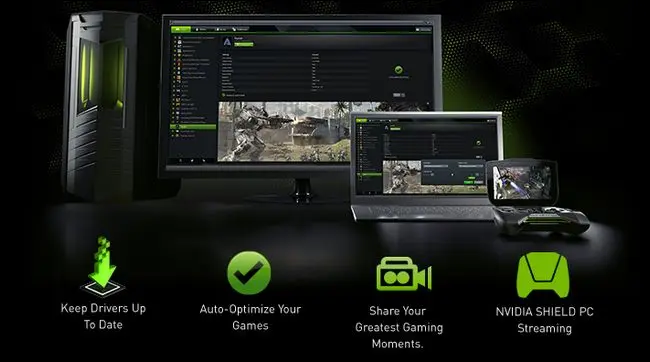
This will generate a PIN that you will need to enter on your Nvidia gaming PC. Make sure your gaming PC is on and the GeForce Experience software is installed. Open GeForce Experience and click on the “Shield” icon on the top right corner. Enter the PIN generated by the Raspberry Pi and click “Pair”.

5. Once the pairing is complete, Moonlight will show a list of the games installed on your gaming PC. You can choose any game to stream on your Raspberry Pi.

6. Finally, connect a controller to the Raspberry Pi and start playing!

Conclusion:

In this article, we have shown you how to turn a Raspberry Pi into a steam machine with Moonlight. With this setup, you can stream any game from your Nvidia-powered gaming PC to your Raspberry Pi. This is a great way to save money and still enjoy your favorite games on the big screen. Give it a try and let us know your experience!


Previous Article

Trending IT Professionals Article Topics on Techopedia

Next Article

Ubuntu Software Center Not Working? Here Are ...

Matthew Lynch

Related articles More from author

  • Digital & Mobile Technology

    What Streaks Are on Snapchat (and What to Know About Them)

    May 31, 2023
    By Matthew Lynch
  • Digital & Mobile Technology

    Best Virtual Machine Software Programs

    June 6, 2023
    By Matthew Lynch
  • Digital & Mobile Technology

    How to Check CPU Usage in Windows 11

    July 6, 2023
    By Matthew Lynch
  • Digital & Mobile Technology

    Intro to Facebook Groups: Open, Closed, and Secret Groups Explained

    June 11, 2023
    By Matthew Lynch
  • Digital & Mobile Technology

    How to Change Phone Number Associated With Apple ID

    May 20, 2023
    By Matthew Lynch
  • Digital & Mobile Technology

    How to Find All Unread Messages in Gmail

    June 2, 2023
    By Matthew Lynch

Search

Login & Registration

  • Log in
  • Entries feed
  • Comments feed
  • WordPress.org

Newsletter

Signup for The Tech Edvocate Newsletter and have the latest in EdTech news and opinion delivered to your email address!

About Us

Since technology is not going anywhere and does more good than harm, adapting is the best course of action. That is where The Tech Edvocate comes in. We plan to cover the PreK-12 and Higher Education EdTech sectors and provide our readers with the latest news and opinion on the subject. From time to time, I will invite other voices to weigh in on important issues in EdTech. We hope to provide a well-rounded, multi-faceted look at the past, present, the future of EdTech in the US and internationally.

We started this journey back in June 2016, and we plan to continue it for many more years to come. I hope that you will join us in this discussion of the past, present and future of EdTech and lend your own insight to the issues that are discussed.

Newsletter

Signup for The Tech Edvocate Newsletter and have the latest in EdTech news and opinion delivered to your email address!

Contact Us

The Tech Edvocate
910 Goddin Street
Richmond, VA 23231
(601) 630-5238
[email protected]

Copyright © 2026 Matthew Lynch. All rights reserved.