
The Tech Edvocate

Top Menu

  • Advertisement
  • Apps
  • Home Page
  • Home Page Five (No Sidebar)
  • Home Page Four
  • Home Page Three
  • Home Page Two
  • Home Tech2
  • Icons [No Sidebar]
  • Left Sidbear Page
  • Lynch Educational Consulting
  • My Account
  • My Speaking Page
  • Newsletter Sign Up Confirmation
  • Newsletter Unsubscription
  • Our Brands
  • Page Example
  • Privacy Policy
  • Protected Content
  • Register
  • Request a Product Review
  • Shop
  • Shortcodes Examples
  • Signup
  • Start Here
    • Governance
    • Careers
    • Contact Us
  • Terms and Conditions
  • The Edvocate
  • The Tech Edvocate Product Guide
  • Topics
  • Write For Us
  • Advertise

Main Menu

  • Start Here
    • Our Brands
    • Governance
      • Lynch Educational Consulting, LLC.
      • Dr. Lynch’s Personal Website
      • Careers
    • Write For Us
    • The Tech Edvocate Product Guide
    • Contact Us
    • Books
    • Edupedia
    • Post a Job
    • The Edvocate Podcast
    • Terms and Conditions
    • Privacy Policy
  • Topics
    • Assistive Technology
    • Child Development Tech
    • Early Childhood & K-12 EdTech
    • EdTech Futures
    • EdTech News
    • EdTech Policy & Reform
    • EdTech Startups & Businesses
    • Higher Education EdTech
    • Online Learning & eLearning
    • Parent & Family Tech
    • Personalized Learning
    • Product Reviews
  • Advertise
  • Tech Edvocate Awards
  • The Edvocate
  • Pedagogue
  • School Ratings

logo

The Tech Edvocate

  • Start Here
    • Our Brands
    • Governance
      • Lynch Educational Consulting, LLC.
      • Dr. Lynch’s Personal Website
        • My Speaking Page
      • Careers
    • Write For Us
    • The Tech Edvocate Product Guide
    • Contact Us
    • Books
    • Edupedia
    • Post a Job
    • The Edvocate Podcast
    • Terms and Conditions
    • Privacy Policy
  • Topics
    • Assistive Technology
    • Child Development Tech
    • Early Childhood & K-12 EdTech
    • EdTech Futures
    • EdTech News
    • EdTech Policy & Reform
    • EdTech Startups & Businesses
    • Higher Education EdTech
    • Online Learning & eLearning
    • Parent & Family Tech
    • Personalized Learning
    • Product Reviews
  • Advertise
  • Tech Edvocate Awards
  • The Edvocate
  • Pedagogue
  • School Ratings
  • Miro vs Conceptboard for project management

  • How to use Teamwork for resource management

  • How much does Procore cost per month

  • How to organize Microsoft Planner buckets

  • Is Teamwork good for billable hours

  • Procore vs Buildertrend which is better

  • Airtable project management templates

  • Can Miro track project progress

  • How to use Basecamp for client work

  • Can Lucidchart create swimlane diagrams

How To
Home›How To›6 Ways to Check Starbucks Gift Card Balance on PC or Mac

6 Ways to Check Starbucks Gift Card Balance on PC or Mac
By Matthew Lynch
March 22, 2024
0
Spread the love

Are you in need of a caffeine fix but unsure how much is left on your Starbucks gift card? Fret not, for there are multiple ways to check your Starbucks gift card balance from the comfort of your PC or Mac. In this article, we will walk through six different methods you can use to stay updated on your remaining balance.

1. Official Starbucks Website

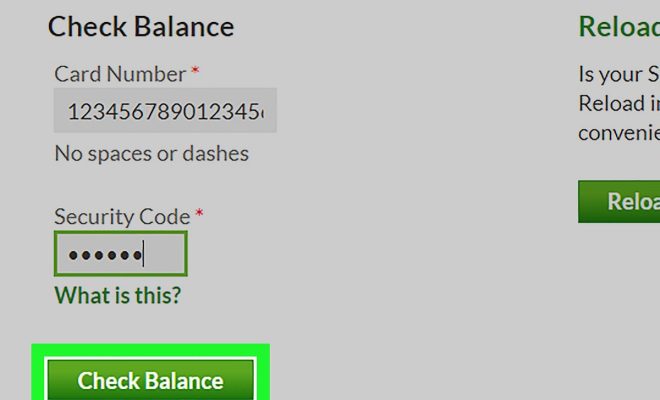
One of the easiest ways to check your Starbucks gift card balance is by visiting the official Starbucks website at www.starbucks.com. Simply navigate to the bottom of the homepage, click on ‘Check Gift Card Balance,’ enter your card details, and voilà! Your balance will be displayed promptly.

2. Mobile App

The Starbucks mobile app is another great resource for checking your gift card balance. Download the app on your smartphone, sign in with your Starbucks account, and add your gift card information in the app’s wallet section. Once added, you can view your current balance by clicking on the card icon.

3. Ask a Barista In-Store

If you’re already in a Starbucks store, consider asking a friendly barista for assistance. They can quickly scan your gift card and provide you with its current remaining balance.

4. Call Customer Service

You may check your Starbucks gift card balance by calling their Customer Service hotline at 1-800-STARBUC(782-7282). Follow the automated prompts and provide your card details when prompted to receive an up-to-date balance.

5. Use an Online Balance Checker Tool

There are various third-party websites available that offer free real-time gift card balance checking services. Search for one of these tools online, input your Starbucks gift card information as prompted, and receive an immediate update on how much is left on your card.

6. E-Gift Receipts

If you received an e-gift from a friend or loved one, the email containing the gift card information usually shows the initial balance of the card. However, remember that this method is only helpful if you have not made any purchases with your Starbucks gift card since receiving it.

Conclusion

Keeping tabs on how much money remains on your Starbucks gift card is simple and can be accomplished in a variety of ways. Whichever method you choose, you’ll be able to appreciate your favorite order at Starbucks without worrying about running out of funds!


Previous Article

How to Write an Appendix: 11 Steps

Next Article

How to Get a Free iPad: 6 ...

Matthew Lynch

Related articles More from author

  • How To

    4 Ways to Get Rid of a Pimple with No Head

    October 12, 2023
    By Matthew Lynch
  • How To

    4 Ways to Cook Zoodles

    October 21, 2023
    By Matthew Lynch
  • How To

    3 Ways to Grow Butternut Squash

    October 16, 2023
    By Matthew Lynch
  • How To

    5 Ways to Practice Taoist Meditation

    January 29, 2024
    By Matthew Lynch
  • How To

    How to Calculate CPM: 7 Steps

    April 4, 2024
    By Matthew Lynch
  • How To

    How to Use Powder Hair Dye: 14 Steps

    April 9, 2024
    By Matthew Lynch

Search

Login & Registration

  • Log in
  • Entries feed
  • Comments feed
  • WordPress.org

Newsletter

Signup for The Tech Edvocate Newsletter and have the latest in EdTech news and opinion delivered to your email address!

About Us

Since technology is not going anywhere and does more good than harm, adapting is the best course of action. That is where The Tech Edvocate comes in. We plan to cover the PreK-12 and Higher Education EdTech sectors and provide our readers with the latest news and opinion on the subject. From time to time, I will invite other voices to weigh in on important issues in EdTech. We hope to provide a well-rounded, multi-faceted look at the past, present, the future of EdTech in the US and internationally.

We started this journey back in June 2016, and we plan to continue it for many more years to come. I hope that you will join us in this discussion of the past, present and future of EdTech and lend your own insight to the issues that are discussed.

Newsletter

Signup for The Tech Edvocate Newsletter and have the latest in EdTech news and opinion delivered to your email address!

Contact Us

The Tech Edvocate
910 Goddin Street
Richmond, VA 23231
(601) 630-5238
[email protected]

Copyright © 2026 Matthew Lynch. All rights reserved.