The Tech Edvocate

Top Menu

  • Advertisement
  • Apps
  • Home Page
  • Home Page Five (No Sidebar)
  • Home Page Four
  • Home Page Three
  • Home Page Two
  • Home Tech2
  • Icons [No Sidebar]
  • Left Sidbear Page
  • Lynch Educational Consulting
  • My Account
  • My Speaking Page
  • Newsletter Sign Up Confirmation
  • Newsletter Unsubscription
  • Our Brands
  • Page Example
  • Privacy Policy
  • Protected Content
  • Register
  • Request a Product Review
  • Shop
  • Shortcodes Examples
  • Signup
  • Start Here
    • Governance
    • Careers
    • Contact Us
  • Terms and Conditions
  • The Edvocate
  • The Tech Edvocate Product Guide
  • Topics
  • Write For Us
  • Advertise

Main Menu

  • Start Here
    • Our Brands
    • Governance
      • Lynch Educational Consulting, LLC.
      • Dr. Lynch’s Personal Website
      • Careers
    • Write For Us
    • The Tech Edvocate Product Guide
    • Contact Us
    • Books
    • Edupedia
    • Post a Job
    • The Edvocate Podcast
    • Terms and Conditions
    • Privacy Policy
  • Topics
    • Assistive Technology
    • Child Development Tech
    • Early Childhood & K-12 EdTech
    • EdTech Futures
    • EdTech News
    • EdTech Policy & Reform
    • EdTech Startups & Businesses
    • Higher Education EdTech
    • Online Learning & eLearning
    • Parent & Family Tech
    • Personalized Learning
    • Product Reviews
  • Advertise
  • Tech Edvocate Awards
  • The Edvocate
  • Pedagogue
  • School Ratings

logo

The Tech Edvocate

  • Start Here
    • Our Brands
    • Governance
      • Lynch Educational Consulting, LLC.
      • Dr. Lynch’s Personal Website
        • My Speaking Page
      • Careers
    • Write For Us
    • The Tech Edvocate Product Guide
    • Contact Us
    • Books
    • Edupedia
    • Post a Job
    • The Edvocate Podcast
    • Terms and Conditions
    • Privacy Policy
  • Topics
    • Assistive Technology
    • Child Development Tech
    • Early Childhood & K-12 EdTech
    • EdTech Futures
    • EdTech News
    • EdTech Policy & Reform
    • EdTech Startups & Businesses
    • Higher Education EdTech
    • Online Learning & eLearning
    • Parent & Family Tech
    • Personalized Learning
    • Product Reviews
  • Advertise
  • Tech Edvocate Awards
  • The Edvocate
  • Pedagogue
  • School Ratings
  • Unbelievable: South Korea’s AI Cheating Scandal Forces Glasses Inspections

  • 7 Disturbing Truths About the Latest AI Data Breach

  • This Ancient Builder’s $150M AI Bet Could Redefine Construction

  • The Astonishing Reason Canada Might Embrace Chinese Automakers

  • This One Week of Cyber Incidents in October 2026 Proves AI Is Our Biggest Threat

  • Amex Reverses Controversial Clawback: What It Means for Your Rewards

  • Mind-Blowing: NHTSA Just Launched a Waymo Recall Query — Here’s Why It Matters

  • Your Data Stolen? 9 Critical Steps After the Academy Mortgage Data Breach

  • Devastating: Why Your Car Insurance Rates Are Skyrocketing in 2026 – And What You Can Do

  • 10,000+ Victims: This Accounting Giant’s Data Breach Just Got Much Worse

Google ClassroomGoogle Classroom Tips
Home›Google Classroom›Can I Save an Assignment as a Draft in Google Classroom and Finish It Later?

Can I Save an Assignment as a Draft in Google Classroom and Finish It Later?

By Matthew Lynch
October 9, 2020
0
Spread the love

One of the best features of Google products is the auto-save feature. Gone are the days where you lose your work if your computer crashes or you log off and forget to press save. Google Classroom also has a nifty auto-save feature with assignments.  

One option while working on an assignment, is to click on the drop-down arrow next to where it says ‘Assign’, and select ‘Save as draft’. However, if you are in the middle of creating an assignment and exit out of it for any reason, it will automatically be saved as a draft and you can come back to it later to finish it. 

Here is an example of an assignment that has not been finished or posted yet:
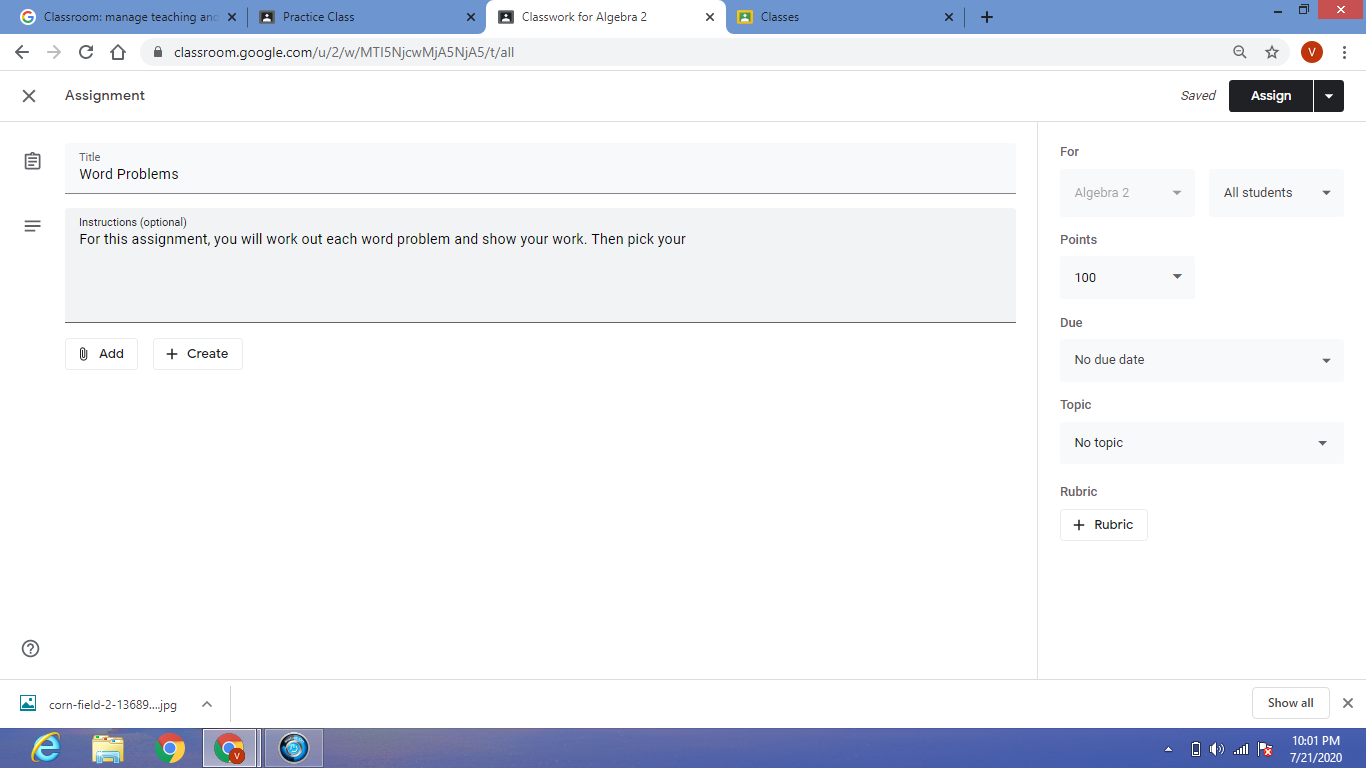
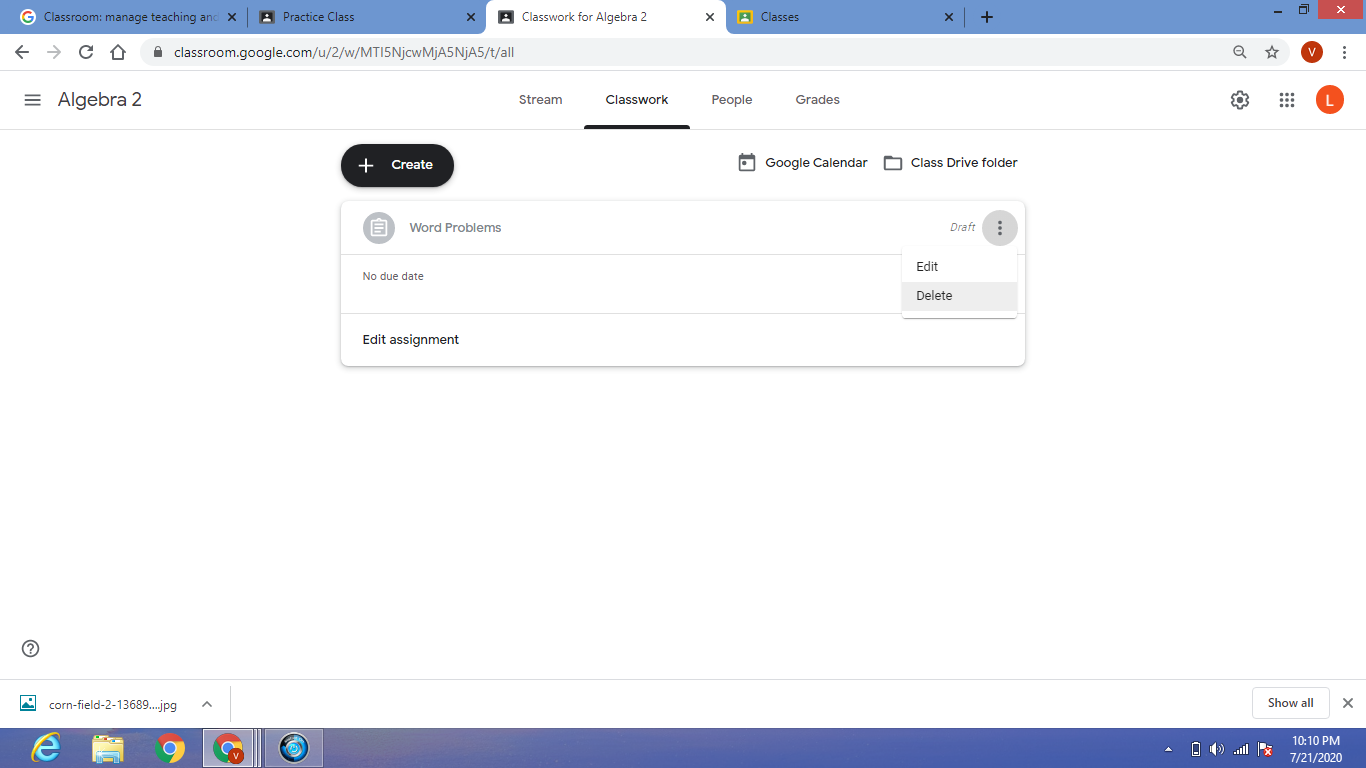
Next to the word “Assignment” in the top left corner is an “X”. If you click it, you will be exited out of the assignment and will be brought back to the “Classwork” tab.  Here, you will see it was saved as a “Draft”. 
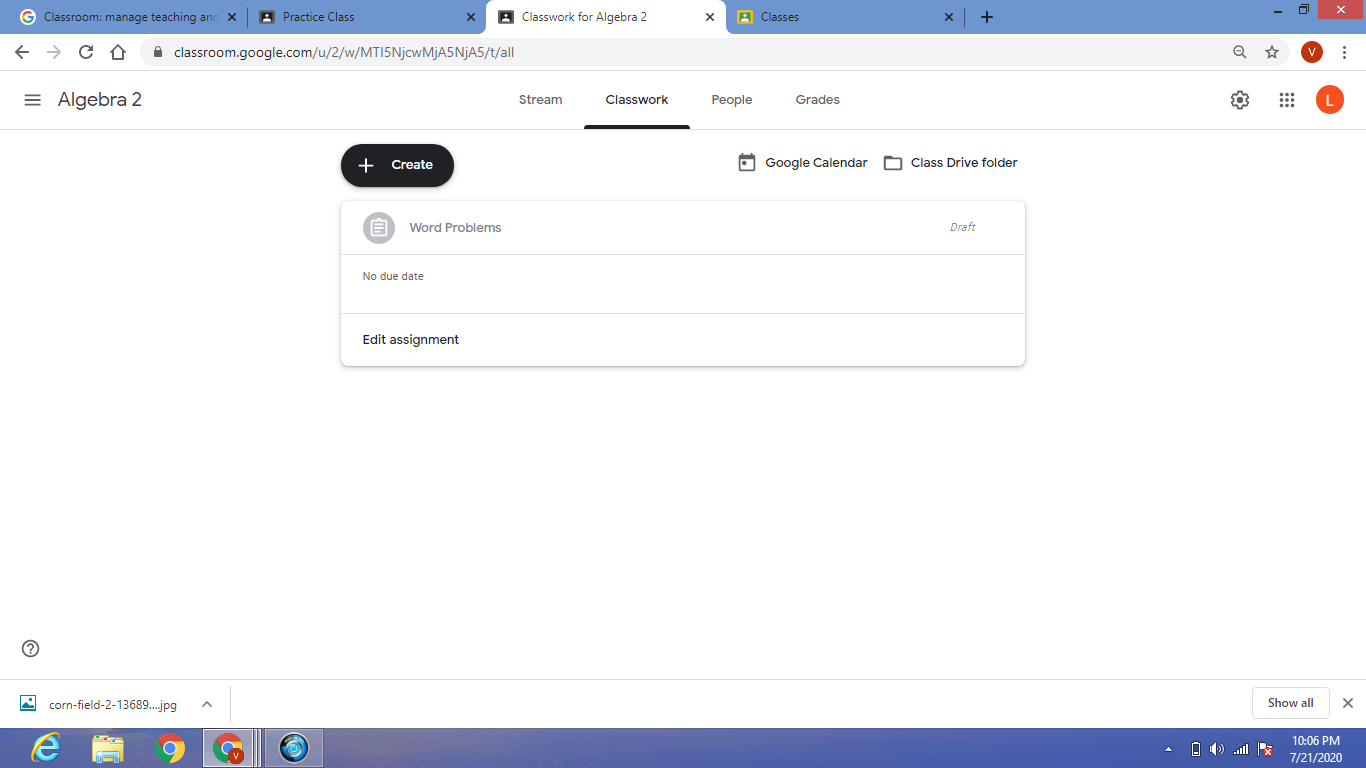
You can even log out and come back later, and it will still be there. Click on “Edit Assignment” and you can go back in and finish creating the assignment at your leisure. 

You also can click next to where it says “Draft” and the ellipsis (three dots) will appear and give an option to delete. If you want to get rid of the draft, click on delete and it will erase it for you.
Previous Article

Designing with Open Educational Resources (OER)

Next Article

How To Build Strong Relationships During The ...

Matthew Lynch

Related articles More from author

  • Early Childhood & K-12 EdTechGoogle ClassroomHigher Education EdTech

    10 Benefits of Google Classroom Integration

    September 4, 2018
    By Matthew Lynch
  • Google Classroom Tips

    9 Ways to Fix “Google Keeps Stopping” Error on Android

    February 20, 2024
    By Matthew Lynch
  • Google Classroom Tips

    Google Classroom Tip #48: Create Dynamic Presentations

    December 18, 2018
    By Matthew Lynch
  • Google Classroom

    Google Classroom: A Free Learning Management System For Online Learning

    March 21, 2023
    By Matthew Lynch
  • Early Childhood & K-12 EdTechGoogle ClassroomHigher Education EdTech

    Interactive Reading for the Google Classroom

    September 25, 2018
    By Matthew Lynch
  • Google Classroom Tips

    Google Outlines New Efforts to Keep Spam Out of Your Inbox

    February 2, 2024
    By Matthew Lynch

Search

Login & Registration

  • Log in
  • Entries feed
  • Comments feed
  • WordPress.org

Newsletter

Signup for The Tech Edvocate Newsletter and have the latest in EdTech news and opinion delivered to your email address!

About Us

Since technology is not going anywhere and does more good than harm, adapting is the best course of action. That is where The Tech Edvocate comes in. We plan to cover the PreK-12 and Higher Education EdTech sectors and provide our readers with the latest news and opinion on the subject. From time to time, I will invite other voices to weigh in on important issues in EdTech. We hope to provide a well-rounded, multi-faceted look at the past, present, the future of EdTech in the US and internationally.

We started this journey back in June 2016, and we plan to continue it for many more years to come. I hope that you will join us in this discussion of the past, present and future of EdTech and lend your own insight to the issues that are discussed.

Newsletter

Signup for The Tech Edvocate Newsletter and have the latest in EdTech news and opinion delivered to your email address!

Contact Us

The Tech Edvocate
910 Goddin Street
Richmond, VA 23231
(601) 630-5238
[email protected]

Copyright © 2026 Matthew Lynch. All rights reserved.