
The Tech Edvocate

Top Menu

  • Advertisement
  • Apps
  • Home Page
  • Home Page Five (No Sidebar)
  • Home Page Four
  • Home Page Three
  • Home Page Two
  • Home Tech2
  • Icons [No Sidebar]
  • Left Sidbear Page
  • Lynch Educational Consulting
  • My Account
  • My Speaking Page
  • Newsletter Sign Up Confirmation
  • Newsletter Unsubscription
  • Our Brands
  • Page Example
  • Privacy Policy
  • Protected Content
  • Register
  • Request a Product Review
  • Shop
  • Shortcodes Examples
  • Signup
  • Start Here
    • Governance
    • Careers
    • Contact Us
  • Terms and Conditions
  • The Edvocate
  • The Tech Edvocate Product Guide
  • Topics
  • Write For Us
  • Advertise

Main Menu

  • Start Here
    • Our Brands
    • Governance
      • Lynch Educational Consulting, LLC.
      • Dr. Lynch’s Personal Website
      • Careers
    • Write For Us
    • The Tech Edvocate Product Guide
    • Contact Us
    • Books
    • Edupedia
    • Post a Job
    • The Edvocate Podcast
    • Terms and Conditions
    • Privacy Policy
  • Topics
    • Assistive Technology
    • Child Development Tech
    • Early Childhood & K-12 EdTech
    • EdTech Futures
    • EdTech News
    • EdTech Policy & Reform
    • EdTech Startups & Businesses
    • Higher Education EdTech
    • Online Learning & eLearning
    • Parent & Family Tech
    • Personalized Learning
    • Product Reviews
  • Advertise
  • Tech Edvocate Awards
  • The Edvocate
  • Pedagogue
  • School Ratings

logo

The Tech Edvocate

  • Start Here
    • Our Brands
    • Governance
      • Lynch Educational Consulting, LLC.
      • Dr. Lynch’s Personal Website
        • My Speaking Page
      • Careers
    • Write For Us
    • The Tech Edvocate Product Guide
    • Contact Us
    • Books
    • Edupedia
    • Post a Job
    • The Edvocate Podcast
    • Terms and Conditions
    • Privacy Policy
  • Topics
    • Assistive Technology
    • Child Development Tech
    • Early Childhood & K-12 EdTech
    • EdTech Futures
    • EdTech News
    • EdTech Policy & Reform
    • EdTech Startups & Businesses
    • Higher Education EdTech
    • Online Learning & eLearning
    • Parent & Family Tech
    • Personalized Learning
    • Product Reviews
  • Advertise
  • Tech Edvocate Awards
  • The Edvocate
  • Pedagogue
  • School Ratings
  • The Silent Revolution: How AI Property Valuation Is Quietly Reshaping Real Estate

  • The Astonishing Truth: Why Your Dream Car Is Now a $52,000 Illusion

  • Toxic Algorithms: Why Your Bank’s AI Could Cost You Everything

  • OpenAI’s GPT-6 Cyber: A Dangerous New AI Threat or Our Ultimate Digital Guardian?

  • This Game-Changing Natural Ozempic Alternative Just Blew Up on Social Media

  • Bónuszösszeg, ingyen pörgetés és befizetési feltétel: üdvözlő és befizetés nélküli kaszinóajánlatok magyar játékosoknak

  • 9 Critical Reasons Why Athexio Might Be The Investment You Need (Or Should Avoid)

  • A Single Breakthrough Could Finally Kill Range Anxiety for Millions of EV Owners

  • Your Money, Their AI: The Secret Agents Invading Bank Accounts

  • US Battery as a Service Market Shifts Toward Fleet-Based Energy

Technology
Home›Technology›5 Best Free Camtasia alternatives for Windows 11

5 Best Free Camtasia alternatives for Windows 11
By Matthew Lynch
March 6, 2024
0
Spread the love

When it comes to screen recording and video editing software on Windows 11, Camtasia is a popular option known for its robust features. However, its cost may not be within everyone’s budget. Fortunately, there are several free alternatives that offer a good range of features suitable for both beginners and advanced users. Here are the top 5 free Camtasia alternatives.

1. OBS Studio

Open Broadcaster Software, or OBS Studio, is a completely free and open-source software for video recording and live streaming. With its high-performance real-time video/audio capturing and mixing capabilities, OBS allows you to create scenes made up of multiple sources including window captures, images, text, browser windows, webcams, capture cards, and more.

2. ShareX

ShareX is an open-source and free program that boasts an impressive set of features focused on screen capture. While it doesn’t offer a built-in video editor like Camtasia, it excels in quick and efficient screen recording, allowing direct uploading to various platforms like YouTube. ShareX also supports numerous methods of capture including full screen, window, monitor, region, freehand, and scrolling.

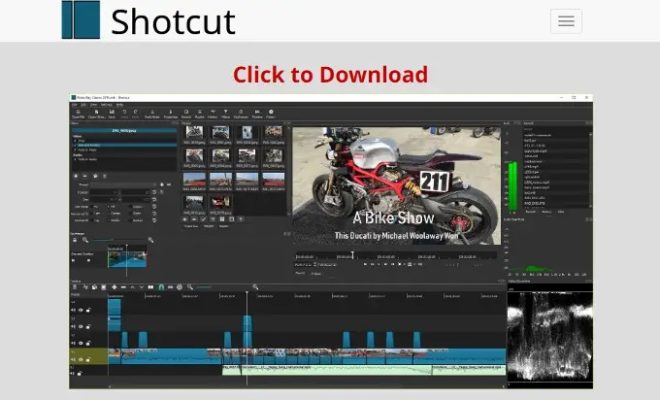
3. Shotcut

Shotcut is another powerful open-source program that offers extensive format support and audio/video editing features. Its interface can be complex at first but offers a comprehensive solution once you get familiar with it. It includes a wide range of video effects and supports 4K HD resolution.

4. DaVinci Resolve

DaVinci Resolve combines professional 8K editing, color correction, visual effects, and audio post-production in one software tool. While the professional version comes at a premium price, DaVinci Resolve 17 offers a remarkable free version that can certainly meet —and in some cases exceed— the expectations of amateur video producers looking for a deep set of high-quality tools.

5. Lightworks

Lightworks has established itself as another great tool for video editing with its simple yet powerful features accessible through an intuitive user interface. It’s suitable for quick video edits as well as more complex projects for which you might have considered Camtasia. The free version comes with a comprehensive set of tools that would satisfy the needs of most content creators.

These alternatives give you plenty of options to choose from based on your specific needs whether they be screen recording or video editing on Windows 11 without breaking the bank.


Previous Article

Shop the Best Pioneer Woman Products from ...

Next Article

The world’s best hotel was just announced ...

Matthew Lynch

Related articles More from author

  • Technology

    Kelly Monaco to Exit ‘General Hospital’ After 21 Years

    August 27, 2024
    By Matthew Lynch
  • Technology

    LinkedIn’s new AI assistant can help recruiters match with top candidates

    October 29, 2024
    By Matthew Lynch
  • Technology

    In the Vice-Presidential Debate, Tim Walz Had Better Policy Points, But His Addled Delivery Rolled Right Off J.D. Vance’s Reaganesque ...

    October 2, 2024
    By Matthew Lynch
  • Technology

    Netflix’s ‘The Shadow Strays’ teases a young assassin trying to rescue a child

    August 30, 2024
    By Matthew Lynch
  • Technology

    Highlights From the Toasts at the TIME100 Next Gala 2024

    October 10, 2024
    By Matthew Lynch
  • Technology

    6 Ways to Fix AirTags Not Showing Up in Find My

    February 19, 2024
    By Matthew Lynch

Search

Login & Registration

  • Log in
  • Entries feed
  • Comments feed
  • WordPress.org

Newsletter

Signup for The Tech Edvocate Newsletter and have the latest in EdTech news and opinion delivered to your email address!

About Us

Since technology is not going anywhere and does more good than harm, adapting is the best course of action. That is where The Tech Edvocate comes in. We plan to cover the PreK-12 and Higher Education EdTech sectors and provide our readers with the latest news and opinion on the subject. From time to time, I will invite other voices to weigh in on important issues in EdTech. We hope to provide a well-rounded, multi-faceted look at the past, present, the future of EdTech in the US and internationally.

We started this journey back in June 2016, and we plan to continue it for many more years to come. I hope that you will join us in this discussion of the past, present and future of EdTech and lend your own insight to the issues that are discussed.

Newsletter

Signup for The Tech Edvocate Newsletter and have the latest in EdTech news and opinion delivered to your email address!

Contact Us

The Tech Edvocate
910 Goddin Street
Richmond, VA 23231
(601) 630-5238
[email protected]

Copyright © 2026 Matthew Lynch. All rights reserved.