
The Tech Edvocate

Top Menu

  • Advertisement
  • Apps
  • Home Page
  • Home Page Five (No Sidebar)
  • Home Page Four
  • Home Page Three
  • Home Page Two
  • Home Tech2
  • Icons [No Sidebar]
  • Left Sidbear Page
  • Lynch Educational Consulting
  • My Account
  • My Speaking Page
  • Newsletter Sign Up Confirmation
  • Newsletter Unsubscription
  • Our Brands
  • Page Example
  • Privacy Policy
  • Protected Content
  • Register
  • Request a Product Review
  • Shop
  • Shortcodes Examples
  • Signup
  • Start Here
    • Governance
    • Careers
    • Contact Us
  • Terms and Conditions
  • The Edvocate
  • The Tech Edvocate Product Guide
  • Topics
  • Write For Us
  • Advertise

Main Menu

  • Start Here
    • Our Brands
    • Governance
      • Lynch Educational Consulting, LLC.
      • Dr. Lynch’s Personal Website
      • Careers
    • Write For Us
    • The Tech Edvocate Product Guide
    • Contact Us
    • Books
    • Edupedia
    • Post a Job
    • The Edvocate Podcast
    • Terms and Conditions
    • Privacy Policy
  • Topics
    • Assistive Technology
    • Child Development Tech
    • Early Childhood & K-12 EdTech
    • EdTech Futures
    • EdTech News
    • EdTech Policy & Reform
    • EdTech Startups & Businesses
    • Higher Education EdTech
    • Online Learning & eLearning
    • Parent & Family Tech
    • Personalized Learning
    • Product Reviews
  • Advertise
  • Tech Edvocate Awards
  • The Edvocate
  • Pedagogue
  • School Ratings

logo

The Tech Edvocate

  • Start Here
    • Our Brands
    • Governance
      • Lynch Educational Consulting, LLC.
      • Dr. Lynch’s Personal Website
        • My Speaking Page
      • Careers
    • Write For Us
    • The Tech Edvocate Product Guide
    • Contact Us
    • Books
    • Edupedia
    • Post a Job
    • The Edvocate Podcast
    • Terms and Conditions
    • Privacy Policy
  • Topics
    • Assistive Technology
    • Child Development Tech
    • Early Childhood & K-12 EdTech
    • EdTech Futures
    • EdTech News
    • EdTech Policy & Reform
    • EdTech Startups & Businesses
    • Higher Education EdTech
    • Online Learning & eLearning
    • Parent & Family Tech
    • Personalized Learning
    • Product Reviews
  • Advertise
  • Tech Edvocate Awards
  • The Edvocate
  • Pedagogue
  • School Ratings
  • Can Kayak book directly

  • How to list hotel on Booking.com

  • How to optimize Airbnb listing

  • How to get more bookings on Booking.com

  • How accurate is Kayak price forecast

  • How does Hopper app work

  • Travelocity vs Hotels.com comparison

  • Is Kayak a booking site or search engine

  • Can Google Flights find error fares

  • How to bundle flights and hotels Travelocity

Tech Advice
Home›Tech Advice›How to Secure Your iPhone, iPad, or Mac With Lockdown Mode

How to Secure Your iPhone, iPad, or Mac With Lockdown Mode
By Matthew Lynch
July 23, 2023
0
Spread the love

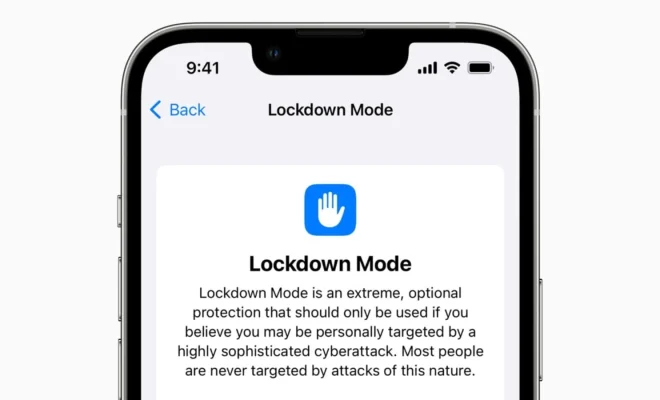
In today’s digital age, protecting our devices and the sensitive information stored within them is of utmost importance. Apple products like the iPhone, iPad, and Mac are known for their strong built-in security features; however, to ensure maximum protection, users can enable what is known as “Lockdown Mode” on their devices. This article will guide you through the steps on how to activate and use lockdown mode for your iPhone, iPad, or Mac.

What is Lockdown Mode?

Lockdown mode is a security feature that temporarily disables access to your device’s data until a password or passcode is entered. When activated, the feature prevents unauthorized access to sensitive personal data during instances such as theft or loss of your device. Any attempts made via USB connections to bypass the password lock will be futile under lockdown mode.

Securing your iPhone and iPad with Lockdown Mode

1. Activate Face ID or Touch ID: Make sure you have enabled Face ID or Touch ID on your device by going to “Settings” > “Face ID & Passcode” (or “Touch ID & Passcode”) > a passcode will be required to confirm any changes made.

2. Enable ‘USB Accessories’ toggle: Head over to “Settings” > “Face ID & Passcode” (or “Touch ID & Passcode”), scroll down to the option labeled ‘USB Accessories,’ then make sure it is turned OFF. This prevents USB devices from connecting when your iPhone or iPad has been locked for more than an hour.

3. Implement short auto-lock durations: Go to “Settings” > “Display & Brightness” > “Auto-Lock” and set the duration as short as possible (30 seconds or 1 minute) so that if you accidentally leave your device unattended, it locks quickly.

Securing your Mac with Lockdown Mode

1. Set a strong password: Ensure that you have created a solid password for your Mac by going to “System Preferences” > “Users & Groups” > select your user account, and click on “Change Password.”

2. Enable ‘Require password’ option: Head to “System Preferences” > “Security & Privacy” > click the “General” tab and ensure that the “Require password” option is selected with immediate action required after sleep or screen saver begins. This ensures that even during short periods of inactivity, your device will be locked and require a password to unlock.

3. Activate FileVault: Enable FileVault under the “FileVault” tab in “System Preferences” > “Security & Privacy” by clicking on the “Turn On FileVault” button. This feature ensures encryption of your Mac’s entire drive, making it difficult for unauthorized users to access your data.

4. Disable automatic login: Disable automatic login at startup by going to “System Preferences” > “Users & Groups” > click the lock icon and enter your administrator password to make changes > open “Login Options” and choose “Off” for automatic login.

5. Activate Firewall: Go to “System Preferences” > “Security & Privacy” > click the “Firewall” tab and ensure that the Firewall is turned on. It is also recommended to enable stealth mode by clicking “Firewall Options…” and checking the box next to “Enable stealth mode.”

Conclusion

By following the steps outlined above, users can effectively secure their iPhone, iPad, or Mac with lockdown mode. Remember, maintaining a strong password, enabling security features, and regularly updating software components are integral in safeguarding your digital life from potential threats and unwanted access incidents.

Previous Article

How to Use Apple’s Live Text Feature ...

Next Article

How to Share Files and Folders in ...

Matthew Lynch

Related articles More from author

  • Tech Advice

    2023 Chevy Corvette E-Ray Radically Alters America’s Sports Car

    August 11, 2023
    By Matthew Lynch
  • Tech Advice

    2024 Chevrolet Camaro ZL1 2dr Coupe : Trim Details, Reviews, Prices, Specs, and Incentives

    August 20, 2023
    By Matthew Lynch
  • Tech Advice

    Mario Kart 8’s Booster Course Wave 2 DLC Available Now

    July 17, 2023
    By Matthew Lynch
  • Tech Advice

    Resident Evil Village’s Lady Dimitrescu explained: The terrifying tall vampire lady’s story

    July 17, 2023
    By Matthew Lynch
  • Tech Advice

    Great Deals on a new 2024 Acura Integra A-Spec Tech Package 4dr Hatchback at The Autoblog Smart Buy Program

    August 21, 2023
    By Matthew Lynch
  • Tech Advice

    Future Electric Cars: All Upcoming EVs 2024-2030

    September 12, 2023
    By Matthew Lynch

Search

Login & Registration

  • Log in
  • Entries feed
  • Comments feed
  • WordPress.org

Newsletter

Signup for The Tech Edvocate Newsletter and have the latest in EdTech news and opinion delivered to your email address!

About Us

Since technology is not going anywhere and does more good than harm, adapting is the best course of action. That is where The Tech Edvocate comes in. We plan to cover the PreK-12 and Higher Education EdTech sectors and provide our readers with the latest news and opinion on the subject. From time to time, I will invite other voices to weigh in on important issues in EdTech. We hope to provide a well-rounded, multi-faceted look at the past, present, the future of EdTech in the US and internationally.

We started this journey back in June 2016, and we plan to continue it for many more years to come. I hope that you will join us in this discussion of the past, present and future of EdTech and lend your own insight to the issues that are discussed.

Newsletter

Signup for The Tech Edvocate Newsletter and have the latest in EdTech news and opinion delivered to your email address!

Contact Us

The Tech Edvocate
910 Goddin Street
Richmond, VA 23231
(601) 630-5238
[email protected]

Copyright © 2026 Matthew Lynch. All rights reserved.
