The Tech Edvocate

Top Menu

  • Advertisement
  • Apps
  • Home Page
  • Home Page Five (No Sidebar)
  • Home Page Four
  • Home Page Three
  • Home Page Two
  • Home Tech2
  • Icons [No Sidebar]
  • Left Sidbear Page
  • Lynch Educational Consulting
  • My Account
  • My Speaking Page
  • Newsletter Sign Up Confirmation
  • Newsletter Unsubscription
  • Our Brands
  • Page Example
  • Privacy Policy
  • Protected Content
  • Register
  • Request a Product Review
  • Shop
  • Shortcodes Examples
  • Signup
  • Start Here
    • Governance
    • Careers
    • Contact Us
  • Terms and Conditions
  • The Edvocate
  • The Tech Edvocate Product Guide
  • Topics
  • Write For Us
  • Advertise

Main Menu

  • Start Here
    • Our Brands
    • Governance
      • Lynch Educational Consulting, LLC.
      • Dr. Lynch’s Personal Website
      • Careers
    • Write For Us
    • The Tech Edvocate Product Guide
    • Contact Us
    • Books
    • Edupedia
    • Post a Job
    • The Edvocate Podcast
    • Terms and Conditions
    • Privacy Policy
  • Topics
    • Assistive Technology
    • Child Development Tech
    • Early Childhood & K-12 EdTech
    • EdTech Futures
    • EdTech News
    • EdTech Policy & Reform
    • EdTech Startups & Businesses
    • Higher Education EdTech
    • Online Learning & eLearning
    • Parent & Family Tech
    • Personalized Learning
    • Product Reviews
  • Advertise
  • Tech Edvocate Awards
  • The Edvocate
  • Pedagogue
  • School Ratings

logo

The Tech Edvocate

  • Start Here
    • Our Brands
    • Governance
      • Lynch Educational Consulting, LLC.
      • Dr. Lynch’s Personal Website
        • My Speaking Page
      • Careers
    • Write For Us
    • The Tech Edvocate Product Guide
    • Contact Us
    • Books
    • Edupedia
    • Post a Job
    • The Edvocate Podcast
    • Terms and Conditions
    • Privacy Policy
  • Topics
    • Assistive Technology
    • Child Development Tech
    • Early Childhood & K-12 EdTech
    • EdTech Futures
    • EdTech News
    • EdTech Policy & Reform
    • EdTech Startups & Businesses
    • Higher Education EdTech
    • Online Learning & eLearning
    • Parent & Family Tech
    • Personalized Learning
    • Product Reviews
  • Advertise
  • Tech Edvocate Awards
  • The Edvocate
  • Pedagogue
  • School Ratings
  • The Chew That Changed My Training: Why Nitraflex Pre-Workout Chews Deliver Unbelievable Pumps

  • The Brutal Truth: Why Your AI Skills Training Is Failing (And How to Fix It)

  • 8 Essential AI Upskilling Programs Your Business Needs to Thrive Now

  • One Critical Mistake Companies Make With AI Skills Training

  • The AI Career Showdown: Which Path Pays More And Fits You Best?

  • The Shocking Truth About the Highest Paying AI Jobs in 2026

  • The Staggering Truth About 5 AI Job Roles That Will Redefine Your Career by 2026

  • Crypto Crackdown: Is the FCA’s Iron Fist Crushing Innovation, or Just Protecting You?

  • 7 Critical Steps to Survive the Crypto Crackdown: How to Navigate FCA Regulations

  • This One Thing Is Quietly Reshaping Illegal Crypto Trading — And Regulators Are Panicking

Tech Advice
Home›Tech Advice›Avoid the Trash Heap: Creative Uses for an Old Computer

Avoid the Trash Heap: Creative Uses for an Old Computer
By Matthew Lynch
July 24, 2023
0
Spread the love

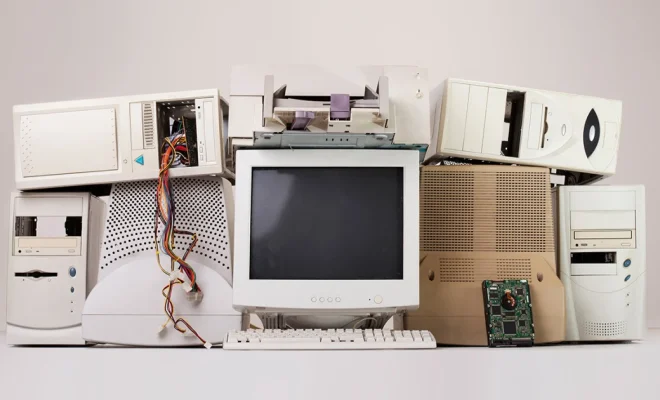
In today’s world of rapidly evolving technology, it’s only a matter of time before a once-new and shiny computer starts showing its age. However, this doesn’t mean that an old computer should be tossed aside. In fact, there are many creative uses for an old computer that can breathe new life into it and save it from the trash heap. In this article, we’ll explore some imaginative ways to repurpose your old computer and make the most of its remaining potential.

1. Set Up a Home Server

One of the most practical uses for an old computer is to set it up as a home server. This can act as a central hub for all your digital files – from documents to photos and videos – making them easily accessible from other devices in your house. Additionally, a home server can be used to host a personal website or even manage your smart home devices.

2. Build a Retro Gaming Machine

Feed your nostalgia by installing an emulator on your old computer and turning it into a retro gaming console. There are many emulators available that allow you to play classic games from various consoles like Atari, Nintendo, and Sega. This is not only a fun way to revisit your childhood memories but also a unique way to create entertainment for family gatherings or parties.

3. Create a Digital Art Station

If you or someone in your family has artistic talents, consider converting the old computer into a dedicated digital art station. With low-cost drawing tablets available on the market, you can connect one of those tablets to your computer and install graphic design software such as Photoshop or GIMP, creating an affordable space for creative expression.

4. Designate It as Your Backup Machine

Data loss is always a concern, especially when it comes to important files such as work documents and precious memories captured in photographs. To avoid potentially losing these valuable files, use your old computer as a backup machine. Install backup software or simply use it as a storage device to archive your crucial files, making sure everything is safe even in the event of a primary computer failure.

5. Donate Your Old Computer

If you can’t find a purpose for your old computer but it’s still in working condition, consider donating it to a charity, school, or non-profit organization. Many institutions often need computers but are limited by tight budgets. By donating your old computer, you not only help those in need but also do your part in reducing electronic waste.

6. Create a Media Center

In an age of streaming services, an old computer can be transformed into a media center by connecting it to your TV and installing media management software like Kodi or Plex. With this setup, you can organize and stream your personal media library or access online content such as YouTube and Netflix through your old computer.

Conclusion

Before you decide to discard an aging computer, remember that it still has the potential for many creative uses. From home servers to art stations and retro gaming machines, repurposing an old computer can be both eco-friendly and cost-effective while providing entertainment or utility for years to come.

Previous Article

Too Many Autocorrect Fails? Tweak These Keyboard ...

Next Article

Switch It Up: How to Stream, Mirror ...

Matthew Lynch

Related articles More from author

  • Tech Advice

    FuboTV Review: Solid for Soccer Fans But Channel Selection Falls Short

    July 16, 2023
    By Matthew Lynch
  • Tech Advice

    What to Do If Your Google TV Remote Is Not Working

    February 19, 2024
    By Matthew Lynch
  • Tech Advice

    Pokemon Go Latios and Latias Guide: Best Counters, Weaknesses and Moves

    July 17, 2023
    By Matthew Lynch
  • Tech Advice

    Samsung Galaxy Watch 6 vs. 6 Classic vs. 5 Pro: What’s Different About Each Watch

    October 19, 2023
    By Matthew Lynch
  • Tech Advice

    The Best VPNs for Remaining Anonymous Online

    October 19, 2023
    By Matthew Lynch
  • Tech Advice

    How To Send Money Overseas From Australia

    August 9, 2023
    By Matthew Lynch

Search

Login & Registration

  • Log in
  • Entries feed
  • Comments feed
  • WordPress.org

Newsletter

Signup for The Tech Edvocate Newsletter and have the latest in EdTech news and opinion delivered to your email address!

About Us

Since technology is not going anywhere and does more good than harm, adapting is the best course of action. That is where The Tech Edvocate comes in. We plan to cover the PreK-12 and Higher Education EdTech sectors and provide our readers with the latest news and opinion on the subject. From time to time, I will invite other voices to weigh in on important issues in EdTech. We hope to provide a well-rounded, multi-faceted look at the past, present, the future of EdTech in the US and internationally.

We started this journey back in June 2016, and we plan to continue it for many more years to come. I hope that you will join us in this discussion of the past, present and future of EdTech and lend your own insight to the issues that are discussed.

Newsletter

Signup for The Tech Edvocate Newsletter and have the latest in EdTech news and opinion delivered to your email address!

Contact Us

The Tech Edvocate
910 Goddin Street
Richmond, VA 23231
(601) 630-5238
[email protected]

Copyright © 2026 Matthew Lynch. All rights reserved.