The Tech Edvocate

Top Menu

  • Advertisement
  • Apps
  • Home Page
  • Home Page Five (No Sidebar)
  • Home Page Four
  • Home Page Three
  • Home Page Two
  • Home Tech2
  • Icons [No Sidebar]
  • Left Sidbear Page
  • Lynch Educational Consulting
  • My Account
  • My Speaking Page
  • Newsletter Sign Up Confirmation
  • Newsletter Unsubscription
  • Our Brands
  • Page Example
  • Privacy Policy
  • Protected Content
  • Register
  • Request a Product Review
  • Shop
  • Shortcodes Examples
  • Signup
  • Start Here
    • Governance
    • Careers
    • Contact Us
  • Terms and Conditions
  • The Edvocate
  • The Tech Edvocate Product Guide
  • Topics
  • Write For Us
  • Advertise

Main Menu

  • Start Here
    • Our Brands
    • Governance
      • Lynch Educational Consulting, LLC.
      • Dr. Lynch’s Personal Website
      • Careers
    • Write For Us
    • The Tech Edvocate Product Guide
    • Contact Us
    • Books
    • Edupedia
    • Post a Job
    • The Edvocate Podcast
    • Terms and Conditions
    • Privacy Policy
  • Topics
    • Assistive Technology
    • Child Development Tech
    • Early Childhood & K-12 EdTech
    • EdTech Futures
    • EdTech News
    • EdTech Policy & Reform
    • EdTech Startups & Businesses
    • Higher Education EdTech
    • Online Learning & eLearning
    • Parent & Family Tech
    • Personalized Learning
    • Product Reviews
  • Advertise
  • Tech Edvocate Awards
  • The Edvocate
  • Pedagogue
  • School Ratings

logo

The Tech Edvocate

  • Start Here
    • Our Brands
    • Governance
      • Lynch Educational Consulting, LLC.
      • Dr. Lynch’s Personal Website
        • My Speaking Page
      • Careers
    • Write For Us
    • The Tech Edvocate Product Guide
    • Contact Us
    • Books
    • Edupedia
    • Post a Job
    • The Edvocate Podcast
    • Terms and Conditions
    • Privacy Policy
  • Topics
    • Assistive Technology
    • Child Development Tech
    • Early Childhood & K-12 EdTech
    • EdTech Futures
    • EdTech News
    • EdTech Policy & Reform
    • EdTech Startups & Businesses
    • Higher Education EdTech
    • Online Learning & eLearning
    • Parent & Family Tech
    • Personalized Learning
    • Product Reviews
  • Advertise
  • Tech Edvocate Awards
  • The Edvocate
  • Pedagogue
  • School Ratings
  • Baffling: CrowdStrike’s $500 Million AI Bet Reshapes Cybersecurity

  • This Crucial Autonomous Driving Rule Could Cost You Everything

  • Baffling: Microsoft AI CEO Demands Halt to Conscious AI Development

  • O seară în ritmul tău: atmosfera divertismentului de cazinou pe internet

  • Outrageous: AppLovin Hit With Lawsuit Over AI Claims — What Investors Need to Know

  • 9 Critical Ways AI Investment Fraud Is Quietly Draining Your Bank Account

  • Is the AI Bubble Bursting? OpenAI’s Funding Woes Revealed

  • Why Millions Are Skipping College for These 7 Online Courses Right Now

  • The Astonishing Truth About PS5 Pro vs Xbox Ally X Financing

  • The Urgent Truth About 2026 Privacy Laws: Why Your Business Could Face Catastrophic Fines

Tech Advice
Home›Tech Advice›3 New Google Maps Features You’ll Want to Try Out

3 New Google Maps Features You’ll Want to Try Out
By Matthew Lynch
July 15, 2023
0
Spread the love

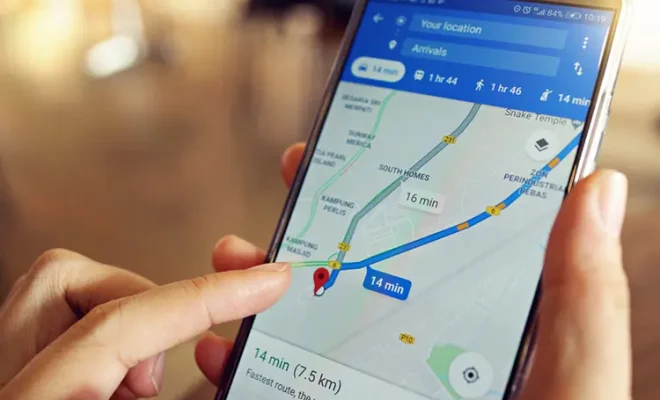
In recent years, Google Maps has become an indispensable tool for navigating and exploring our ever-changing world. It has made getting from point A to point B simpler and more efficient than ever. The tech giant continually improves its popular app with new features, making it even more indispensable. In this article, we’ll dive into three of the most recent Google Maps features that you should definitely try out.

1. Indoor Live View

Indoor Live View is a game-changing feature that takes augmented reality (AR) navigation to the next level. Previously available only for outdoor navigation, Live View now offers indoor AR navigation as well. This feature allows users to find their way inside large buildings or complexes like airports, shopping malls, and transit stations.

To access Indoor Live View, simply open Google Maps on your smartphone, tap on the Live View button near the bottom of the screen, and follow the on-screen directions. Aside from guidance on which way to walk, it also shows helpful pins pointing out important places like restrooms or exits within the building.

2. Eco-friendly Routing

With climate change increasingly becoming a global concern, Google Maps has introduced eco-friendly routing as part of its commitment to building a more sustainable future. This feature prioritizes routes that produce the least carbon emissions based on factors such as traffic data and topography.

To access Eco-friendly Routing, simply enter your destination in Google Maps and tap on “Directions.” The app will display suggested routes prioritizing those that are more environmentally friendly. This not only helps reduce your carbon footprint but can also save you fuel costs in the long run!

3. Curbside Grocery Pickup

During these unprecedented times brought about by the COVID-19 pandemic, curbside pickup options have become essential for many users who prefer minimal contact while shopping for groceries. As a response to this demand, Google Maps has introduced a feature that shows stores offering curbside pickup in your area.

To find stores providing this service, simply open Google Maps, type “Curbside Grocery Pickup near me” in the search bar, and tap the Search button. A list of nearby stores offering curbside pickup will appear on your screen, allowing you to easily plan your shopping trip and minimize contact with others.

Final Thoughts

As we navigate an ever-changing world, staying up-to-date with the latest features in our most-used apps is essential for making our lives more convenient. With these three new Google Maps features, indoor navigation, eco-friendly trips, and safe grocery shopping are now within reach. Don’t wait any longer—update your Google Maps app today and start enjoying these fantastic features!


Previous Article

Easy Ways to Get Rid of Annoying ...

Next Article

Diablo 4: Launch Day, PC Specs and ...

Matthew Lynch

Related articles More from author

  • Tech Advice

    How to Sell NFTs: A Comprehensive Guide

    September 6, 2023
    By Matthew Lynch
  • Tech Advice

    A closer look at Honda’s fabled Type R performance models

    July 12, 2023
    By Matthew Lynch
  • Tech Advice

    Best Desktop Computers for 2023: Apple, Dell, HP and More

    July 13, 2023
    By Matthew Lynch
  • Tech Advice

    Fitbit Ionic Review: Buy The Versa Instead

    July 12, 2023
    By Matthew Lynch
  • Tech Advice

    What Is Car Buyers Remorse?

    August 22, 2023
    By Matthew Lynch
  • Tech Advice

    2024 Dodge Durango SXT 4dr 4×2 SUV: Trim Details, Reviews, Prices, Specs, and Incentives

    August 21, 2023
    By Matthew Lynch

Search

Login & Registration

  • Log in
  • Entries feed
  • Comments feed
  • WordPress.org

Newsletter

Signup for The Tech Edvocate Newsletter and have the latest in EdTech news and opinion delivered to your email address!

About Us

Since technology is not going anywhere and does more good than harm, adapting is the best course of action. That is where The Tech Edvocate comes in. We plan to cover the PreK-12 and Higher Education EdTech sectors and provide our readers with the latest news and opinion on the subject. From time to time, I will invite other voices to weigh in on important issues in EdTech. We hope to provide a well-rounded, multi-faceted look at the past, present, the future of EdTech in the US and internationally.

We started this journey back in June 2016, and we plan to continue it for many more years to come. I hope that you will join us in this discussion of the past, present and future of EdTech and lend your own insight to the issues that are discussed.

Newsletter

Signup for The Tech Edvocate Newsletter and have the latest in EdTech news and opinion delivered to your email address!

Contact Us

The Tech Edvocate
910 Goddin Street
Richmond, VA 23231
(601) 630-5238
[email protected]

Copyright © 2026 Matthew Lynch. All rights reserved.