The Tech Edvocate

Top Menu

  • Advertisement
  • Apps
  • Home Page
  • Home Page Five (No Sidebar)
  • Home Page Four
  • Home Page Three
  • Home Page Two
  • Home Tech2
  • Icons [No Sidebar]
  • Left Sidbear Page
  • Lynch Educational Consulting
  • My Account
  • My Speaking Page
  • Newsletter Sign Up Confirmation
  • Newsletter Unsubscription
  • Our Brands
  • Page Example
  • Privacy Policy
  • Protected Content
  • Register
  • Request a Product Review
  • Shop
  • Shortcodes Examples
  • Signup
  • Start Here
    • Governance
    • Careers
    • Contact Us
  • Terms and Conditions
  • The Edvocate
  • The Tech Edvocate Product Guide
  • Topics
  • Write For Us
  • Advertise

Main Menu

  • Start Here
    • Our Brands
    • Governance
      • Lynch Educational Consulting, LLC.
      • Dr. Lynch’s Personal Website
      • Careers
    • Write For Us
    • The Tech Edvocate Product Guide
    • Contact Us
    • Books
    • Edupedia
    • Post a Job
    • The Edvocate Podcast
    • Terms and Conditions
    • Privacy Policy
  • Topics
    • Assistive Technology
    • Child Development Tech
    • Early Childhood & K-12 EdTech
    • EdTech Futures
    • EdTech News
    • EdTech Policy & Reform
    • EdTech Startups & Businesses
    • Higher Education EdTech
    • Online Learning & eLearning
    • Parent & Family Tech
    • Personalized Learning
    • Product Reviews
  • Advertise
  • Tech Edvocate Awards
  • The Edvocate
  • Pedagogue
  • School Ratings

logo

The Tech Edvocate

  • Start Here
    • Our Brands
    • Governance
      • Lynch Educational Consulting, LLC.
      • Dr. Lynch’s Personal Website
        • My Speaking Page
      • Careers
    • Write For Us
    • The Tech Edvocate Product Guide
    • Contact Us
    • Books
    • Edupedia
    • Post a Job
    • The Edvocate Podcast
    • Terms and Conditions
    • Privacy Policy
  • Topics
    • Assistive Technology
    • Child Development Tech
    • Early Childhood & K-12 EdTech
    • EdTech Futures
    • EdTech News
    • EdTech Policy & Reform
    • EdTech Startups & Businesses
    • Higher Education EdTech
    • Online Learning & eLearning
    • Parent & Family Tech
    • Personalized Learning
    • Product Reviews
  • Advertise
  • Tech Edvocate Awards
  • The Edvocate
  • Pedagogue
  • School Ratings
  • The AI Job Apocalypse: Are Companies Hiding The Real Reason For Mass Layoffs?

  • One Crucial Factor Could Decimate Your US Auto Insurance Rates in 2026

  • Unbelievable: Meta Hit With $25 Billion Fine — Is Your Health Data Next?

  • 10 Crucial AI Literacy Courses Every Parent Needs Now

  • The Unseen Force Quietly Reshaping Rural Life: 7 Satellite Internet Providers Battling for Supremacy

  • Best Buy’s Gamers Hub: The Unbelievable Truth About Its “Rewards” And Discounts

  • 8 Crucial Reasons Why MAI-DxO Just Obliterated Doctors in a Head-to-Head Diagnosis Battle

  • The Brutal Truth About Student Loan Refinancing for New Grads in 2024

  • The Brutal Truth: AI Just Blew Up PHP Security – Here’s How to Survive ‘Black October’

  • Sodium-ion storage maker Peak Energy raises $108 million in GM-led round – PV Magazine

Tech Advice
Home›Tech Advice›Games you can play on your MacBook Pro’s Touch Bar

Games you can play on your MacBook Pro’s Touch Bar
By Matthew Lynch
July 14, 2023
0
Spread the love

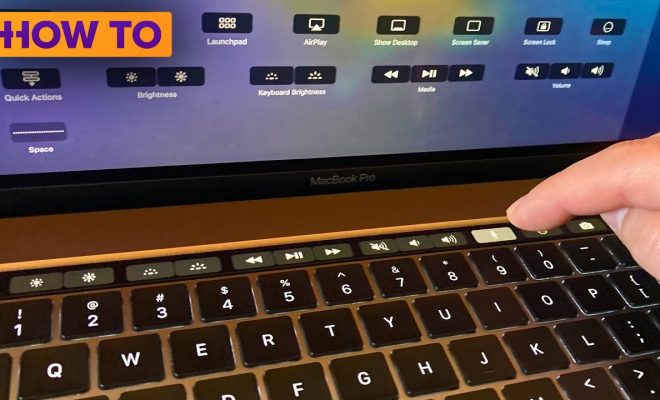
The MacBook Pro’s Touch Bar is a unique feature that enhances productivity and creativity for users. But did you know that you can also play games on it? Although the Touch Bar isn’t meant to replace your gaming console, it adds a fun dimension to your laptop and offers a quick break from work. In this article, we’ll explore some of the coolest games you can play on your MacBook Pro’s Touch Bar. As a bonus, here is how you can Play Free Pyramid Solitaire Online.

1. Pac-Bar

Pac-Bar is a delightful adaptation of the classic arcade game, Pac-Man, designed specifically for the Touch Bar. The gameplay remains the same – you control Pac-Man as he eats pellets and avoids ghosts along a narrow path. It may feel a bit cramped compared to the original version, but it’s perfect for the limited screen real estate on the Touch Bar.

2. PongTouchBar

Evoking nostalgia for all those Atari gamers out there, PongTouchBar is another fantastic classic game adapted for the MacBook Pro Touch Bar. Control your paddle using simple gestures, and hit that bouncing ball back and forth against an AI opponent. It’s another game that suits perfectly with the Touch Bar’s landscape orientation.

3. Dino: The TouchBar Game

Inspired by Google Chrome’s iconic offline dinosaur game, Dino: The TouchBar Game brings hours of endless fun as you control your dino through jumps and ducks while avoiding obstacles like cacti and birds. The game comes in both color and monochrome variants to match your preferences.

4. Lemmings

A blast from the past, Lemmings is reimagined on the MacBook Pro’s Touch Bar as a simpler yet addictive version of its original counterpart. You’re still guiding little lemmings through levels with various skills, but with scaled-down graphics to fit perfectly in the slim layout.

5. JumpString

An original game specifically designed for the Touch Bar, JumpString is a fast-paced challenge where you control a bouncing dot and avoid obstacles. The gameplay requires quick reflexes and good timing, making it enjoyable for casual gaming.

6. Snake

Take a trip down memory lane with the classic Snake game on your Touch Bar. It’s easy to play and addictive; just use your arrow keys to control the snake as it collects food without hitting any walls or itself. Get ready to give your attention to this game while the Touch Bar becomes engulfed in nostalgia.

7. TouchBar Piano

Not so much a game but still a fun activity, TouchBar Piano translates the traditional keyboard instrument to the Touch Bar. Play melodies, chords, or even try writing your own music using the multi-touch enabled piano keys.

These games may not bring mind-blowing graphics or complex gameplay; however, they do offer a convenient way to have fun with your MacBook Pro’s Touch Bar. Remember, you can always take a break from work and enjoy these quirky games as they don’t require anything other than your laptop and innovative Touch Bar!

Previous Article

MacOS Monterey: Is your computer compatible with ...

Next Article

MacBook Factory-Resetting Tips and Tricks You Need ...

Matthew Lynch

Related articles More from author

  • Tech Advice

    Amazon Halo View review: $80 is a great price, but you get what you pay for

    July 17, 2023
    By Matthew Lynch
  • Tech Advice

    Keyboard Shortcuts for Android Phones: A Comprehensive Guide

    July 4, 2023
    By Matthew Lynch
  • Tech Advice

    Best Essential Oil Diffusers for 2023

    July 5, 2023
    By Matthew Lynch
  • Tech Advice

    Compare 15-Year Mortgage Rates for 2023

    July 11, 2023
    By Matthew Lynch
  • Tech Advice

    What Is Driving Less Than 50 Miles a Day Insurance?

    August 22, 2023
    By Matthew Lynch
  • Tech Advice

    2024 Ford Expedition Max XLT 4dr 4×2 SUV: Trim Details, Reviews, Prices, Specs, and Incentives

    August 21, 2023
    By Matthew Lynch

Search

Login & Registration

  • Log in
  • Entries feed
  • Comments feed
  • WordPress.org

Newsletter

Signup for The Tech Edvocate Newsletter and have the latest in EdTech news and opinion delivered to your email address!

About Us

Since technology is not going anywhere and does more good than harm, adapting is the best course of action. That is where The Tech Edvocate comes in. We plan to cover the PreK-12 and Higher Education EdTech sectors and provide our readers with the latest news and opinion on the subject. From time to time, I will invite other voices to weigh in on important issues in EdTech. We hope to provide a well-rounded, multi-faceted look at the past, present, the future of EdTech in the US and internationally.

We started this journey back in June 2016, and we plan to continue it for many more years to come. I hope that you will join us in this discussion of the past, present and future of EdTech and lend your own insight to the issues that are discussed.

Newsletter

Signup for The Tech Edvocate Newsletter and have the latest in EdTech news and opinion delivered to your email address!

Contact Us

The Tech Edvocate
910 Goddin Street
Richmond, VA 23231
(601) 630-5238
[email protected]

Copyright © 2026 Matthew Lynch. All rights reserved.