The Tech Edvocate

Top Menu

  • Advertisement
  • Apps
  • Home Page
  • Home Page Five (No Sidebar)
  • Home Page Four
  • Home Page Three
  • Home Page Two
  • Home Tech2
  • Icons [No Sidebar]
  • Left Sidbear Page
  • Lynch Educational Consulting
  • My Account
  • My Speaking Page
  • Newsletter Sign Up Confirmation
  • Newsletter Unsubscription
  • Our Brands
  • Page Example
  • Privacy Policy
  • Protected Content
  • Register
  • Request a Product Review
  • Shop
  • Shortcodes Examples
  • Signup
  • Start Here
    • Governance
    • Careers
    • Contact Us
  • Terms and Conditions
  • The Edvocate
  • The Tech Edvocate Product Guide
  • Topics
  • Write For Us
  • Advertise

Main Menu

  • Start Here
    • Our Brands
    • Governance
      • Lynch Educational Consulting, LLC.
      • Dr. Lynch’s Personal Website
      • Careers
    • Write For Us
    • The Tech Edvocate Product Guide
    • Contact Us
    • Books
    • Edupedia
    • Post a Job
    • The Edvocate Podcast
    • Terms and Conditions
    • Privacy Policy
  • Topics
    • Assistive Technology
    • Child Development Tech
    • Early Childhood & K-12 EdTech
    • EdTech Futures
    • EdTech News
    • EdTech Policy & Reform
    • EdTech Startups & Businesses
    • Higher Education EdTech
    • Online Learning & eLearning
    • Parent & Family Tech
    • Personalized Learning
    • Product Reviews
  • Advertise
  • Tech Edvocate Awards
  • The Edvocate
  • Pedagogue
  • School Ratings

logo

The Tech Edvocate

  • Start Here
    • Our Brands
    • Governance
      • Lynch Educational Consulting, LLC.
      • Dr. Lynch’s Personal Website
        • My Speaking Page
      • Careers
    • Write For Us
    • The Tech Edvocate Product Guide
    • Contact Us
    • Books
    • Edupedia
    • Post a Job
    • The Edvocate Podcast
    • Terms and Conditions
    • Privacy Policy
  • Topics
    • Assistive Technology
    • Child Development Tech
    • Early Childhood & K-12 EdTech
    • EdTech Futures
    • EdTech News
    • EdTech Policy & Reform
    • EdTech Startups & Businesses
    • Higher Education EdTech
    • Online Learning & eLearning
    • Parent & Family Tech
    • Personalized Learning
    • Product Reviews
  • Advertise
  • Tech Edvocate Awards
  • The Edvocate
  • Pedagogue
  • School Ratings
  • 100 Best Apps for Spaced Repetition

  • 100 Best Apps for Building a Second Brain

  • 100 Best Apps for Second Brain

  • A Casino Bonus Is Not Its Cash Value: How to Read Reviews Clearly

  • 100 Best Apps for Zettelkasten

  • 100 Best Apps for Bullet Journaling

  • 100 Best Apps for Getting Things Done

  • 100 Best Apps for GTD Method

  • 100 Best Apps for Overcoming Writer’s Block

  • 100 Best Apps for Beating Procrastination

Digital & Mobile Technology
Home›Digital & Mobile Technology›How to Use the Excel TRUNC Function

How to Use the Excel TRUNC Function
By Matthew Lynch
July 24, 2023
0
Spread the love

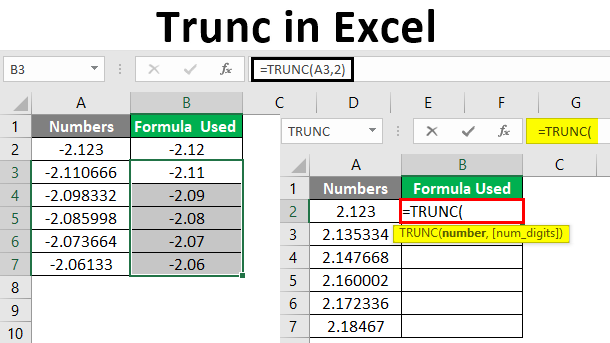
The TRUNC function in Excel is a powerful tool that allows you to remove decimal places from a number, while still maintaining the integer value. This function can be useful in a variety of situations, such as when you need to round down a number for financial calculations or to display data in a certain format.

Syntax

The syntax for the TRUNC function is as follows:

1=TRUNC(number,[num_digits])

Where number is the number you want to truncate and [num_digits] is the number of digits to truncate. If [num_digits] is not specified, the function will truncate the number to 0 decimal places.

Example

Let’s say you have the following number: 123.456. If you want to truncate this number to 2 decimal places, you would use the following formula:

1=TRUNC(123.456,2)

The result would be 123.45.

If you wanted to truncate the number to 0 decimal places, you would use the following formula:

1=TRUNC(123.456)

The result would be 123.

Additional Tips

Here are some additional tips for using the TRUNC function in Excel:

1. If you want to round up instead of down, use theROUNDUPfunction instead.

2. If you want to round to a specific number of decimal places, use theROUNDfunction instead.

3. You can also use negative values for[num_digits]to truncate to the left of the decimal point.

With these tips in mind, you can now confidently use the TRUNC function in Excel to truncate numbers to your desired format.


Previous Article

Microsoft Windows XP on New Computers: A ...

Next Article

Comparing Vudu, Netflix, and Hulu

Matthew Lynch

Related articles More from author

  • Digital & Mobile Technology

    What Are the Different iPhone Camera Filters and When Should You Use Them?

    June 21, 2023
    By Matthew Lynch
  • Digital & Mobile Technology

    What Are Diodes and What Are They Used For?

    July 6, 2023
    By Matthew Lynch
  • Digital & Mobile Technology

    The 7 Best Shortcuts to Use With Your iPhone 15 Pro’s Action Button

    March 20, 2024
    By Matthew Lynch
  • Digital & Mobile Technology

    What Do You Do if Your Chromebook Won’t Turn On?

    June 23, 2023
    By Matthew Lynch
  • Digital & Mobile Technology

    How to Use TikTok: 11 Tips for Beginners

    July 30, 2023
    By Matthew Lynch
  • Digital & Mobile Technology

    21 Free French Games to Help You Learn and Improve

    June 9, 2023
    By Matthew Lynch

Search

Login & Registration

  • Log in
  • Entries feed
  • Comments feed
  • WordPress.org

Newsletter

Signup for The Tech Edvocate Newsletter and have the latest in EdTech news and opinion delivered to your email address!

About Us

Since technology is not going anywhere and does more good than harm, adapting is the best course of action. That is where The Tech Edvocate comes in. We plan to cover the PreK-12 and Higher Education EdTech sectors and provide our readers with the latest news and opinion on the subject. From time to time, I will invite other voices to weigh in on important issues in EdTech. We hope to provide a well-rounded, multi-faceted look at the past, present, the future of EdTech in the US and internationally.

We started this journey back in June 2016, and we plan to continue it for many more years to come. I hope that you will join us in this discussion of the past, present and future of EdTech and lend your own insight to the issues that are discussed.

Newsletter

Signup for The Tech Edvocate Newsletter and have the latest in EdTech news and opinion delivered to your email address!

Contact Us

The Tech Edvocate
910 Goddin Street
Richmond, VA 23231
(601) 630-5238
[email protected]

Copyright © 2026 Matthew Lynch. All rights reserved.