The Tech Edvocate

Top Menu

  • Advertisement
  • Apps
  • Home Page
  • Home Page Five (No Sidebar)
  • Home Page Four
  • Home Page Three
  • Home Page Two
  • Home Tech2
  • Icons [No Sidebar]
  • Left Sidbear Page
  • Lynch Educational Consulting
  • My Account
  • My Speaking Page
  • Newsletter Sign Up Confirmation
  • Newsletter Unsubscription
  • Our Brands
  • Page Example
  • Privacy Policy
  • Protected Content
  • Register
  • Request a Product Review
  • Shop
  • Shortcodes Examples
  • Signup
  • Start Here
    • Governance
    • Careers
    • Contact Us
  • Terms and Conditions
  • The Edvocate
  • The Tech Edvocate Product Guide
  • Topics
  • Write For Us
  • Advertise

Main Menu

  • Start Here
    • Our Brands
    • Governance
      • Lynch Educational Consulting, LLC.
      • Dr. Lynch’s Personal Website
      • Careers
    • Write For Us
    • The Tech Edvocate Product Guide
    • Contact Us
    • Books
    • Edupedia
    • Post a Job
    • The Edvocate Podcast
    • Terms and Conditions
    • Privacy Policy
  • Topics
    • Assistive Technology
    • Child Development Tech
    • Early Childhood & K-12 EdTech
    • EdTech Futures
    • EdTech News
    • EdTech Policy & Reform
    • EdTech Startups & Businesses
    • Higher Education EdTech
    • Online Learning & eLearning
    • Parent & Family Tech
    • Personalized Learning
    • Product Reviews
  • Advertise
  • Tech Edvocate Awards
  • The Edvocate
  • Pedagogue
  • School Ratings

logo

The Tech Edvocate

  • Start Here
    • Our Brands
    • Governance
      • Lynch Educational Consulting, LLC.
      • Dr. Lynch’s Personal Website
        • My Speaking Page
      • Careers
    • Write For Us
    • The Tech Edvocate Product Guide
    • Contact Us
    • Books
    • Edupedia
    • Post a Job
    • The Edvocate Podcast
    • Terms and Conditions
    • Privacy Policy
  • Topics
    • Assistive Technology
    • Child Development Tech
    • Early Childhood & K-12 EdTech
    • EdTech Futures
    • EdTech News
    • EdTech Policy & Reform
    • EdTech Startups & Businesses
    • Higher Education EdTech
    • Online Learning & eLearning
    • Parent & Family Tech
    • Personalized Learning
    • Product Reviews
  • Advertise
  • Tech Edvocate Awards
  • The Edvocate
  • Pedagogue
  • School Ratings
  • The Brutal Truth: How Microsoft Buyouts Could Gut Your Favorite Xbox Games

  • The Brutal Truth About 2026 Short-Term Rental Regulations: What Every Investor Needs to Know

  • Germany’s Bold Move: Why This Fusion Deal Could Redefine Global Energy

  • A race to patch vulnerabilities exposed by AI

  • The Staggering Reason EV Buyers Are Hitting the Brakes (It’s Not What You Think)

  • A Disturbing OpenAI Lawsuit: Did an AI Chatbot Cause a Tragic Death?

  • The AI Job Apocalypse: Are Companies Hiding The Real Reason For Mass Layoffs?

  • One Crucial Factor Could Decimate Your US Auto Insurance Rates in 2026

  • Unbelievable: Meta Hit With $25 Billion Fine — Is Your Health Data Next?

  • 10 Crucial AI Literacy Courses Every Parent Needs Now

Digital & Mobile Technology
Home›Digital & Mobile Technology›The 13 Best Windows 7 Gadgets for System Monitoring

The 13 Best Windows 7 Gadgets for System Monitoring
By Matthew Lynch
July 24, 2023
0
Spread the love

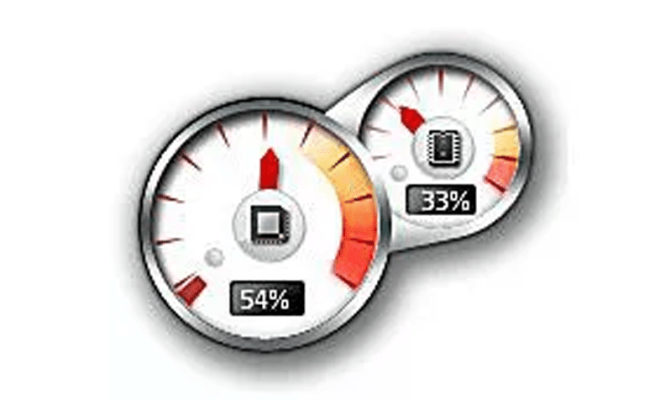
Windows 7 may no longer be the latest operating system from Microsoft, but it is still widely used by many people around the world. One of the most useful features of Windows 7 is its ability to support gadgets, which are small applications that can be placed on the desktop for quick and easy access to important information.

If you’re looking for gadgets to help you monitor your system performance, then you’re in luck. Here are the 13 best Windows 7 gadgets for system monitoring:

1. All CPU Meter

This gadget displays the load on each core of your processor, as well as the overall CPU usage. It also shows the temperature of your processor and can warn you if it gets too hot.

2. GPU Observer

If you’re a gamer or use graphics-intensive applications, then this gadget is for you. It displays the load on your graphics card, as well as the temperature and fan speed.

3. Network Meter

This gadget shows you how much data is being sent and received on your network connection. It can help you identify if your connection is being used by other applications or if there is any suspicious activity.

4. DriveInfo

This gadget displays information about your hard drives, including the amount of free space, total capacity, and the read/write speed.

5. Battery Meter

If you’re using a laptop, then this gadget is essential. It displays the remaining battery life, as well as the time remaining until your battery runs out.

6. System Control A1

This gadget displays a variety of system information, including CPU usage, memory usage, and disk usage. It also allows you to control your system’s power settings.

7. System Monitor II

This gadget is a comprehensive system monitoring tool that displays information about your CPU, memory, network, and hard drives. It also includes a variety of customizable skins.

8. Digital Clock

While not strictly a system monitoring gadget, this simple digital clock gadget can be useful for keeping track of time while you’re working on your computer.

9. Drives Meter

This gadget displays information about your hard drives, including the amount of free space, total capacity, and the read/write speed. It can also display information about your CD/DVD drives.

10. Quick CPU

This gadget allows you to control your CPU’s speed and power settings. It can be useful for conserving battery life on a laptop or for overclocking a desktop computer.

11. RAM Meter

This gadget displays the amount of RAM being used by your system. It can help you identify if you need to add more RAM to your computer.

12. Volume Control

This gadget allows you to control the volume of your computer’s speakers or headphones. It can be useful for quickly adjusting the volume while you’re listening to music or watching videos.

13. Weather

Again, not strictly a system monitoring gadget, but this weather gadget can be useful for keeping track of the weather in your area while you’re working on your computer.

In conclusion, these 13 gadgets can help you keep track of important system information and improve your overall computing experience. Whether you’re a gamer, a power user, or just someone who wants to keep an eye on their system performance, there’s a gadget on this list for you. So download them today and start monitoring your system like a pro!


Previous Article

How to Access Samsung Cloud

Next Article

How to Make DIY Filament for Your ...

Matthew Lynch

Related articles More from author

  • Digital & Mobile Technology

    How to Improve Internet Speed for Streaming

    April 26, 2023
    By Matthew Lynch
  • Digital & Mobile Technology

    Learn the Purpose of the 192.168.1.254 Router IP Address

    June 3, 2023
    By Matthew Lynch
  • Digital & Mobile Technology

    PS4 vs Xbox One: Which Console Is Right for You?

    June 21, 2023
    By Matthew Lynch
  • Digital & Mobile Technology

    How to Create and Manage Projects in Google Docs

    May 27, 2023
    By Matthew Lynch
  • Digital & Mobile Technology

    How to Stream 3D Movies on Vudu

    June 9, 2023
    By Matthew Lynch
  • Digital & Mobile Technology

    How to Cancel Your Amazon Kindle Unlimited Subscription

    May 20, 2023
    By Matthew Lynch

Search

Login & Registration

  • Log in
  • Entries feed
  • Comments feed
  • WordPress.org

Newsletter

Signup for The Tech Edvocate Newsletter and have the latest in EdTech news and opinion delivered to your email address!

About Us

Since technology is not going anywhere and does more good than harm, adapting is the best course of action. That is where The Tech Edvocate comes in. We plan to cover the PreK-12 and Higher Education EdTech sectors and provide our readers with the latest news and opinion on the subject. From time to time, I will invite other voices to weigh in on important issues in EdTech. We hope to provide a well-rounded, multi-faceted look at the past, present, the future of EdTech in the US and internationally.

We started this journey back in June 2016, and we plan to continue it for many more years to come. I hope that you will join us in this discussion of the past, present and future of EdTech and lend your own insight to the issues that are discussed.

Newsletter

Signup for The Tech Edvocate Newsletter and have the latest in EdTech news and opinion delivered to your email address!

Contact Us

The Tech Edvocate
910 Goddin Street
Richmond, VA 23231
(601) 630-5238
[email protected]

Copyright © 2026 Matthew Lynch. All rights reserved.