The Tech Edvocate

Top Menu

  • Advertisement
  • Apps
  • Home Page
  • Home Page Five (No Sidebar)
  • Home Page Four
  • Home Page Three
  • Home Page Two
  • Home Tech2
  • Icons [No Sidebar]
  • Left Sidbear Page
  • Lynch Educational Consulting
  • My Account
  • My Speaking Page
  • Newsletter Sign Up Confirmation
  • Newsletter Unsubscription
  • Our Brands
  • Page Example
  • Privacy Policy
  • Protected Content
  • Register
  • Request a Product Review
  • Shop
  • Shortcodes Examples
  • Signup
  • Start Here
    • Governance
    • Careers
    • Contact Us
  • Terms and Conditions
  • The Edvocate
  • The Tech Edvocate Product Guide
  • Topics
  • Write For Us
  • Advertise

Main Menu

  • Start Here
    • Our Brands
    • Governance
      • Lynch Educational Consulting, LLC.
      • Dr. Lynch’s Personal Website
      • Careers
    • Write For Us
    • The Tech Edvocate Product Guide
    • Contact Us
    • Books
    • Edupedia
    • Post a Job
    • The Edvocate Podcast
    • Terms and Conditions
    • Privacy Policy
  • Topics
    • Assistive Technology
    • Child Development Tech
    • Early Childhood & K-12 EdTech
    • EdTech Futures
    • EdTech News
    • EdTech Policy & Reform
    • EdTech Startups & Businesses
    • Higher Education EdTech
    • Online Learning & eLearning
    • Parent & Family Tech
    • Personalized Learning
    • Product Reviews
  • Advertise
  • Tech Edvocate Awards
  • The Edvocate
  • Pedagogue
  • School Ratings

logo

The Tech Edvocate

  • Start Here
    • Our Brands
    • Governance
      • Lynch Educational Consulting, LLC.
      • Dr. Lynch’s Personal Website
        • My Speaking Page
      • Careers
    • Write For Us
    • The Tech Edvocate Product Guide
    • Contact Us
    • Books
    • Edupedia
    • Post a Job
    • The Edvocate Podcast
    • Terms and Conditions
    • Privacy Policy
  • Topics
    • Assistive Technology
    • Child Development Tech
    • Early Childhood & K-12 EdTech
    • EdTech Futures
    • EdTech News
    • EdTech Policy & Reform
    • EdTech Startups & Businesses
    • Higher Education EdTech
    • Online Learning & eLearning
    • Parent & Family Tech
    • Personalized Learning
    • Product Reviews
  • Advertise
  • Tech Edvocate Awards
  • The Edvocate
  • Pedagogue
  • School Ratings
  • How to use ClickUp goals feature

  • Trello for Business

  • Can Smartsheet do automation

  • How to use Microsoft Planner boards

  • How many transactions in Kashoo

  • Sage

  • Is Sage worth it for accountants

  • How to use Smartsheet templates

  • How many users in Zoho Books free plan

  • Can Wrike integrate with Adobe Creative Cloud

Digital & Mobile Technology
Home›Digital & Mobile Technology›Low RAM on Your Phone? 7 Android Memory Management Tips You Need to Know

Low RAM on Your Phone? 7 Android Memory Management Tips You Need to Know
By Matthew Lynch
July 31, 2023
0
Spread the love

If you’re experiencing sluggish performance or frequent crashes on your Android phone, it’s possible that your device’s RAM is too low for the apps and processes you’re running.

RAM, or Random Access Memory, is the temporary storage that your phone uses to store data and run apps. When you have too many apps or processes running at the same time, your phone’s RAM can become overwhelmed, leading to slow performance, app crashes, and freezes.

Here are seven Android memory management tips you can use to help improve your phone’s performance and keep it running smoothly:

1. Check your phone’s RAM usage

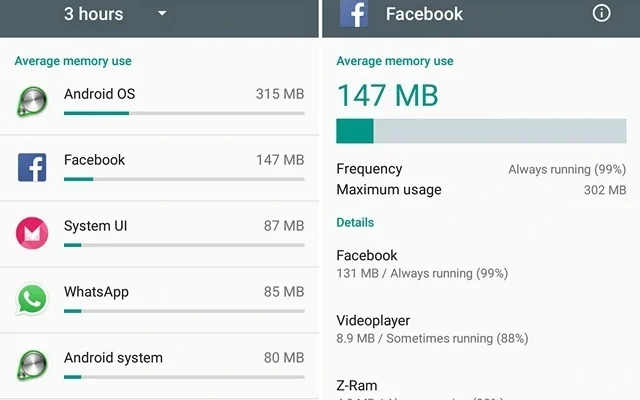
Before you can start optimizing your phone’s RAM usage, you need to know how much RAM your phone has and how much of it is currently being used. To do this, go to your phone’s Settings and look for the Memory or Performance section. Here, you’ll see a breakdown of your phone’s RAM usage and which apps and processes are using the most memory.

2. Close unused apps

One of the simplest ways to free up RAM on your phone is to close any apps that you’re not using. To do this, go to your phone’s multitasking menu (usually accessed by pressing the square or recent apps button) and swipe away any apps you don’t need.

3. Disable bloatware and unwanted apps

Another way to free up RAM on your phone is to disable any apps that you don’t need or want. Many Android phones come with a lot of pre-installed apps that you may never use, and these can take up valuable RAM. To disable these apps, go to your phone’s Settings, then to the Apps or Application Manager section. Here, you’ll see a list of all the apps installed on your phone. Select any apps you don’t need and choose the Disable or Uninstall option.

4. Use lightweight apps

Some apps are more resource-intensive than others, so using lightweight versions of your favorite apps can help reduce the amount of RAM they use. For example, instead of using the full Facebook app, try the Facebook Lite version, which uses less RAM and data.

5. Remove widgets and live wallpapers

Widgets and live wallpapers can be fun and useful, but they can also use up a lot of RAM. If you’re experiencing performance issues on your phone, consider removing any unused or unnecessary widgets and live wallpapers to free up some memory.

6. Use a memory management app

There are many memory management apps available on the Google Play Store that can help optimize your phone’s RAM usage. These apps can clear cache and unused files, close background apps, and provide other performance-enhancing features.

7. Upgrade your phone’s RAM

If you’ve tried all of the above tips and your phone’s performance is still poor, it may be time to consider upgrading your phone’s RAM. Some Android phones allow you to add more RAM by installing a memory card or swapping out the existing RAM module.

In conclusion, your Android phone’s RAM plays a crucial role in its performance, and if you have too little RAM, you may experience slow performance and crashes. By following the tips above, you can optimize your phone’s RAM usage and keep it running smoothly.


Previous Article

Why Does Windows Crash? The 9 Most ...

Next Article

How to Blur Your FaceTime Background on ...

Matthew Lynch

Related articles More from author

  • Digital & Mobile Technology

    A Brief History of the World’s First Cell Phones

    August 5, 2023
    By Matthew Lynch
  • Digital & Mobile Technology

    How to Find Your Default Gateway IP Address

    June 2, 2023
    By Matthew Lynch
  • Digital & Mobile Technology

    4 Simple Ways to Reduce Mobile Data Usage

    July 31, 2023
    By Matthew Lynch
  • Digital & Mobile Technology

    What Is CMOS and What Is It For?

    June 2, 2023
    By Matthew Lynch
  • Digital & Mobile Technology

    Free Ways to Find Someone Online

    May 31, 2023
    By Matthew Lynch
  • Digital & Mobile Technology

    What Is Safari?

    June 10, 2023
    By Matthew Lynch

Search

Login & Registration

  • Log in
  • Entries feed
  • Comments feed
  • WordPress.org

Newsletter

Signup for The Tech Edvocate Newsletter and have the latest in EdTech news and opinion delivered to your email address!

About Us

Since technology is not going anywhere and does more good than harm, adapting is the best course of action. That is where The Tech Edvocate comes in. We plan to cover the PreK-12 and Higher Education EdTech sectors and provide our readers with the latest news and opinion on the subject. From time to time, I will invite other voices to weigh in on important issues in EdTech. We hope to provide a well-rounded, multi-faceted look at the past, present, the future of EdTech in the US and internationally.

We started this journey back in June 2016, and we plan to continue it for many more years to come. I hope that you will join us in this discussion of the past, present and future of EdTech and lend your own insight to the issues that are discussed.

Newsletter

Signup for The Tech Edvocate Newsletter and have the latest in EdTech news and opinion delivered to your email address!

Contact Us

The Tech Edvocate
910 Goddin Street
Richmond, VA 23231
(601) 630-5238
[email protected]

Copyright © 2026 Matthew Lynch. All rights reserved.