The Tech Edvocate

Top Menu

  • Advertisement
  • Apps
  • Home Page
  • Home Page Five (No Sidebar)
  • Home Page Four
  • Home Page Three
  • Home Page Two
  • Home Tech2
  • Icons [No Sidebar]
  • Left Sidbear Page
  • Lynch Educational Consulting
  • My Account
  • My Speaking Page
  • Newsletter Sign Up Confirmation
  • Newsletter Unsubscription
  • Our Brands
  • Page Example
  • Privacy Policy
  • Protected Content
  • Register
  • Request a Product Review
  • Shop
  • Shortcodes Examples
  • Signup
  • Start Here
    • Governance
    • Careers
    • Contact Us
  • Terms and Conditions
  • The Edvocate
  • The Tech Edvocate Product Guide
  • Topics
  • Write For Us
  • Advertise

Main Menu

  • Start Here
    • Our Brands
    • Governance
      • Lynch Educational Consulting, LLC.
      • Dr. Lynch’s Personal Website
      • Careers
    • Write For Us
    • The Tech Edvocate Product Guide
    • Contact Us
    • Books
    • Edupedia
    • Post a Job
    • The Edvocate Podcast
    • Terms and Conditions
    • Privacy Policy
  • Topics
    • Assistive Technology
    • Child Development Tech
    • Early Childhood & K-12 EdTech
    • EdTech Futures
    • EdTech News
    • EdTech Policy & Reform
    • EdTech Startups & Businesses
    • Higher Education EdTech
    • Online Learning & eLearning
    • Parent & Family Tech
    • Personalized Learning
    • Product Reviews
  • Advertise
  • Tech Edvocate Awards
  • The Edvocate
  • Pedagogue
  • School Ratings

logo

The Tech Edvocate

  • Start Here
    • Our Brands
    • Governance
      • Lynch Educational Consulting, LLC.
      • Dr. Lynch’s Personal Website
        • My Speaking Page
      • Careers
    • Write For Us
    • The Tech Edvocate Product Guide
    • Contact Us
    • Books
    • Edupedia
    • Post a Job
    • The Edvocate Podcast
    • Terms and Conditions
    • Privacy Policy
  • Topics
    • Assistive Technology
    • Child Development Tech
    • Early Childhood & K-12 EdTech
    • EdTech Futures
    • EdTech News
    • EdTech Policy & Reform
    • EdTech Startups & Businesses
    • Higher Education EdTech
    • Online Learning & eLearning
    • Parent & Family Tech
    • Personalized Learning
    • Product Reviews
  • Advertise
  • Tech Edvocate Awards
  • The Edvocate
  • Pedagogue
  • School Ratings
  • How to use ClickUp goals feature

  • Trello for Business

  • Can Smartsheet do automation

  • How to use Microsoft Planner boards

  • How many transactions in Kashoo

  • Sage

  • Is Sage worth it for accountants

  • How to use Smartsheet templates

  • How many users in Zoho Books free plan

  • Can Wrike integrate with Adobe Creative Cloud

Digital & Mobile Technology
Home›Digital & Mobile Technology›How to Stream Amazon Prime on Discord

How to Stream Amazon Prime on Discord
By Matthew Lynch
July 5, 2023
0
Spread the love

Amazon Prime is one of the most popular video streaming services, offering a vast array of movies, TV shows, and original content, including some of the most popular series such as The Marvelous Mrs. Maisel, The Man in the High Castle or The Boys. Discord, on the other hand, is a popular voice and text chat app used by gaming communities, businesses, and groups of friends alike, offering an easy way to stay in touch and communicate with others.

If you want to stream Amazon Prime on Discord, there are a few ways to do it, and we will go through the steps you need to follow to make it happen.

Method 1: Discord Screen Share

One of the easiest ways to stream Amazon Prime on Discord is by using the built-in screen share feature. This works on both the desktop and mobile versions of Discord, allowing you to share your screen, including any video content you are watching.

Here’s how to do it:

1. Open Discord and start a voice call with the person or group you want to stream the Amazon Prime content with. You can do this by clicking on the phone icon on the top right corner of the screen.
2. Open Amazon Prime and start playing the content you want to stream.
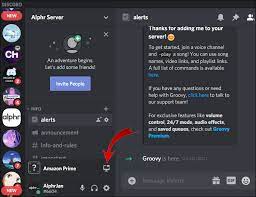
3. Click on the ‘Screen Share’ button in the bottom left corner of the Discord window.
4. Choose the window you want to share, which should be the Amazon Prime window. You can also select the option to share your entire screen, but this may not be ideal if you have other windows open that you do not want to share.
5. Click on the ‘Go Live’ button to start sharing your screen.
6. Your Amazon Prime content should now be streaming on Discord, and the other participants in the call should be able to see and hear it.

Method 2: Use a Screen Recording Software

If the screen share feature on Discord is not working correctly or you want to improve the quality of the stream, you can use a screen recording software to capture the Amazon Prime content and share it on Discord.

Here’s how to do it:

1. Download and install a screen recording software such as OBS Studio, Bandicam, or Camtasia.
2. Open the screen recording software and select the window or specific area you want to record, which should be the Amazon Prime content.
3. Start recording the content by clicking on the ‘Record’ button in the screen recording software.
4. Open Discord and start a voice call with the person or group you want to stream the Amazon Prime content with.
5. Play the Amazon Prime content you want to stream and make sure it is being recorded in the screen recording software.
6. Once you’ve recorded the content, stop the recording in the screen recording software and save the file.
7. Share the recorded file on Discord by uploading it to a shared drive or sending it directly to the other participants in the call.

Conclusion

Streaming Amazon Prime on Discord is a great way to watch your favorite content with friends or family who may not be in the same room as you. By following the steps outlined above, you can stream Amazon Prime content using the built-in screen share feature on Discord or by using a screen recording software. With these methods, you can enjoy your favorite movies and TV shows with your loved ones, no matter where they are.


Previous Article

Whatever Happened to the Facebook Phone?

Next Article

Venmo Instant Transfer Not Working? Here’s What ...

Matthew Lynch

Related articles More from author

  • Digital & Mobile Technology

    The Best Sites for Free Public Domain Movies

    June 12, 2023
    By Matthew Lynch
  • Digital & Mobile Technology

    What Is a Wireframe in 3D Animation?

    July 24, 2023
    By Matthew Lynch
  • Digital & Mobile Technology

    The 13 Best Windows 7 Gadgets for System Monitoring

    July 24, 2023
    By Matthew Lynch
  • Digital & Mobile Technology

    What Is Optimized Battery Charging on iPhone?

    June 1, 2023
    By Matthew Lynch
  • Digital & Mobile Technology

    AOMEI Backupper Standard v7.2.0 Review (A Backup Tool)

    June 4, 2023
    By Matthew Lynch
  • Digital & Mobile Technology

    What Is QMK in Keyboards? Can You Use It on Your Keyboard?

    June 10, 2023
    By Matthew Lynch

Search

Login & Registration

  • Log in
  • Entries feed
  • Comments feed
  • WordPress.org

Newsletter

Signup for The Tech Edvocate Newsletter and have the latest in EdTech news and opinion delivered to your email address!

About Us

Since technology is not going anywhere and does more good than harm, adapting is the best course of action. That is where The Tech Edvocate comes in. We plan to cover the PreK-12 and Higher Education EdTech sectors and provide our readers with the latest news and opinion on the subject. From time to time, I will invite other voices to weigh in on important issues in EdTech. We hope to provide a well-rounded, multi-faceted look at the past, present, the future of EdTech in the US and internationally.

We started this journey back in June 2016, and we plan to continue it for many more years to come. I hope that you will join us in this discussion of the past, present and future of EdTech and lend your own insight to the issues that are discussed.

Newsletter

Signup for The Tech Edvocate Newsletter and have the latest in EdTech news and opinion delivered to your email address!

Contact Us

The Tech Edvocate
910 Goddin Street
Richmond, VA 23231
(601) 630-5238
[email protected]

Copyright © 2026 Matthew Lynch. All rights reserved.