The Tech Edvocate

Top Menu

  • Advertisement
  • Apps
  • Home Page
  • Home Page Five (No Sidebar)
  • Home Page Four
  • Home Page Three
  • Home Page Two
  • Home Tech2
  • Icons [No Sidebar]
  • Left Sidbear Page
  • Lynch Educational Consulting
  • My Account
  • My Speaking Page
  • Newsletter Sign Up Confirmation
  • Newsletter Unsubscription
  • Our Brands
  • Page Example
  • Privacy Policy
  • Protected Content
  • Register
  • Request a Product Review
  • Shop
  • Shortcodes Examples
  • Signup
  • Start Here
    • Governance
    • Careers
    • Contact Us
  • Terms and Conditions
  • The Edvocate
  • The Tech Edvocate Product Guide
  • Topics
  • Write For Us
  • Advertise

Main Menu

  • Start Here
    • Our Brands
    • Governance
      • Lynch Educational Consulting, LLC.
      • Dr. Lynch’s Personal Website
      • Careers
    • Write For Us
    • The Tech Edvocate Product Guide
    • Contact Us
    • Books
    • Edupedia
    • Post a Job
    • The Edvocate Podcast
    • Terms and Conditions
    • Privacy Policy
  • Topics
    • Assistive Technology
    • Child Development Tech
    • Early Childhood & K-12 EdTech
    • EdTech Futures
    • EdTech News
    • EdTech Policy & Reform
    • EdTech Startups & Businesses
    • Higher Education EdTech
    • Online Learning & eLearning
    • Parent & Family Tech
    • Personalized Learning
    • Product Reviews
  • Advertise
  • Tech Edvocate Awards
  • The Edvocate
  • Pedagogue
  • School Ratings

logo

The Tech Edvocate

  • Start Here
    • Our Brands
    • Governance
      • Lynch Educational Consulting, LLC.
      • Dr. Lynch’s Personal Website
        • My Speaking Page
      • Careers
    • Write For Us
    • The Tech Edvocate Product Guide
    • Contact Us
    • Books
    • Edupedia
    • Post a Job
    • The Edvocate Podcast
    • Terms and Conditions
    • Privacy Policy
  • Topics
    • Assistive Technology
    • Child Development Tech
    • Early Childhood & K-12 EdTech
    • EdTech Futures
    • EdTech News
    • EdTech Policy & Reform
    • EdTech Startups & Businesses
    • Higher Education EdTech
    • Online Learning & eLearning
    • Parent & Family Tech
    • Personalized Learning
    • Product Reviews
  • Advertise
  • Tech Edvocate Awards
  • The Edvocate
  • Pedagogue
  • School Ratings
  • The Astonishing Truth About Student Loan Refinance Rates: What You Need to Know Now

  • Devastating: AI Agents Just Found a Zero-Day in Medical Software in 11 Minutes

  • The AI Education Revolution: 10 Urgent Questions Universities Must Answer Now

  • Explosive Zero-Day Vulnerability: 15 Million Websites Under Siege – Is Yours Next?

  • The Ultimate Kuru Footwear Trio: A Comfort Revolution for Every Adventure

  • Why Your Mortgage Could Be Denied by Biased AI – And What the Fed Is Doing About It

  • Unprecedented: Lawsuit Demands Total AI Shutdown Amid Rising Global Panic

  • The Astonishing Truth: Microcredentials Now Trump MBAs for Data Science Jobs

  • The Astonishing Twist: AI Cuts Your Job, Then Helps You Sue Your Boss

  • The Staggering Truth About Palo Alto’s $4.5 Billion AI Bet

Digital & Mobile Technology
Home›Digital & Mobile Technology›Player Movement in Unity Explained: Rigidbody and Collider

Player Movement in Unity Explained: Rigidbody and Collider
By Matthew Lynch
June 23, 2023
0
Spread the love

Player movement is one of the most essential features in any game. Whether it’s jumping over obstacles or running through a maze, the player’s motion is critical to gameplay. Unity offers two components that allow players to move around: the Rigidbody and the Collider. In this article, we will dive deep into these features, explaining how they work and how they interact with each other, to create a smooth and realistic player movement.

Rigidbody

The Rigidbody is an essential component in Unity that allows objects to have realistic motion. It simulates real-world physics, providing the player with the ability to interact with their environment in a natural way. When applied to a player object, the Rigidbody component enables it to respond to external forces like gravity, collisions, and manipulation.

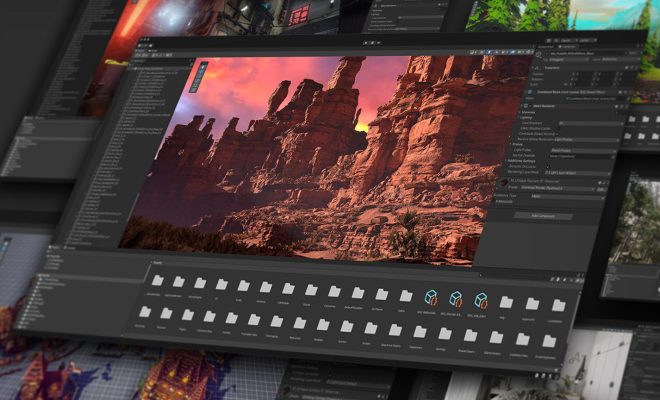
To use a Rigidbody in Unity, you need to add it to the game object. You can do this by selecting the GameObject, going to the Inspector panel, and clicking the Add Component button. From the dropdown list, select Rigidbody. Once added, you can customize the Rigidbody’s properties and adjust its mass, drag, and gravity scale according to your game’s physics requirements.

The Rigidbody component relies on the laws of motion to move the player around. Acceleration or deceleration of the force applied to an object determines its velocity, direction, and momentum. Gravity and friction affect the Rigidbody, making the player move like they would in real life.

Collider

The Collider component is what allows the player to interact with the game world. It defines the shape and size of the player’s physical body, determining how the player’s Rigidbody interacts with other objects. Without a collider, players would pass through walls, obstacles, and other elements, making the game unplayable.

There are various types of Collider components that you can use, depending on the shape of the object you want to create. The most commonly used Collider types are Box Collider, Sphere Collider, and Capsule Collider. To add a Collider component to the player object, select it, go to the Inspector panel, and click the Add Component button. From the dropdown list, select the desired Collider type.

The Collider component is responsible for detecting collisions and generating triggers. When the player collides with an object, the Collider sends a message to the Rigidbody, telling it to stop moving, bounce back, or slide. This interaction is what makes the player’s movement in the game world feel realistic.

Interaction between Rigidbody and Collider

The Rigidbody and Collider components work together to create engaging and meaningful player movement in Unity. The Rigidbody’s physics simulation provides realistic motion, while the Collider’s shape defines the boundaries for the player’s interaction with the game world.

When the player moves around in the game, the Rigidbody’s velocity and direction change, affecting the Collider’s position and triggering detection. The Collider component detects collisions and transmits the message to the Rigidbody, prompting it to apply the appropriate force, depending on the object’s properties.

Previous Article

The Best MMO Gaming Mice

Next Article

How to Remotely Turn a PC On ...

Matthew Lynch

Related articles More from author

  • Digital & Mobile Technology

    How Many HDMI Inputs Do I Want on an HDTV?

    June 4, 2023
    By Matthew Lynch
  • Digital & Mobile Technology

    How to Change What Siri Calls You

    June 3, 2023
    By Matthew Lynch
  • Digital & Mobile Technology

    Best Free Typing Lessons for Kids and Adults

    May 31, 2023
    By Matthew Lynch
  • Digital & Mobile Technology

    Cortana: Microsoft’s Virtual Assistant

    June 9, 2023
    By Matthew Lynch
  • Digital & Mobile Technology

    The 8 Best Apps to Send Money in 2023

    June 4, 2023
    By Matthew Lynch
  • Digital & Mobile Technology

    How to Use Sticky Notes in Windows 10

    June 9, 2023
    By Matthew Lynch

Search

Login & Registration

  • Log in
  • Entries feed
  • Comments feed
  • WordPress.org

Newsletter

Signup for The Tech Edvocate Newsletter and have the latest in EdTech news and opinion delivered to your email address!

About Us

Since technology is not going anywhere and does more good than harm, adapting is the best course of action. That is where The Tech Edvocate comes in. We plan to cover the PreK-12 and Higher Education EdTech sectors and provide our readers with the latest news and opinion on the subject. From time to time, I will invite other voices to weigh in on important issues in EdTech. We hope to provide a well-rounded, multi-faceted look at the past, present, the future of EdTech in the US and internationally.

We started this journey back in June 2016, and we plan to continue it for many more years to come. I hope that you will join us in this discussion of the past, present and future of EdTech and lend your own insight to the issues that are discussed.

Newsletter

Signup for The Tech Edvocate Newsletter and have the latest in EdTech news and opinion delivered to your email address!

Contact Us

The Tech Edvocate
910 Goddin Street
Richmond, VA 23231
(601) 630-5238
[email protected]

Copyright © 2026 Matthew Lynch. All rights reserved.