The Tech Edvocate

Top Menu

  • Advertisement
  • Apps
  • Home Page
  • Home Page Five (No Sidebar)
  • Home Page Four
  • Home Page Three
  • Home Page Two
  • Home Tech2
  • Icons [No Sidebar]
  • Left Sidbear Page
  • Lynch Educational Consulting
  • My Account
  • My Speaking Page
  • Newsletter Sign Up Confirmation
  • Newsletter Unsubscription
  • Our Brands
  • Page Example
  • Privacy Policy
  • Protected Content
  • Register
  • Request a Product Review
  • Shop
  • Shortcodes Examples
  • Signup
  • Start Here
    • Governance
    • Careers
    • Contact Us
  • Terms and Conditions
  • The Edvocate
  • The Tech Edvocate Product Guide
  • Topics
  • Write For Us
  • Advertise

Main Menu

  • Start Here
    • Our Brands
    • Governance
      • Lynch Educational Consulting, LLC.
      • Dr. Lynch’s Personal Website
      • Careers
    • Write For Us
    • The Tech Edvocate Product Guide
    • Contact Us
    • Books
    • Edupedia
    • Post a Job
    • The Edvocate Podcast
    • Terms and Conditions
    • Privacy Policy
  • Topics
    • Assistive Technology
    • Child Development Tech
    • Early Childhood & K-12 EdTech
    • EdTech Futures
    • EdTech News
    • EdTech Policy & Reform
    • EdTech Startups & Businesses
    • Higher Education EdTech
    • Online Learning & eLearning
    • Parent & Family Tech
    • Personalized Learning
    • Product Reviews
  • Advertise
  • Tech Edvocate Awards
  • The Edvocate
  • Pedagogue
  • School Ratings

logo

The Tech Edvocate

  • Start Here
    • Our Brands
    • Governance
      • Lynch Educational Consulting, LLC.
      • Dr. Lynch’s Personal Website
        • My Speaking Page
      • Careers
    • Write For Us
    • The Tech Edvocate Product Guide
    • Contact Us
    • Books
    • Edupedia
    • Post a Job
    • The Edvocate Podcast
    • Terms and Conditions
    • Privacy Policy
  • Topics
    • Assistive Technology
    • Child Development Tech
    • Early Childhood & K-12 EdTech
    • EdTech Futures
    • EdTech News
    • EdTech Policy & Reform
    • EdTech Startups & Businesses
    • Higher Education EdTech
    • Online Learning & eLearning
    • Parent & Family Tech
    • Personalized Learning
    • Product Reviews
  • Advertise
  • Tech Edvocate Awards
  • The Edvocate
  • Pedagogue
  • School Ratings
  • This One Skill Is Quietly Reshaping Every Career — And How to Master It Now

  • The Silent Threat: How AI Is Reshaping Recent College Graduates’ Job Prospects

  • This Crucial Shift in AI Will Devastate Millions of College Grads

  • The Brutal Truth: Zero-Day Exploit Analysis vs. Traditional Cybersecurity Careers — Which Path Pays $300,000?

  • The Urgent Truth: Why These Certifications Are Your Only Defense Against Zero-Day Attacks

  • The FBI Investigates a Zero-Day Attack on Your Job Applications

  • The Startling Truth About AI’s Impact on Your Coding Job by 2026

  • The Shocking Truth About Your Code: AI Is Already Rewriting Your Future

  • Is This Why Code Review Is Dead? AI’s Staggering Impact on Tech Jobs

  • The Shocking Truth About CogniBoost vs Focus Drugs: What No One Is Telling You

How To
Home›How To›4 Ways to Write Your Degree on a Resume

4 Ways to Write Your Degree on a Resume
By Matthew Lynch
March 23, 2024
0
Spread the love

Introduction:

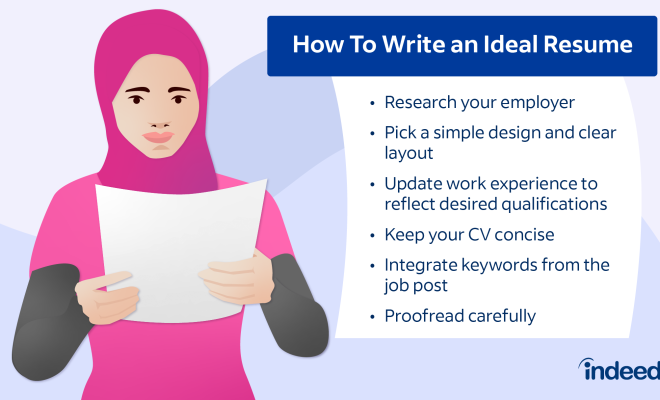
A well-crafted resume is essential to make a strong impression on potential employers, and how you present your educational qualifications can significantly impact their perception of your suitability for the job. In this article, we will discuss four ways to effectively write your degree on a resume to maximize your chances of landing that desired position.

1. List Your Degree in the Education Section:

This is the most common and straightforward way to include your degree on a resume. Add an education section in your resume (usually after the experience section) and list your degrees in reverse chronological order. Include the following details:

– Name of the degree (e.g., Bachelor of Science in Computer Science)

– Name of the institution

– City and state of the institution

– Graduation year (optional)

Example:

Education

Bachelor of Science in Computer Science, XYZ University, Anytown, CA, 2020

2. Highlight Your Degree in the Objective or Professional Summary:

If you have recently graduated or if your education is particularly relevant to the position you are applying for, consider mentioning it briefly in the objective or professional summary at the top of your resume. This allows you to emphasize your academic achievements early on.

Example:

Objective: Recent Bachelor of Arts in English graduate seeking a position as an editorial assistant to leverage exceptional writing and editing skills.

3. Use Degree Abbreviations When Space is Limited:

In some cases, such as when you’re crafting a one-page resume or trying to save space, abbreviating your degree can be helpful. Make sure you use widely recognized abbreviations (e.g., B.S. for Bachelor of Science or M.A. for Master of Arts). Also, ensure consistency with using periods within abbreviations throughout your resume.

Example:

Education

B.S. in Civil Engineering, ABC University, Springfield, IL, 2018

4. Tailor the Presentation of Your Degree to the Job Requirements:

Carefully analyze the job posting to determine if a specific degree or area of study is required or highly desired for the position. If so, tailor how you present your degree on your resume to emphasize how your educational qualifications match those requirements.

Example:

When applying for a job as a marketing analyst that requires strong data analysis skills, showcase your relevant coursework, write the degree as Bachelor of Science in Marketing (Data Analysis Focus), or mention any relevant projects or research you completed during your studies.

Conclusion:

Presenting your degree effectively on a resume can make a significant difference in capturing the attention of hiring managers. Choose from these four strategies to ensure that your academic qualifications are showcased in the best possible light, increasing your chances of landing an interview and ultimately securing your desired position.


Previous Article

These are the 6 Best Dog Seat ...

Next Article

Nine Free Apps That Will Change Your ...

Matthew Lynch

Related articles More from author

  • How To

    3 Ways to Celebrate Mother’s Day Without a Mom

    December 26, 2023
    By Matthew Lynch
  • How To

    How to Plant Cabbage

    December 3, 2023
    By Matthew Lynch
  • How To

    How to Write Any High School Essay

    March 7, 2024
    By Matthew Lynch
  • How To

    How to Tell if Your Partner Is Cheating

    January 6, 2024
    By Matthew Lynch
  • How To

    3 Ways to Make Face Cream

    October 9, 2023
    By Matthew Lynch
  • How To

    How to Write a Research Essay

    October 12, 2023
    By Matthew Lynch

Search

Login & Registration

  • Log in
  • Entries feed
  • Comments feed
  • WordPress.org

Newsletter

Signup for The Tech Edvocate Newsletter and have the latest in EdTech news and opinion delivered to your email address!

About Us

Since technology is not going anywhere and does more good than harm, adapting is the best course of action. That is where The Tech Edvocate comes in. We plan to cover the PreK-12 and Higher Education EdTech sectors and provide our readers with the latest news and opinion on the subject. From time to time, I will invite other voices to weigh in on important issues in EdTech. We hope to provide a well-rounded, multi-faceted look at the past, present, the future of EdTech in the US and internationally.

We started this journey back in June 2016, and we plan to continue it for many more years to come. I hope that you will join us in this discussion of the past, present and future of EdTech and lend your own insight to the issues that are discussed.

Newsletter

Signup for The Tech Edvocate Newsletter and have the latest in EdTech news and opinion delivered to your email address!

Contact Us

The Tech Edvocate
910 Goddin Street
Richmond, VA 23231
(601) 630-5238
[email protected]

Copyright © 2026 Matthew Lynch. All rights reserved.