
The Tech Edvocate

Top Menu

  • Advertisement
  • Apps
  • Home Page
  • Home Page Five (No Sidebar)
  • Home Page Four
  • Home Page Three
  • Home Page Two
  • Home Tech2
  • Icons [No Sidebar]
  • Left Sidbear Page
  • Lynch Educational Consulting
  • My Account
  • My Speaking Page
  • Newsletter Sign Up Confirmation
  • Newsletter Unsubscription
  • Our Brands
  • Page Example
  • Privacy Policy
  • Protected Content
  • Register
  • Request a Product Review
  • Shop
  • Shortcodes Examples
  • Signup
  • Start Here
    • Governance
    • Careers
    • Contact Us
  • Terms and Conditions
  • The Edvocate
  • The Tech Edvocate Product Guide
  • Topics
  • Write For Us
  • Advertise

Main Menu

  • Start Here
    • Our Brands
    • Governance
      • Lynch Educational Consulting, LLC.
      • Dr. Lynch’s Personal Website
      • Careers
    • Write For Us
    • The Tech Edvocate Product Guide
    • Contact Us
    • Books
    • Edupedia
    • Post a Job
    • The Edvocate Podcast
    • Terms and Conditions
    • Privacy Policy
  • Topics
    • Assistive Technology
    • Child Development Tech
    • Early Childhood & K-12 EdTech
    • EdTech Futures
    • EdTech News
    • EdTech Policy & Reform
    • EdTech Startups & Businesses
    • Higher Education EdTech
    • Online Learning & eLearning
    • Parent & Family Tech
    • Personalized Learning
    • Product Reviews
  • Advertise
  • Tech Edvocate Awards
  • The Edvocate
  • Pedagogue
  • School Ratings

logo

The Tech Edvocate

  • Start Here
    • Our Brands
    • Governance
      • Lynch Educational Consulting, LLC.
      • Dr. Lynch’s Personal Website
        • My Speaking Page
      • Careers
    • Write For Us
    • The Tech Edvocate Product Guide
    • Contact Us
    • Books
    • Edupedia
    • Post a Job
    • The Edvocate Podcast
    • Terms and Conditions
    • Privacy Policy
  • Topics
    • Assistive Technology
    • Child Development Tech
    • Early Childhood & K-12 EdTech
    • EdTech Futures
    • EdTech News
    • EdTech Policy & Reform
    • EdTech Startups & Businesses
    • Higher Education EdTech
    • Online Learning & eLearning
    • Parent & Family Tech
    • Personalized Learning
    • Product Reviews
  • Advertise
  • Tech Edvocate Awards
  • The Edvocate
  • Pedagogue
  • School Ratings
  • The Brutal Truth: Why Your AI Skills Training Is Failing (And How to Fix It)

  • 8 Essential AI Upskilling Programs Your Business Needs to Thrive Now

  • One Critical Mistake Companies Make With AI Skills Training

  • The AI Career Showdown: Which Path Pays More And Fits You Best?

  • The Shocking Truth About the Highest Paying AI Jobs in 2026

  • The Staggering Truth About 5 AI Job Roles That Will Redefine Your Career by 2026

  • Crypto Crackdown: Is the FCA’s Iron Fist Crushing Innovation, or Just Protecting You?

  • 7 Critical Steps to Survive the Crypto Crackdown: How to Navigate FCA Regulations

  • This One Thing Is Quietly Reshaping Illegal Crypto Trading — And Regulators Are Panicking

  • The AI Cyberattack That Changed Everything: Top Autonomous Security Software Reviews 2026

How To
Home›How To›3 Ways to Transfer Money from PayPal to a Bank Account

3 Ways to Transfer Money from PayPal to a Bank Account
By Matthew Lynch
March 21, 2024
0
Spread the love

In today’s fast-paced world, managing your finances across different platforms can be a daunting task. Fortunately, PayPal has made it easy to transfer money from your account to a bank account seamlessly. There are three main methods that you can use to transfer money from PayPal to a bank account: using the PayPal website, utilizing the PayPal mobile app, or through linking a bank account.

1. Using the PayPal Website

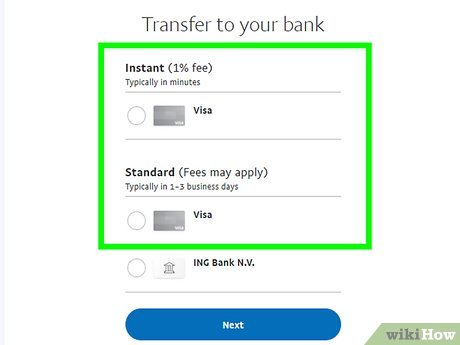
Transferring money from your PayPal account to a bank account can be accomplished through the PayPal website. Here is a step-by-step guide:

a. Log in to your PayPal account on their website.

b. Click on “Wallet” at the top of the page.

c. Under “Bank accounts,” click on the designated bank account to which you want to transfer funds.

d. Click on “Transfer Money.”

e. Input the amount you would like to transfer and click on “Continue.”

f. Review the details of your transaction and then click on “Transfer Now.”

2. Utilizing the PayPal Mobile App

The PayPal mobile app offers an easy way for those constantly on-the-move to transfer money from their accounts directly to their banks. Follow these steps:

a. Download and launch the PayPal mobile app and sign in to your account.

b. Tap on “More” located at the bottom-right corner of the main screen.

c. Select “Manage Balance.”

d. Tap on “Transfer Money” and select your bank account.

e. Input the desired amount for transferring, then tap on “Next.”

f. Review your transaction details and tap on “Transfer Now.”

3. Linking a Bank Account

To facilitate direct deposit payments or recurring transactions, linking your bank account directly with PayPal is an efficient solution. By doing this, you enable automatic transfers between these two accounts easily and quickly.

a. Log into your PayPal account.

b. Click on “Wallet” at the top of the page.

c. Click on “Link a bank” and then select your preferred bank from the list.

d. Input your online banking login credentials or your bank account, routing number, and account type (checking or savings) and click on “Agree and Link.”

e. Verify your bank account by inputting the two small deposits PayPal will make to your account.

f. Once linked, you can initiate transfers between PayPal and your bank account simply by clicking on “Transfer Money” and selecting the desired amount.

In conclusion, these methods make it nearly effortless to transfer money from your PayPal account to a bank account. Whether you choose to use the PayPal website, mobile app, or link your bank account directly, these options ensure that managing funds between platforms is efficient and secure.


Previous Article

How to Play Three Card Poker: 13 ...

Next Article

How to Light a Furnace: 6 Steps

Matthew Lynch

Related articles More from author

  • How To

    How to Become an Auctioneer

    February 12, 2024
    By Matthew Lynch
  • How To

    How to Plan a Presentation: 13 Steps

    January 7, 2024
    By Matthew Lynch
  • How To

    3 Easy Ways to Get Oil Out of Shoes

    October 23, 2023
    By Matthew Lynch
  • How To

    3 Ways to Remove Wrinkles from Leather Jackets

    January 5, 2024
    By Matthew Lynch
  • How To

    How to Eat a Baked Potato

    February 14, 2024
    By Matthew Lynch
  • How To

    3 Ways to Revive a Dying Aloe Vera Plant

    October 6, 2023
    By Matthew Lynch

Search

Login & Registration

  • Log in
  • Entries feed
  • Comments feed
  • WordPress.org

Newsletter

Signup for The Tech Edvocate Newsletter and have the latest in EdTech news and opinion delivered to your email address!

About Us

Since technology is not going anywhere and does more good than harm, adapting is the best course of action. That is where The Tech Edvocate comes in. We plan to cover the PreK-12 and Higher Education EdTech sectors and provide our readers with the latest news and opinion on the subject. From time to time, I will invite other voices to weigh in on important issues in EdTech. We hope to provide a well-rounded, multi-faceted look at the past, present, the future of EdTech in the US and internationally.

We started this journey back in June 2016, and we plan to continue it for many more years to come. I hope that you will join us in this discussion of the past, present and future of EdTech and lend your own insight to the issues that are discussed.

Newsletter

Signup for The Tech Edvocate Newsletter and have the latest in EdTech news and opinion delivered to your email address!

Contact Us

The Tech Edvocate
910 Goddin Street
Richmond, VA 23231
(601) 630-5238
[email protected]

Copyright © 2026 Matthew Lynch. All rights reserved.