
The Tech Edvocate

Top Menu

  • Advertisement
  • Apps
  • Home Page
  • Home Page Five (No Sidebar)
  • Home Page Four
  • Home Page Three
  • Home Page Two
  • Home Tech2
  • Icons [No Sidebar]
  • Left Sidbear Page
  • Lynch Educational Consulting
  • My Account
  • My Speaking Page
  • Newsletter Sign Up Confirmation
  • Newsletter Unsubscription
  • Our Brands
  • Page Example
  • Privacy Policy
  • Protected Content
  • Register
  • Request a Product Review
  • Shop
  • Shortcodes Examples
  • Signup
  • Start Here
    • Governance
    • Careers
    • Contact Us
  • Terms and Conditions
  • The Edvocate
  • The Tech Edvocate Product Guide
  • Topics
  • Write For Us
  • Advertise

Main Menu

  • Start Here
    • Our Brands
    • Governance
      • Lynch Educational Consulting, LLC.
      • Dr. Lynch’s Personal Website
      • Careers
    • Write For Us
    • The Tech Edvocate Product Guide
    • Contact Us
    • Books
    • Edupedia
    • Post a Job
    • The Edvocate Podcast
    • Terms and Conditions
    • Privacy Policy
  • Topics
    • Assistive Technology
    • Child Development Tech
    • Early Childhood & K-12 EdTech
    • EdTech Futures
    • EdTech News
    • EdTech Policy & Reform
    • EdTech Startups & Businesses
    • Higher Education EdTech
    • Online Learning & eLearning
    • Parent & Family Tech
    • Personalized Learning
    • Product Reviews
  • Advertise
  • Tech Edvocate Awards
  • The Edvocate
  • Pedagogue
  • School Ratings

logo

The Tech Edvocate

  • Start Here
    • Our Brands
    • Governance
      • Lynch Educational Consulting, LLC.
      • Dr. Lynch’s Personal Website
        • My Speaking Page
      • Careers
    • Write For Us
    • The Tech Edvocate Product Guide
    • Contact Us
    • Books
    • Edupedia
    • Post a Job
    • The Edvocate Podcast
    • Terms and Conditions
    • Privacy Policy
  • Topics
    • Assistive Technology
    • Child Development Tech
    • Early Childhood & K-12 EdTech
    • EdTech Futures
    • EdTech News
    • EdTech Policy & Reform
    • EdTech Startups & Businesses
    • Higher Education EdTech
    • Online Learning & eLearning
    • Parent & Family Tech
    • Personalized Learning
    • Product Reviews
  • Advertise
  • Tech Edvocate Awards
  • The Edvocate
  • Pedagogue
  • School Ratings
  • JisuLife Ultra2 Portable Fan: A Powerful Multi-Function Cooling Solution

  • A Visitors Guide to Viña del Mar, Chile

  • A Visitors Guide to Århus, Denmark

  • A Visitors Guide to Bakersfield (CA), United States

  • A Visitors Guide to Aurora (CO), United States

  • A Visitor’s Guide to Toledo (OH), United States

  • A Visitors Guide to Cincinnati (OH), United States

  • The MagicEagle Cam 5: Revolutionizing Wildlife Monitoring with Smart 4G Technology

  • A Visitors Guide to Pittsburgh (PA), United States

  • A Visitors Guide to Colorado Springs (CO), United States

How To
Home›How To›3 Ways to Fax from a Computer

3 Ways to Fax from a Computer
By Matthew Lynch
March 22, 2024
0
Spread the love

Introduction:

Gone are the days when sending a fax required a dedicated machine and a trip to the office. With advancements in technology, it is now possible to send faxes from the comfort of your own computer. Whether you have an all-in-one printer, a fax modem, or only an internet connection, you can get your documents where they need to go. Read on to discover three simple ways to fax from a computer.

1. Using an All-in-One Printer with Fax Capabilities

Many modern printers come equipped with integrated fax features that make it easy to send faxes directly from your computer. To do so:

a. Ensure your all-in-one printer has fax functionality and is properly connected to your computer.

b. Open the document you want to fax on your computer.

c. Go to “File,” then “Print,” and select your printer with the built-in fax function.

d. Enter the recipient’s fax number and any additional information required (such as a cover page).

e. Hit “Send” or “Fax” to transmit your document.

2. Utilizing a Fax Modem

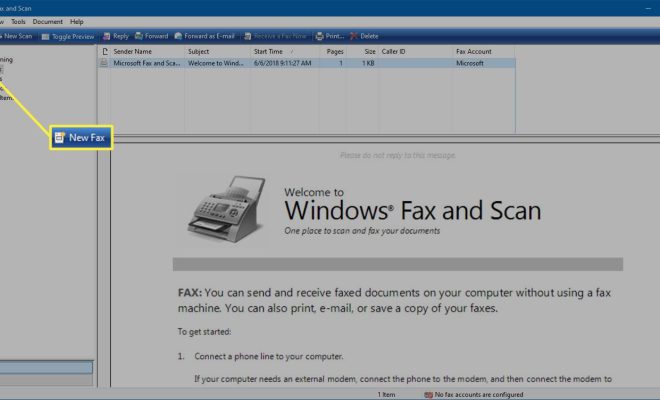
If you still have an older computer with a built-in dial-up modem, it may also be capable of sending faxes directly from your machine:

a. Connect your computer’s modem to your phone line using the appropriate cable (usually an RJ-11 cable).

b. Install any necessary drivers or software for your modem if they are not already installed.

c. Open the document you want to fax and proceed to “File,” then “Print.”

d. Select the “Fax” option from the list of printers available.

e. Fill out the recipient’s information (fax number, cover page notes, etc.) and hit “Send” or “Fax.”

3. Leveraging Online Fax Services

For those without access to specialized equipment, there are numerous online fax services which allow you to send faxes from your computer through the internet:

a. Choose an online fax service that meets your needs in terms of features and pricing (some popular options include eFax, MyFax, and FaxZero).

b. Sign up for an account if necessary, and log in to your chosen service.

c. Follow the website’s instructions for uploading your document and inputting the correct recipient information.

d. Hit “Send” or “Fax” within the service platform to transmit your document.

Conclusion

Sending a fax from your computer has never been easier. By using one of these three methods—using an all-in-one printer with fax capabilities, utilizing a fax modem, or leveraging online fax services—you can send important documents quickly and efficiently. Choose the method that works best for you and enjoy the convenience of faxing from your computer.


Previous Article

How to Reset a Water Heater: 9 ...

Next Article

How to Play PS3 Games on the ...

Matthew Lynch

Related articles More from author

  • How To

    How to Make a Stylus for iPad

    April 8, 2024
    By Matthew Lynch
  • How To

    How to Treat Scalp Pimples: 15 Steps

    December 23, 2023
    By Matthew Lynch
  • How To

    3 Ways to Determine the Sex of a Chicken

    October 10, 2023
    By Matthew Lynch
  • How To

    3 Ways to Make Wine Labels

    December 19, 2023
    By Matthew Lynch
  • How To

    How to Dye Roots

    November 5, 2023
    By Matthew Lynch
  • How To

    3 Ways to Set Up a Steam Controller on Your PC

    March 5, 2024
    By Matthew Lynch

Search

Login & Registration

  • Register
  • Log in
  • Entries feed
  • Comments feed
  • WordPress.org

Newsletter

Signup for The Tech Edvocate Newsletter and have the latest in EdTech news and opinion delivered to your email address!

About Us

Since technology is not going anywhere and does more good than harm, adapting is the best course of action. That is where The Tech Edvocate comes in. We plan to cover the PreK-12 and Higher Education EdTech sectors and provide our readers with the latest news and opinion on the subject. From time to time, I will invite other voices to weigh in on important issues in EdTech. We hope to provide a well-rounded, multi-faceted look at the past, present, the future of EdTech in the US and internationally.

We started this journey back in June 2016, and we plan to continue it for many more years to come. I hope that you will join us in this discussion of the past, present and future of EdTech and lend your own insight to the issues that are discussed.

Newsletter

Signup for The Tech Edvocate Newsletter and have the latest in EdTech news and opinion delivered to your email address!

Contact Us

The Tech Edvocate
910 Goddin Street
Richmond, VA 23231
(601) 630-5238
[email protected]

Copyright © 2025 Matthew Lynch. All rights reserved.