The Tech Edvocate

Top Menu

  • Advertisement
  • Apps
  • Home Page
  • Home Page Five (No Sidebar)
  • Home Page Four
  • Home Page Three
  • Home Page Two
  • Home Tech2
  • Icons [No Sidebar]
  • Left Sidbear Page
  • Lynch Educational Consulting
  • My Account
  • My Speaking Page
  • Newsletter Sign Up Confirmation
  • Newsletter Unsubscription
  • Our Brands
  • Page Example
  • Privacy Policy
  • Protected Content
  • Register
  • Request a Product Review
  • Shop
  • Shortcodes Examples
  • Signup
  • Start Here
    • Governance
    • Careers
    • Contact Us
  • Terms and Conditions
  • The Edvocate
  • The Tech Edvocate Product Guide
  • Topics
  • Write For Us
  • Advertise

Main Menu

  • Start Here
    • Our Brands
    • Governance
      • Lynch Educational Consulting, LLC.
      • Dr. Lynch’s Personal Website
      • Careers
    • Write For Us
    • The Tech Edvocate Product Guide
    • Contact Us
    • Books
    • Edupedia
    • Post a Job
    • The Edvocate Podcast
    • Terms and Conditions
    • Privacy Policy
  • Topics
    • Assistive Technology
    • Child Development Tech
    • Early Childhood & K-12 EdTech
    • EdTech Futures
    • EdTech News
    • EdTech Policy & Reform
    • EdTech Startups & Businesses
    • Higher Education EdTech
    • Online Learning & eLearning
    • Parent & Family Tech
    • Personalized Learning
    • Product Reviews
  • Advertise
  • Tech Edvocate Awards
  • The Edvocate
  • Pedagogue
  • School Ratings

logo

The Tech Edvocate

  • Start Here
    • Our Brands
    • Governance
      • Lynch Educational Consulting, LLC.
      • Dr. Lynch’s Personal Website
        • My Speaking Page
      • Careers
    • Write For Us
    • The Tech Edvocate Product Guide
    • Contact Us
    • Books
    • Edupedia
    • Post a Job
    • The Edvocate Podcast
    • Terms and Conditions
    • Privacy Policy
  • Topics
    • Assistive Technology
    • Child Development Tech
    • Early Childhood & K-12 EdTech
    • EdTech Futures
    • EdTech News
    • EdTech Policy & Reform
    • EdTech Startups & Businesses
    • Higher Education EdTech
    • Online Learning & eLearning
    • Parent & Family Tech
    • Personalized Learning
    • Product Reviews
  • Advertise
  • Tech Edvocate Awards
  • The Edvocate
  • Pedagogue
  • School Ratings
  • A Visitor’s Guide to Fresno (CA), United States

  • A Visitors Guide to New Orleans (LA), United States

  • A Visitors Guide to Sacramento (CA), United States

  • A Visitors Guide to Lyon, France

  • JisuLife Ultra2 Portable Fan: A Powerful Multi-Function Cooling Solution

  • A Visitors Guide to Viña del Mar, Chile

  • A Visitors Guide to Århus, Denmark

  • A Visitors Guide to Bakersfield (CA), United States

  • A Visitors Guide to Aurora (CO), United States

  • A Visitor’s Guide to Toledo (OH), United States

How To
Home›How To›3 Simple Ways to Reset a Kitchenaid Dishwasher

3 Simple Ways to Reset a Kitchenaid Dishwasher
By Matthew Lynch
February 13, 2024
0
Spread the love

Introduction:

A Kitchenaid dishwasher is a reliable and efficient appliance that makes your kitchen cleaning chores much easier. However, like any other electronic device, it may sometimes need resetting to clear minor glitches or errors. In this article, we will discuss three simple methods to reset your Kitchenaid dishwasher and get it back to running smoothly.

1. Power Cycling the Dishwasher:

Power cycling, also known as turning the device off and on again, is often the easiest way to reset your dishwasher quickly. This method works well for minor software issues. Here is how to power cycle your Kitchenaid dishwasher:

Step 1: Locate and turn off the power source of your dishwasher by either unplugging it from the electrical socket or turning off the corresponding circuit breaker.

Step 2: Wait for 30 seconds to ensure all residual power has dissipated from the appliance.

Step 3: Restore power to your dishwasher by either plugging it back in or switching on the circuit breaker.

Step 4: Check if your Kitchenaid dishwasher has now resumed normal operation. If not, try one of the other methods below.

2. Using the Control Panel Reset Method:

The control panel reset method allows you to reset certain functions or clear error codes that your appliance might be displaying. Follow these steps:

Step 1: Ensure your dishwasher is powered on but not running a cleaning cycle.

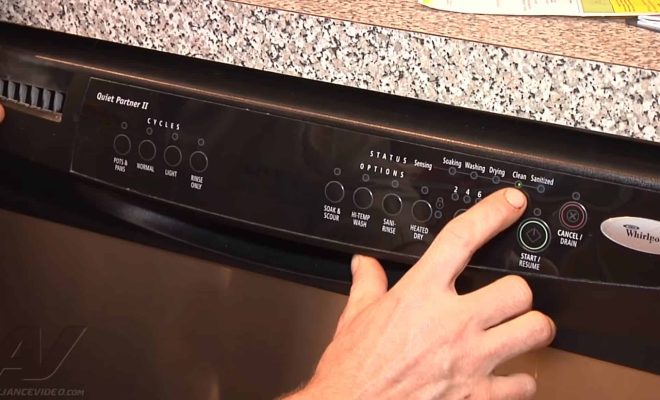
Step 2: Press and hold the “Start” button for approximately three seconds until you hear a beep sound or see all LED indicators flashing, indicating that the control panel has been reset successfully.

Step 3: Wait for a few minutes until the blinking lights stop as it completes its resetting process.

Step 4: Finally, run an empty short cleaning cycle (usually called “Rinse Only”) to check if everything is working normally again.

3. Factory Resetting Your Dishwasher:

For more severe issues or when the other two methods fail, a factory reset might be needed. Factory resetting your dishwasher erases all your customized settings and restores the appliance to its original state. Note that this method might differ slightly depending on your Kitchenaid dishwasher model. However, here’s a general guide to perform a factory reset:

Step 1: Turn off the dishwasher using the power button or by unplugging it from an electrical outlet/cutting off its power supply.

Step 2: Press and hold the “Hi-Temp Wash” button (or equivalent button for higher wash temperature) for about five seconds until you see all LED lights flash.

Step 3: Turn the dishwasher on, and simultaneously hold down both the “Sani Rinse” (or Sanitize) and “Heated Dry” buttons for around five seconds. This process resets your Kitchenaid dishwasher to factory settings.

Step 4: After completing the factory reset, test your appliance by running an empty short cleaning cycle to ensure everything is functioning as intended.

Conclusion:

Resetting your Kitchenaid dishwasher is an easy and effective way to solve minor issues or glitches, saving you time and effort if done correctly. By following these three simple methods – power cycling, control panel reset, or factory reset – you can get your dishwasher back up and running efficiently in no time. However, if problems persist or you encounter more complicated issues despite trying these methods, it’s advised to consult with a professional technician to troubleshoot further.

Previous Article

11 Easy Ways to Not Be Clingy ...

Next Article

How to Create a Pregnancy Journal

Matthew Lynch

Related articles More from author

  • How To

    10 Ways to Prevent Hair Loss

    October 12, 2023
    By Matthew Lynch
  • How To

    How to Paraglide

    April 6, 2024
    By Matthew Lynch
  • How To

    How to Prune Dracaena: 11 Steps

    October 18, 2023
    By Matthew Lynch
  • How To

    How to Check AirAsia Bookings: 9 Steps

    April 4, 2024
    By Matthew Lynch
  • How To

    How to Check an iPhone Warranty: 9 Steps

    April 6, 2024
    By Matthew Lynch
  • How To

    How to Avoid Eyebrow Piercing Scars

    February 29, 2024
    By Matthew Lynch

Search

Login & Registration

  • Register
  • Log in
  • Entries feed
  • Comments feed
  • WordPress.org

Newsletter

Signup for The Tech Edvocate Newsletter and have the latest in EdTech news and opinion delivered to your email address!

About Us

Since technology is not going anywhere and does more good than harm, adapting is the best course of action. That is where The Tech Edvocate comes in. We plan to cover the PreK-12 and Higher Education EdTech sectors and provide our readers with the latest news and opinion on the subject. From time to time, I will invite other voices to weigh in on important issues in EdTech. We hope to provide a well-rounded, multi-faceted look at the past, present, the future of EdTech in the US and internationally.

We started this journey back in June 2016, and we plan to continue it for many more years to come. I hope that you will join us in this discussion of the past, present and future of EdTech and lend your own insight to the issues that are discussed.

Newsletter

Signup for The Tech Edvocate Newsletter and have the latest in EdTech news and opinion delivered to your email address!

Contact Us

The Tech Edvocate
910 Goddin Street
Richmond, VA 23231
(601) 630-5238
[email protected]

Copyright © 2025 Matthew Lynch. All rights reserved.