The Tech Edvocate

Top Menu

  • Advertisement
  • Apps
  • Home Page
  • Home Page Five (No Sidebar)
  • Home Page Four
  • Home Page Three
  • Home Page Two
  • Home Tech2
  • Icons [No Sidebar]
  • Left Sidbear Page
  • Lynch Educational Consulting
  • My Account
  • My Speaking Page
  • Newsletter Sign Up Confirmation
  • Newsletter Unsubscription
  • Our Brands
  • Page Example
  • Privacy Policy
  • Protected Content
  • Register
  • Request a Product Review
  • Shop
  • Shortcodes Examples
  • Signup
  • Start Here
    • Governance
    • Careers
    • Contact Us
  • Terms and Conditions
  • The Edvocate
  • The Tech Edvocate Product Guide
  • Topics
  • Write For Us
  • Advertise

Main Menu

  • Start Here
    • Our Brands
    • Governance
      • Lynch Educational Consulting, LLC.
      • Dr. Lynch’s Personal Website
      • Careers
    • Write For Us
    • The Tech Edvocate Product Guide
    • Contact Us
    • Books
    • Edupedia
    • Post a Job
    • The Edvocate Podcast
    • Terms and Conditions
    • Privacy Policy
  • Topics
    • Assistive Technology
    • Child Development Tech
    • Early Childhood & K-12 EdTech
    • EdTech Futures
    • EdTech News
    • EdTech Policy & Reform
    • EdTech Startups & Businesses
    • Higher Education EdTech
    • Online Learning & eLearning
    • Parent & Family Tech
    • Personalized Learning
    • Product Reviews
  • Advertise
  • Tech Edvocate Awards
  • The Edvocate
  • Pedagogue
  • School Ratings

logo

The Tech Edvocate

  • Start Here
    • Our Brands
    • Governance
      • Lynch Educational Consulting, LLC.
      • Dr. Lynch’s Personal Website
        • My Speaking Page
      • Careers
    • Write For Us
    • The Tech Edvocate Product Guide
    • Contact Us
    • Books
    • Edupedia
    • Post a Job
    • The Edvocate Podcast
    • Terms and Conditions
    • Privacy Policy
  • Topics
    • Assistive Technology
    • Child Development Tech
    • Early Childhood & K-12 EdTech
    • EdTech Futures
    • EdTech News
    • EdTech Policy & Reform
    • EdTech Startups & Businesses
    • Higher Education EdTech
    • Online Learning & eLearning
    • Parent & Family Tech
    • Personalized Learning
    • Product Reviews
  • Advertise
  • Tech Edvocate Awards
  • The Edvocate
  • Pedagogue
  • School Ratings
  • Viaim Opennote Review: The AI Note-Taker That Disappears Into Your Daily Routine

  • A Visitors Guide to Long Beach (CA), United States

  • A Visitor’s Guide to Fresno (CA), United States

  • A Visitors Guide to New Orleans (LA), United States

  • A Visitors Guide to Sacramento (CA), United States

  • A Visitors Guide to Lyon, France

  • JisuLife Ultra2 Portable Fan: A Powerful Multi-Function Cooling Solution

  • A Visitors Guide to Viña del Mar, Chile

  • A Visitors Guide to Århus, Denmark

  • A Visitors Guide to Bakersfield (CA), United States

Digital & Mobile Technology
Home›Digital & Mobile Technology›Which Upgrades Will Improve Your PC Performance the Most?

Which Upgrades Will Improve Your PC Performance the Most?
By Matthew Lynch
June 23, 2023
0
Spread the love

If you are looking to improve the performance of your PC, there are several upgrades you can consider. However, not all of them will provide the same level of improvement. In this article, we will discuss some of the upgrades that will have the most significant impact on your PC’s performance.

1. Upgrading your CPU

The CPU is one of the most crucial components of a PC, as it is responsible for processing all data and instructions. Upgrading your CPU can significantly improve the speed and overall performance of your computer.
When upgrading your CPU, you must ensure that it is compatible with your motherboard. Some motherboards support specific CPUs, while others are more flexible. Check your motherboard’s manual for compatibility before purchasing a new CPU.

2. Adding more RAM

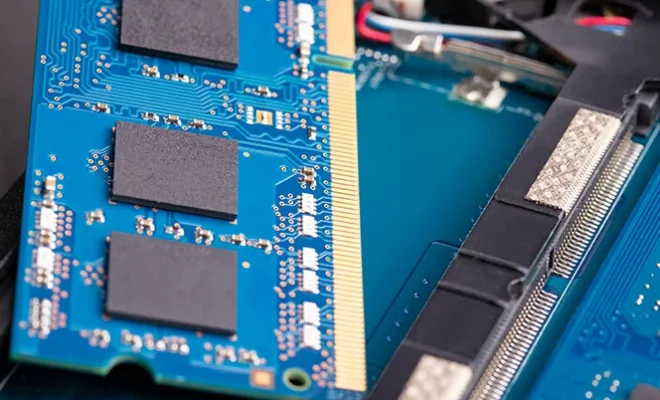
RAM (Random Access Memory) is another component that significantly impacts your PC’s performance. RAM stores data and instructions that your CPU needs to access frequently. The more RAM you have, the more data your CPU can access at any given time, resulting in faster performance.

To add more RAM to your PC, you must ensure that your motherboard can accommodate additional RAM modules. Check your motherboard’s manual for specifications and purchase RAM that matches them.

3. Getting an SSD

An SSD (Solid State Drive) is a type of storage device that uses flash memory instead of traditional spinning platters. SSDs are significantly faster than traditional hard drives, as they do not have any mechanical components that can slow down data transfer speeds.

Upgrading to an SSD can significantly improve your PC’s boot and load times. You can either replace your existing hard drive with an SSD or install an SSD in addition to your existing hard drive.

4. Upgrading your graphics card

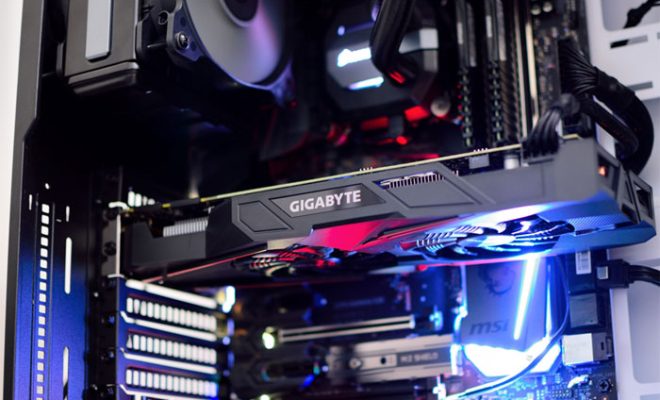
If you use your PC for gaming or graphic design, upgrading your graphics card can significantly improve performance. A powerful graphics card can render graphics faster and support higher resolutions.

When upgrading your graphics card, you must ensure that it is compatible with your motherboard and power supply. High-end graphics cards require more power than standard ones, so you may need to upgrade your power supply if you are upgrading to a powerful GPU.


Previous Article

How to Link Your Nintendo Network ID ...

Next Article

The Best Bluetooth Speakers for Your Car

Matthew Lynch

Related articles More from author

  • Digital & Mobile Technology

    The 10 Best Arduino RFID Projects

    August 1, 2023
    By Matthew Lynch
  • Digital & Mobile Technology

    Ways to Get More RAM on Your Laptop

    July 5, 2023
    By Matthew Lynch
  • Digital & Mobile Technology

    How to Delete Pre-Installed Apps on Android

    June 1, 2023
    By Matthew Lynch
  • Digital & Mobile Technology

    The 7 Best Steam Deck Carrying Cases

    August 1, 2023
    By Matthew Lynch
  • Digital & Mobile Technology

    How to Set Up a New Android Phone

    June 23, 2023
    By Matthew Lynch
  • Digital & Mobile Technology

    Can You Run a Virtual Machine on a Smartphone? How Does It Work?

    September 7, 2023
    By Matthew Lynch

Search

Login & Registration

  • Register
  • Log in
  • Entries feed
  • Comments feed
  • WordPress.org

Newsletter

Signup for The Tech Edvocate Newsletter and have the latest in EdTech news and opinion delivered to your email address!

About Us

Since technology is not going anywhere and does more good than harm, adapting is the best course of action. That is where The Tech Edvocate comes in. We plan to cover the PreK-12 and Higher Education EdTech sectors and provide our readers with the latest news and opinion on the subject. From time to time, I will invite other voices to weigh in on important issues in EdTech. We hope to provide a well-rounded, multi-faceted look at the past, present, the future of EdTech in the US and internationally.

We started this journey back in June 2016, and we plan to continue it for many more years to come. I hope that you will join us in this discussion of the past, present and future of EdTech and lend your own insight to the issues that are discussed.

Newsletter

Signup for The Tech Edvocate Newsletter and have the latest in EdTech news and opinion delivered to your email address!

Contact Us

The Tech Edvocate
910 Goddin Street
Richmond, VA 23231
(601) 630-5238
[email protected]

Copyright © 2025 Matthew Lynch. All rights reserved.