The Tech Edvocate

Top Menu

  • Advertisement
  • Apps
  • Home Page
  • Home Page Five (No Sidebar)
  • Home Page Four
  • Home Page Three
  • Home Page Two
  • Home Tech2
  • Icons [No Sidebar]
  • Left Sidbear Page
  • Lynch Educational Consulting
  • My Account
  • My Speaking Page
  • Newsletter Sign Up Confirmation
  • Newsletter Unsubscription
  • Our Brands
  • Page Example
  • Privacy Policy
  • Protected Content
  • Register
  • Request a Product Review
  • Shop
  • Shortcodes Examples
  • Signup
  • Start Here
    • Governance
    • Careers
    • Contact Us
  • Terms and Conditions
  • The Edvocate
  • The Tech Edvocate Product Guide
  • Topics
  • Write For Us
  • Advertise

Main Menu

  • Start Here
    • Our Brands
    • Governance
      • Lynch Educational Consulting, LLC.
      • Dr. Lynch’s Personal Website
      • Careers
    • Write For Us
    • The Tech Edvocate Product Guide
    • Contact Us
    • Books
    • Edupedia
    • Post a Job
    • The Edvocate Podcast
    • Terms and Conditions
    • Privacy Policy
  • Topics
    • Assistive Technology
    • Child Development Tech
    • Early Childhood & K-12 EdTech
    • EdTech Futures
    • EdTech News
    • EdTech Policy & Reform
    • EdTech Startups & Businesses
    • Higher Education EdTech
    • Online Learning & eLearning
    • Parent & Family Tech
    • Personalized Learning
    • Product Reviews
  • Advertise
  • Tech Edvocate Awards
  • The Edvocate
  • Pedagogue
  • School Ratings

logo

The Tech Edvocate

  • Start Here
    • Our Brands
    • Governance
      • Lynch Educational Consulting, LLC.
      • Dr. Lynch’s Personal Website
        • My Speaking Page
      • Careers
    • Write For Us
    • The Tech Edvocate Product Guide
    • Contact Us
    • Books
    • Edupedia
    • Post a Job
    • The Edvocate Podcast
    • Terms and Conditions
    • Privacy Policy
  • Topics
    • Assistive Technology
    • Child Development Tech
    • Early Childhood & K-12 EdTech
    • EdTech Futures
    • EdTech News
    • EdTech Policy & Reform
    • EdTech Startups & Businesses
    • Higher Education EdTech
    • Online Learning & eLearning
    • Parent & Family Tech
    • Personalized Learning
    • Product Reviews
  • Advertise
  • Tech Edvocate Awards
  • The Edvocate
  • Pedagogue
  • School Ratings
  • JisuLife Ultra2 Portable Fan: A Powerful Multi-Function Cooling Solution

  • A Visitors Guide to Viña del Mar, Chile

  • A Visitors Guide to Århus, Denmark

  • A Visitors Guide to Bakersfield (CA), United States

  • A Visitors Guide to Aurora (CO), United States

  • A Visitor’s Guide to Toledo (OH), United States

  • A Visitors Guide to Cincinnati (OH), United States

  • The MagicEagle Cam 5: Revolutionizing Wildlife Monitoring with Smart 4G Technology

  • A Visitors Guide to Pittsburgh (PA), United States

  • A Visitors Guide to Colorado Springs (CO), United States

Digital & Mobile Technology
Home›Digital & Mobile Technology›Logitech Harmony Smart Control Review

Logitech Harmony Smart Control Review
By Matthew Lynch
July 31, 2023
0
Spread the love

Logitech has been a trusted brand in the world of technology for many years, and their Harmony Smart Control is no exception. The Logitech Harmony Smart Control is a universal remote that has become increasingly popular with TV and home entertainment enthusiasts. Here’s a comprehensive review of the Logitech Harmony Smart Control remote.

Design and Build

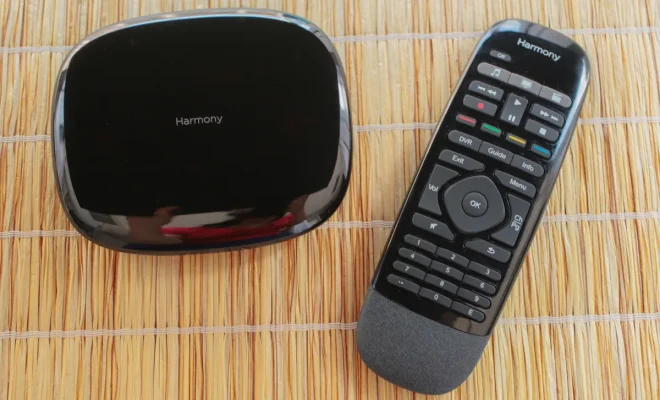
The Logitech Harmony Smart Control features a sleek and modern design that is both durable and comfortable to hold. The remote has a matte black finish and a glossy touch screen display at the top. The touch screen display has a 2.4-inch color LCD screen which is bright, clear, and easy to read.

The Harmony Smart Control also comes with a Hub, which serves as the central point of the remote. The Hub is a small, square device that is connected to a power source and your home Wi-Fi network. You can control all of your devices through the Harmony Hub, and it can communicate through infrared, Bluetooth, and Wi-Fi signals.

Easy Setup

Setting up the Logitech Harmony Smart Control is relatively easy and straightforward. The remote comes with a set-up guide, or you can download the user manual from the Logitech website. Once you download the Harmony app on your Android or iOS device, you will be able to set up your system within minutes.

The app will take you through the entire setup process step-by-step, allowing you to connect your devices, customize your settings, and create activities. When you have completed these steps, you will be able to use your Harmony Smart Control to control everything from your TV to your Blu-ray player, Apple TV, game consoles, and more.

Customizable Buttons

One of the most impressive features of the Logitech Harmony Smart Control is the ability to customize your buttons on the remote. The remote comes preloaded with a wide range of button configurations, but you can also create custom button functions to suit your individual needs.

The remote has a dedicated “Activities” button that allows you to create specific buttons to control a series of devices at once. For example, if you want to watch a Blu-ray movie, you can create an activity button that will turn on your TV, Blu-ray player, sound system, and dim the lights all at once with just one touch of a button.

Smart Home Integration

The Harmony Hub is compatible with numerous smart home devices like Amazon Alexa, Google Home, and Nest Thermostats. This integration means you can use your voice to control your home entertainment system, which is a convenient feature if you have your hands full.

Overall, the Logitech Harmony Smart Control is a fantastic remote that makes managing your home entertainment system a breeze. It is well-designed, easy to use, and has a plethora of customization features that make it stand out among its competitors. If you are in the market for a universal remote, the Logitech Harmony Smart Control should be one of your top considerations.


Previous Article

6 Great Social Networks for Book Lovers

Next Article

Certificate Error Navigation Blocked: What That Means ...

Matthew Lynch

Related articles More from author

  • Digital & Mobile Technology

    What Is Cloud Icon on Google Photos

    February 19, 2024
    By Matthew Lynch
  • Digital & Mobile Technology

    What Is an ACCDE File?

    June 15, 2023
    By Matthew Lynch
  • Digital & Mobile Technology

    I Love My Smartphone’s Camera … but I Needed Better Audio. Here’s How I Did It

    February 3, 2024
    By Matthew Lynch
  • Digital & Mobile Technology

    How to Start Windows 7 Using Last Known Good Configuration

    July 24, 2023
    By Matthew Lynch
  • Digital & Mobile Technology

    Best Chrome Extensions for Managing Downloads

    August 5, 2023
    By Matthew Lynch
  • Digital & Mobile Technology

    How to Make Stencils With Microsoft Word

    April 29, 2023
    By Matthew Lynch

Search

Login & Registration

  • Register
  • Log in
  • Entries feed
  • Comments feed
  • WordPress.org

Newsletter

Signup for The Tech Edvocate Newsletter and have the latest in EdTech news and opinion delivered to your email address!

About Us

Since technology is not going anywhere and does more good than harm, adapting is the best course of action. That is where The Tech Edvocate comes in. We plan to cover the PreK-12 and Higher Education EdTech sectors and provide our readers with the latest news and opinion on the subject. From time to time, I will invite other voices to weigh in on important issues in EdTech. We hope to provide a well-rounded, multi-faceted look at the past, present, the future of EdTech in the US and internationally.

We started this journey back in June 2016, and we plan to continue it for many more years to come. I hope that you will join us in this discussion of the past, present and future of EdTech and lend your own insight to the issues that are discussed.

Newsletter

Signup for The Tech Edvocate Newsletter and have the latest in EdTech news and opinion delivered to your email address!

Contact Us

The Tech Edvocate
910 Goddin Street
Richmond, VA 23231
(601) 630-5238
[email protected]

Copyright © 2025 Matthew Lynch. All rights reserved.