The Tech Edvocate

Top Menu

  • Advertisement
  • Apps
  • Home Page
  • Home Page Five (No Sidebar)
  • Home Page Four
  • Home Page Three
  • Home Page Two
  • Home Tech2
  • Icons [No Sidebar]
  • Left Sidbear Page
  • Lynch Educational Consulting
  • My Account
  • My Speaking Page
  • Newsletter Sign Up Confirmation
  • Newsletter Unsubscription
  • Our Brands
  • Page Example
  • Privacy Policy
  • Protected Content
  • Register
  • Request a Product Review
  • Shop
  • Shortcodes Examples
  • Signup
  • Start Here
    • Governance
    • Careers
    • Contact Us
  • Terms and Conditions
  • The Edvocate
  • The Tech Edvocate Product Guide
  • Topics
  • Write For Us
  • Advertise

Main Menu

  • Start Here
    • Our Brands
    • Governance
      • Lynch Educational Consulting, LLC.
      • Dr. Lynch’s Personal Website
      • Careers
    • Write For Us
    • The Tech Edvocate Product Guide
    • Contact Us
    • Books
    • Edupedia
    • Post a Job
    • The Edvocate Podcast
    • Terms and Conditions
    • Privacy Policy
  • Topics
    • Assistive Technology
    • Child Development Tech
    • Early Childhood & K-12 EdTech
    • EdTech Futures
    • EdTech News
    • EdTech Policy & Reform
    • EdTech Startups & Businesses
    • Higher Education EdTech
    • Online Learning & eLearning
    • Parent & Family Tech
    • Personalized Learning
    • Product Reviews
  • Advertise
  • Tech Edvocate Awards
  • The Edvocate
  • Pedagogue
  • School Ratings

logo

The Tech Edvocate

  • Start Here
    • Our Brands
    • Governance
      • Lynch Educational Consulting, LLC.
      • Dr. Lynch’s Personal Website
        • My Speaking Page
      • Careers
    • Write For Us
    • The Tech Edvocate Product Guide
    • Contact Us
    • Books
    • Edupedia
    • Post a Job
    • The Edvocate Podcast
    • Terms and Conditions
    • Privacy Policy
  • Topics
    • Assistive Technology
    • Child Development Tech
    • Early Childhood & K-12 EdTech
    • EdTech Futures
    • EdTech News
    • EdTech Policy & Reform
    • EdTech Startups & Businesses
    • Higher Education EdTech
    • Online Learning & eLearning
    • Parent & Family Tech
    • Personalized Learning
    • Product Reviews
  • Advertise
  • Tech Edvocate Awards
  • The Edvocate
  • Pedagogue
  • School Ratings
  • JisuLife Ultra2 Portable Fan: A Powerful Multi-Function Cooling Solution

  • A Visitors Guide to Viña del Mar, Chile

  • A Visitors Guide to Århus, Denmark

  • A Visitors Guide to Bakersfield (CA), United States

  • A Visitors Guide to Aurora (CO), United States

  • A Visitor’s Guide to Toledo (OH), United States

  • A Visitors Guide to Cincinnati (OH), United States

  • The MagicEagle Cam 5: Revolutionizing Wildlife Monitoring with Smart 4G Technology

  • A Visitors Guide to Pittsburgh (PA), United States

  • A Visitors Guide to Colorado Springs (CO), United States

Digital & Mobile Technology
Home›Digital & Mobile Technology›Is 4 GB of RAM Enough for Windows 11?

Is 4 GB of RAM Enough for Windows 11?
By Matthew Lynch
June 12, 2023
0
Spread the love

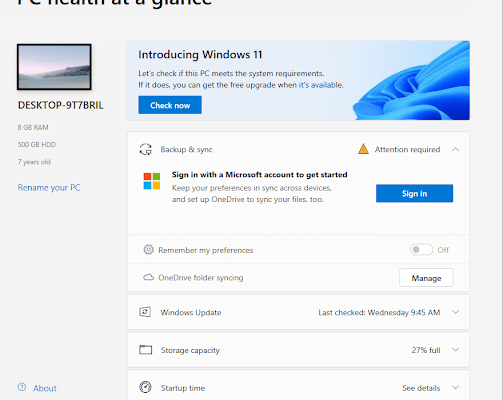
Recently, Microsoft announced that they will be releasing Windows 11, the successor to Windows 10. This new operating system comes with many exciting features, including a new user interface, better performance, and improved security. However, one question that many people are asking is whether 4 GB of RAM is enough for Windows 11.

The short answer is yes, you can run Windows 11 on a PC with 4 GB of RAM. Microsoft has stated that the minimum system requirements for Windows 11 include a 64-bit processor with at least 1 GHz clock speed, 4 GB of RAM, and 64 GB of storage. This means that even older PCs should be able to run Windows 11, assuming they meet these requirements.

However, just because you can run Windows 11 on a PC with 4 GB of RAM doesn’t mean it’s going to perform well. Windows 11 is a more demanding operating system than its predecessor, Windows 10. It requires more resources, especially in terms of RAM, to run smoothly.

If you have a PC with 4 GB of RAM, you may experience slow performance, especially if you’re running multiple applications or programs at the same time. In addition, if you’re using your PC for tasks that require a lot of memory, such as video editing or gaming, 4 GB of RAM may not be enough.

To ensure that Windows 11 runs smoothly on your PC, it’s recommended that you have at least 8 GB of RAM. This will allow you to run multiple applications at the same time without experiencing any slowdowns. It will also help ensure that your PC can handle more memory-intensive tasks.

If you’re planning on upgrading to Windows 11, it’s a good idea to check your PC’s hardware specifications first. Make sure your PC meets the minimum system requirements, including 4 GB of RAM. However, if possible, consider upgrading your RAM to 8 GB or more. This will not only improve your PC’s performance but also ensure that you can fully enjoy all the new features of Windows 11.

In conclusion, while it may be possible to run Windows 11 on a PC with 4 GB of RAM, it’s not recommended. To ensure optimal performance and a smooth user experience, it’s best to have at least 8 GB of RAM. Upgrading your RAM is a relatively easy and affordable way to improve your PC’s performance and make sure it’s ready for Windows 11.


Previous Article

How to Install and Use Grammarly in ...

Next Article

The Sims 4 Is Going Free-to-Play: Here’s ...

Matthew Lynch

Related articles More from author

  • Digital & Mobile Technology

    Using a USB-to-Aux Cable in Car Audio

    June 3, 2023
    By Matthew Lynch
  • Digital & Mobile Technology

    What is an Impact Printer?

    May 5, 2023
    By Matthew Lynch
  • Digital & Mobile Technology

    The Best Audio Search Engines

    September 7, 2023
    By Matthew Lynch
  • Digital & Mobile Technology

    Stereo Amplifier Power: How Many Watts Are Enough for Speakers?

    June 15, 2023
    By Matthew Lynch
  • Digital & Mobile Technology

    Fixes for When You Can’t Make Phone Calls on Your iPhone

    June 6, 2023
    By Matthew Lynch
  • Digital & Mobile Technology

    How to Upload Photos to Google Drive From iPhone

    June 11, 2023
    By Matthew Lynch

Search

Login & Registration

  • Register
  • Log in
  • Entries feed
  • Comments feed
  • WordPress.org

Newsletter

Signup for The Tech Edvocate Newsletter and have the latest in EdTech news and opinion delivered to your email address!

About Us

Since technology is not going anywhere and does more good than harm, adapting is the best course of action. That is where The Tech Edvocate comes in. We plan to cover the PreK-12 and Higher Education EdTech sectors and provide our readers with the latest news and opinion on the subject. From time to time, I will invite other voices to weigh in on important issues in EdTech. We hope to provide a well-rounded, multi-faceted look at the past, present, the future of EdTech in the US and internationally.

We started this journey back in June 2016, and we plan to continue it for many more years to come. I hope that you will join us in this discussion of the past, present and future of EdTech and lend your own insight to the issues that are discussed.

Newsletter

Signup for The Tech Edvocate Newsletter and have the latest in EdTech news and opinion delivered to your email address!

Contact Us

The Tech Edvocate
910 Goddin Street
Richmond, VA 23231
(601) 630-5238
[email protected]

Copyright © 2025 Matthew Lynch. All rights reserved.