The Tech Edvocate

Top Menu

  • Advertisement
  • Apps
  • Home Page
  • Home Page Five (No Sidebar)
  • Home Page Four
  • Home Page Three
  • Home Page Two
  • Home Tech2
  • Icons [No Sidebar]
  • Left Sidbear Page
  • Lynch Educational Consulting
  • My Account
  • My Speaking Page
  • Newsletter Sign Up Confirmation
  • Newsletter Unsubscription
  • Our Brands
  • Page Example
  • Privacy Policy
  • Protected Content
  • Register
  • Request a Product Review
  • Shop
  • Shortcodes Examples
  • Signup
  • Start Here
    • Governance
    • Careers
    • Contact Us
  • Terms and Conditions
  • The Edvocate
  • The Tech Edvocate Product Guide
  • Topics
  • Write For Us
  • Advertise

Main Menu

  • Start Here
    • Our Brands
    • Governance
      • Lynch Educational Consulting, LLC.
      • Dr. Lynch’s Personal Website
      • Careers
    • Write For Us
    • The Tech Edvocate Product Guide
    • Contact Us
    • Books
    • Edupedia
    • Post a Job
    • The Edvocate Podcast
    • Terms and Conditions
    • Privacy Policy
  • Topics
    • Assistive Technology
    • Child Development Tech
    • Early Childhood & K-12 EdTech
    • EdTech Futures
    • EdTech News
    • EdTech Policy & Reform
    • EdTech Startups & Businesses
    • Higher Education EdTech
    • Online Learning & eLearning
    • Parent & Family Tech
    • Personalized Learning
    • Product Reviews
  • Advertise
  • Tech Edvocate Awards
  • The Edvocate
  • Pedagogue
  • School Ratings

logo

The Tech Edvocate

  • Start Here
    • Our Brands
    • Governance
      • Lynch Educational Consulting, LLC.
      • Dr. Lynch’s Personal Website
        • My Speaking Page
      • Careers
    • Write For Us
    • The Tech Edvocate Product Guide
    • Contact Us
    • Books
    • Edupedia
    • Post a Job
    • The Edvocate Podcast
    • Terms and Conditions
    • Privacy Policy
  • Topics
    • Assistive Technology
    • Child Development Tech
    • Early Childhood & K-12 EdTech
    • EdTech Futures
    • EdTech News
    • EdTech Policy & Reform
    • EdTech Startups & Businesses
    • Higher Education EdTech
    • Online Learning & eLearning
    • Parent & Family Tech
    • Personalized Learning
    • Product Reviews
  • Advertise
  • Tech Edvocate Awards
  • The Edvocate
  • Pedagogue
  • School Ratings
  • A Visitors Guide to Viña del Mar, Chile

  • A Visitors Guide to Århus, Denmark

  • A Visitors Guide to Bakersfield (CA), United States

  • A Visitors Guide to Aurora (CO), United States

  • A Visitor’s Guide to Toledo (OH), United States

  • A Visitors Guide to Cincinnati (OH), United States

  • The MagicEagle Cam 5: Revolutionizing Wildlife Monitoring with Smart 4G Technology

  • A Visitors Guide to Pittsburgh (PA), United States

  • A Visitors Guide to Colorado Springs (CO), United States

  • 5 Pairs of Shoes That Will Instantly Step Your Shoe Game Up

Digital & Mobile Technology
Home›Digital & Mobile Technology›How to Subtract Dates in Excel

How to Subtract Dates in Excel
By Matthew Lynch
June 12, 2023
0
Spread the love

Excel is a powerful tool for data analysis, and one of the many functions it can perform is date subtraction. Subtracting dates in Excel may seem tricky at first, but with the right formula, it can be a straightforward process. In this article, we will guide you through the steps to subtract dates in Excel.

Step 1: Formatting the Dates

Before we can begin the subtraction process, it is essential to format the dates correctly in Excel. To do this, click on the cell that contains the date and then navigate to the Home tab. Click on the dropdown arrow next to the Number format box and select the Date option. Choose the date format that you want to use and click OK.

Step 2: Creating a Formula

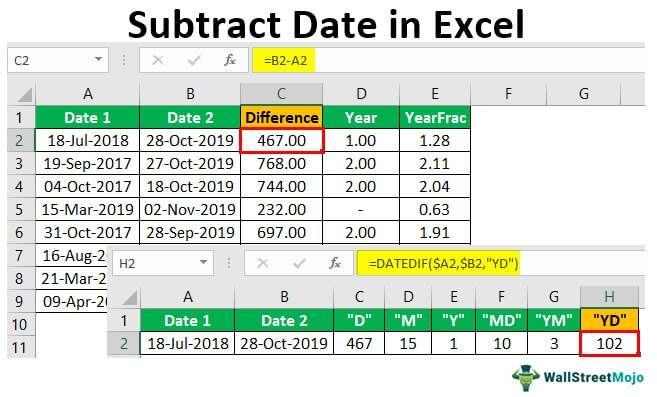
Now that our dates are formatted correctly, we can create a formula to subtract the dates. The formula that we will use is =DATEDIF(start_date, end_date, “unit”), where start_date is the earlier date, end_date is the later date, and unit is the unit of time that we want to measure the difference in, such as “d” for days, “m” for months, or “y” for years.

For example, let’s say we want to find out how many days have passed between the dates 01/01/2022 and 02/28/2022. We would enter the formula =DATEDIF(“01/01/2022”, “02/28/2022”, “d”) into a new cell. The formula will return the answer 58, indicating that 58 days have passed between the two dates.

Step 3: Handling Error Messages

When using the DATEDIF formula, it is essential to ensure that the start_date is earlier than the end_date; otherwise, Excel will return an error message. If you do receive an error message, you can correct it by swapping the dates using a minus sign instead of a plus sign to indicate subtraction.

Another error that you might encounter is the #NUM! error, which occurs when the start_date and end_date parameters are more than 255 days apart. In this case, you can switch the unit parameter to “ym” or “md” to calculate the difference in months or days, respectively.

Conclusion

Subtracting dates in Excel may seem daunting at first, but with the right formula and formatting, it can be a straightforward process. Remember to format your dates correctly, create a formula that uses the DATEDIF function, and handle any error messages that may arise. With these steps in mind, you’ll be sure to get accurate and reliable results when subtracting dates in Excel


Previous Article

Facebook Search Tips

Next Article

Why Does Restarting Fix Many Computer Problems?

Matthew Lynch

Related articles More from author

  • Digital & Mobile Technology

    How to Fix the Discord Game Detection Feature Not Working on Windows

    August 5, 2023
    By Matthew Lynch
  • Digital & Mobile Technology

    Ways to Share Photos and Videos Privately With Your Family

    June 8, 2023
    By Matthew Lynch
  • Digital & Mobile Technology

    What Is Google Docs?

    May 30, 2023
    By Matthew Lynch
  • Digital & Mobile Technology

    The Best IFTTT Alternatives You Might Not Have Heard About

    June 9, 2023
    By Matthew Lynch
  • Digital & Mobile Technology

    The Best Gaming Glasses for Blocking Blue Light

    June 12, 2023
    By Matthew Lynch
  • Digital & Mobile Technology

    How to Download and Install OpenVR Advanced Settings

    June 5, 2023
    By Matthew Lynch

Search

Login & Registration

  • Register
  • Log in
  • Entries feed
  • Comments feed
  • WordPress.org

Newsletter

Signup for The Tech Edvocate Newsletter and have the latest in EdTech news and opinion delivered to your email address!

About Us

Since technology is not going anywhere and does more good than harm, adapting is the best course of action. That is where The Tech Edvocate comes in. We plan to cover the PreK-12 and Higher Education EdTech sectors and provide our readers with the latest news and opinion on the subject. From time to time, I will invite other voices to weigh in on important issues in EdTech. We hope to provide a well-rounded, multi-faceted look at the past, present, the future of EdTech in the US and internationally.

We started this journey back in June 2016, and we plan to continue it for many more years to come. I hope that you will join us in this discussion of the past, present and future of EdTech and lend your own insight to the issues that are discussed.

Newsletter

Signup for The Tech Edvocate Newsletter and have the latest in EdTech news and opinion delivered to your email address!

Contact Us

The Tech Edvocate
910 Goddin Street
Richmond, VA 23231
(601) 630-5238
[email protected]

Copyright © 2025 Matthew Lynch. All rights reserved.