The Tech Edvocate

Top Menu

  • Advertisement
  • Apps
  • Home Page
  • Home Page Five (No Sidebar)
  • Home Page Four
  • Home Page Three
  • Home Page Two
  • Home Tech2
  • Icons [No Sidebar]
  • Left Sidbear Page
  • Lynch Educational Consulting
  • My Account
  • My Speaking Page
  • Newsletter Sign Up Confirmation
  • Newsletter Unsubscription
  • Our Brands
  • Page Example
  • Privacy Policy
  • Protected Content
  • Register
  • Request a Product Review
  • Shop
  • Shortcodes Examples
  • Signup
  • Start Here
    • Governance
    • Careers
    • Contact Us
  • Terms and Conditions
  • The Edvocate
  • The Tech Edvocate Product Guide
  • Topics
  • Write For Us
  • Advertise

Main Menu

  • Start Here
    • Our Brands
    • Governance
      • Lynch Educational Consulting, LLC.
      • Dr. Lynch’s Personal Website
      • Careers
    • Write For Us
    • The Tech Edvocate Product Guide
    • Contact Us
    • Books
    • Edupedia
    • Post a Job
    • The Edvocate Podcast
    • Terms and Conditions
    • Privacy Policy
  • Topics
    • Assistive Technology
    • Child Development Tech
    • Early Childhood & K-12 EdTech
    • EdTech Futures
    • EdTech News
    • EdTech Policy & Reform
    • EdTech Startups & Businesses
    • Higher Education EdTech
    • Online Learning & eLearning
    • Parent & Family Tech
    • Personalized Learning
    • Product Reviews
  • Advertise
  • Tech Edvocate Awards
  • The Edvocate
  • Pedagogue
  • School Ratings

logo

The Tech Edvocate

  • Start Here
    • Our Brands
    • Governance
      • Lynch Educational Consulting, LLC.
      • Dr. Lynch’s Personal Website
        • My Speaking Page
      • Careers
    • Write For Us
    • The Tech Edvocate Product Guide
    • Contact Us
    • Books
    • Edupedia
    • Post a Job
    • The Edvocate Podcast
    • Terms and Conditions
    • Privacy Policy
  • Topics
    • Assistive Technology
    • Child Development Tech
    • Early Childhood & K-12 EdTech
    • EdTech Futures
    • EdTech News
    • EdTech Policy & Reform
    • EdTech Startups & Businesses
    • Higher Education EdTech
    • Online Learning & eLearning
    • Parent & Family Tech
    • Personalized Learning
    • Product Reviews
  • Advertise
  • Tech Edvocate Awards
  • The Edvocate
  • Pedagogue
  • School Ratings
  • JisuLife Ultra2 Portable Fan: A Powerful Multi-Function Cooling Solution

  • A Visitors Guide to Viña del Mar, Chile

  • A Visitors Guide to Århus, Denmark

  • A Visitors Guide to Bakersfield (CA), United States

  • A Visitors Guide to Aurora (CO), United States

  • A Visitor’s Guide to Toledo (OH), United States

  • A Visitors Guide to Cincinnati (OH), United States

  • The MagicEagle Cam 5: Revolutionizing Wildlife Monitoring with Smart 4G Technology

  • A Visitors Guide to Pittsburgh (PA), United States

  • A Visitors Guide to Colorado Springs (CO), United States

Digital & Mobile Technology
Home›Digital & Mobile Technology›How to Program a Universal Remote Control

How to Program a Universal Remote Control
By Matthew Lynch
May 30, 2023
0
Spread the love

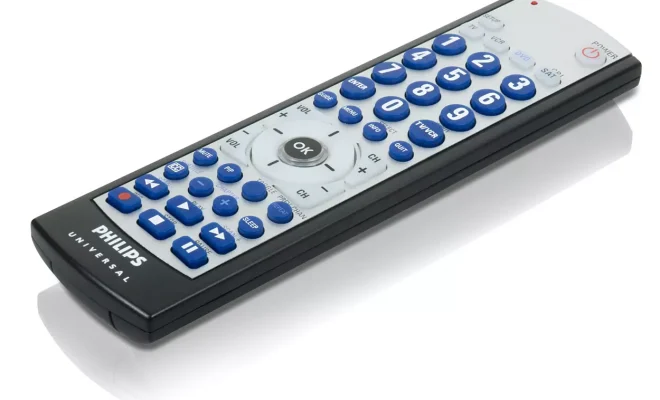
A universal remote control is a device that allows you to control multiple electronic devices such as TVs, soundbars, DVD players, and cable boxes from a single remote. Programming a universal remote control can seem like a challenging task, but with a little patience and the right instructions, it can be quick and easy.

Here’s a guide on how to program a universal remote control:

Step 1: Choose your remote and devices to be paired

First, choose which universal remote you want to use. There are different types of universal remotes available depending on the manufacturer and model, so make sure to read the instructions carefully.

Once you have chosen your remote, it’s time to gather the models of the electronic devices you want to pair with it. You will need to find the brand name and model number of each device in order to program the remote.

Step 2: Find the codes for each device

Most universal remote controls come with a manual or online database that provides the codes for the devices you want to pair. These codes help the remote control communicate with the device so that it can turn it on/off or adjust the volume, among other things.

You can usually find the code list in the manual or on the manufacturer’s website. Choose the code for the device you want to program and write it down.

Step 3: Turn on the device you want to program

Before programming the remote, make sure the device you want to pair with is turned on. This is important because the remote needs to be able to recognize the signal from the device to pair successfully.

Step 4: Pairing the remote and the device

To program a universal remote control, you typically follow these steps:

– Press and hold the device button that corresponds to the device you want to program, such as TV or DVD

– While holding down the button, enter the four or five-digit code for the device you want to program.

– Release the button once the code is entered correctly. The device should turn off, indicating that the programming was successful.

– Test the remote by trying different buttons to see if the device responds.

If the device doesn’t respond or the code doesn’t work, you can try again with a different code from the manufacturer’s list.

Step 5: Program other devices

Repeat the same process for programming other devices with the same remote. Make sure to choose the right device button on the remote to avoid confusion when using it.

If the universal remote cannot find the code for a particular device, it’s possible that the code is not in the remote’s database. In this case, refer to the device’s manual for further instructions or contact the device’s manufacturer.

In conclusion, programming a universal remote control is not as difficult as it may seem. With just a little patience and the correct code, you can have your remote control multiple devices within minutes. This can simplify your entertainment experience and make navigating through devices a breeze.


Previous Article

Sync Your iPhone and iPad in a ...

Next Article

How to Make a Cent Sign on ...

Matthew Lynch

Related articles More from author

  • Digital & Mobile Technology

    What Is an OGG File?

    June 6, 2023
    By Matthew Lynch
  • Digital & Mobile Technology

    Pong: The First Video Game Megahit

    July 25, 2023
    By Matthew Lynch
  • Digital & Mobile Technology

    Why Are Raspberry Pis So Expensive?

    June 26, 2023
    By Matthew Lynch
  • Digital & Mobile Technology

    YouTube TV: What You Need to Know

    June 10, 2023
    By Matthew Lynch
  • Digital & Mobile Technology

    Should You Download the CyberGhost VPN Free Proxy Browser Add-On?

    August 5, 2023
    By Matthew Lynch
  • Digital & Mobile Technology

    How to Fix the “Your Organization’s Data Cannot Be Pasted Here” Error on Windows

    June 6, 2023
    By Matthew Lynch

Search

Login & Registration

  • Register
  • Log in
  • Entries feed
  • Comments feed
  • WordPress.org

Newsletter

Signup for The Tech Edvocate Newsletter and have the latest in EdTech news and opinion delivered to your email address!

About Us

Since technology is not going anywhere and does more good than harm, adapting is the best course of action. That is where The Tech Edvocate comes in. We plan to cover the PreK-12 and Higher Education EdTech sectors and provide our readers with the latest news and opinion on the subject. From time to time, I will invite other voices to weigh in on important issues in EdTech. We hope to provide a well-rounded, multi-faceted look at the past, present, the future of EdTech in the US and internationally.

We started this journey back in June 2016, and we plan to continue it for many more years to come. I hope that you will join us in this discussion of the past, present and future of EdTech and lend your own insight to the issues that are discussed.

Newsletter

Signup for The Tech Edvocate Newsletter and have the latest in EdTech news and opinion delivered to your email address!

Contact Us

The Tech Edvocate
910 Goddin Street
Richmond, VA 23231
(601) 630-5238
[email protected]

Copyright © 2025 Matthew Lynch. All rights reserved.