The Tech Edvocate

Top Menu

  • Advertisement
  • Apps
  • Home Page
  • Home Page Five (No Sidebar)
  • Home Page Four
  • Home Page Three
  • Home Page Two
  • Home Tech2
  • Icons [No Sidebar]
  • Left Sidbear Page
  • Lynch Educational Consulting
  • My Account
  • My Speaking Page
  • Newsletter Sign Up Confirmation
  • Newsletter Unsubscription
  • Our Brands
  • Page Example
  • Privacy Policy
  • Protected Content
  • Register
  • Request a Product Review
  • Shop
  • Shortcodes Examples
  • Signup
  • Start Here
    • Governance
    • Careers
    • Contact Us
  • Terms and Conditions
  • The Edvocate
  • The Tech Edvocate Product Guide
  • Topics
  • Write For Us
  • Advertise

Main Menu

  • Start Here
    • Our Brands
    • Governance
      • Lynch Educational Consulting, LLC.
      • Dr. Lynch’s Personal Website
      • Careers
    • Write For Us
    • The Tech Edvocate Product Guide
    • Contact Us
    • Books
    • Edupedia
    • Post a Job
    • The Edvocate Podcast
    • Terms and Conditions
    • Privacy Policy
  • Topics
    • Assistive Technology
    • Child Development Tech
    • Early Childhood & K-12 EdTech
    • EdTech Futures
    • EdTech News
    • EdTech Policy & Reform
    • EdTech Startups & Businesses
    • Higher Education EdTech
    • Online Learning & eLearning
    • Parent & Family Tech
    • Personalized Learning
    • Product Reviews
  • Advertise
  • Tech Edvocate Awards
  • The Edvocate
  • Pedagogue
  • School Ratings

logo

The Tech Edvocate

  • Start Here
    • Our Brands
    • Governance
      • Lynch Educational Consulting, LLC.
      • Dr. Lynch’s Personal Website
        • My Speaking Page
      • Careers
    • Write For Us
    • The Tech Edvocate Product Guide
    • Contact Us
    • Books
    • Edupedia
    • Post a Job
    • The Edvocate Podcast
    • Terms and Conditions
    • Privacy Policy
  • Topics
    • Assistive Technology
    • Child Development Tech
    • Early Childhood & K-12 EdTech
    • EdTech Futures
    • EdTech News
    • EdTech Policy & Reform
    • EdTech Startups & Businesses
    • Higher Education EdTech
    • Online Learning & eLearning
    • Parent & Family Tech
    • Personalized Learning
    • Product Reviews
  • Advertise
  • Tech Edvocate Awards
  • The Edvocate
  • Pedagogue
  • School Ratings
  • Big 12 Conference: Latest Highlights and Standings from March 2026

  • March Madness Upsets: Iowa and Tennessee Make Major Moves in 2026 NCAA Tournament

  • St. John’s Shocks Kansas with Last-Second Victory in NCAA Tournament Upset

  • Timberwolves Triumph Over Celtics in a Thrilling Showdown

  • Nuggets Outshine Trail Blazers in Thrilling Showdown

  • Orbán’s Defiant Stance: A Call to Challenge Progressive Policies in Brussels

  • Slovenia’s Elections: Golob’s Freedom Movement Edges Out Janša’s Conservatives in Tight Race

  • Escalating Tensions: Iran Threatens Retaliation Amid Ongoing Conflict

  • Supreme Court Weighs In on Late-Arriving Ballots: A Pivotal Case for Mail Voting

  • DHS Shutdown: A Crisis for National Security and Employee Welfare as Day 37 Approaches

Digital & Mobile Technology
Home›Digital & Mobile Technology›How to Connect Nest Thermostat to Alexa

How to Connect Nest Thermostat to Alexa
By Matthew Lynch
June 4, 2023
0
Spread the love

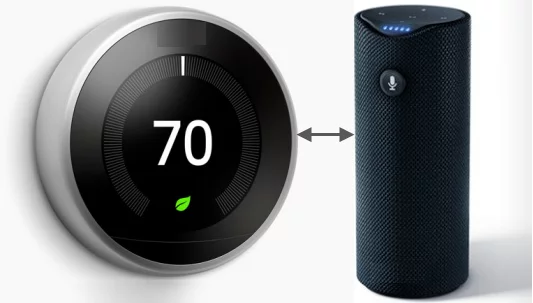
As smart home devices continue to gain popularity, homeowners are always looking for the newest and most innovative devices to add to their setup. One of the most popular devices on the market right now is the Nest Thermostat. The Nest Thermostat is a smart thermostat that allows you to control your home’s heating and cooling system from anywhere using your phone, tablet, or computer. With the integration of Alexa, you can now control your Nest Thermostat with your voice. Here’s how to connect your Nest Thermostat to Alexa.

Step 1: Download the Nest App and Amazon Alexa App

To connect your Nest Thermostat to Alexa, you need to have both the Nest and Amazon Alexa apps installed on your phone or tablet. The Nest app is available for download from the App Store or Google Play Store. The Amazon Alexa app can be downloaded from the same app stores.

Step 2: Enable the Nest Thermostat Skill

Once you have both apps installed, open the Alexa app and enable the Nest Thermostat skill. To do this, follow these steps:

1. Open the Alexa app and tap on the menu button (three lines) in the top left corner.

2. Tap on Skills & Games.

3. Search for “Nest Thermostat” and select the Nest Thermostat skill.

4. Tap on Enable Skill, and you will be prompted to enter your Nest account credentials.

5. Follow the on-screen instructions to complete the setup process.

Step 3: Link Your Nest Thermostat to Alexa

With the Nest Thermostat skill enabled, you can now link your Nest Thermostat to your Alexa account. To do this, follow these steps:

1. Open the Alexa app and tap on the menu button (three lines) in the top left corner.

2. Tap on Smart Home.

3. Tap on Devices and then tap on the plus sign (+) in the top right corner.

4. Tap on “Add Device” and select the “Thermostat” option.

5. Follow the on-screen instructions to link your Nest Thermostat to your Alexa account.

Step 4: Control Your Nest Thermostat with Alexa

With your Nest Thermostat linked to Alexa, you can now use your voice to control your thermostat. Here are some examples of commands you can use:

“Alexa, set the temperature to 72 degrees.”
“Alexa, decrease the temperature by 2 degrees.”
“Alexa, increase the temperature by 3 degrees.”
“Alexa, turn off the air conditioning.”

Conclusion

By following these simple steps, you can connect your Nest Thermostat to Alexa and take control of your home’s temperature with your voice. This integration can be a great addition to your smart home setup and can help you save money on your energy bills. Use your voice to control your Nest Thermostat and enjoy a comfortable temperature no matter where you are in your home.

Previous Article

How to Add Tags to Word Documents

Next Article

How to Access Google Docs Trash

Matthew Lynch

Related articles More from author

  • Digital & Mobile Technology

    The Dialog Box and Dialog Box Launcher in Excel

    July 14, 2023
    By Matthew Lynch
  • Digital & Mobile Technology

    How to Clear Cookies for a Specific Site

    June 2, 2023
    By Matthew Lynch
  • Digital & Mobile Technology

    Mobile Apps to Keep Your Long-Distance Relationship Alive

    June 5, 2023
    By Matthew Lynch
  • Digital & Mobile Technology

    Best Harvard Courses You Can Take Online for Free

    September 7, 2023
    By Matthew Lynch
  • Digital & Mobile Technology

    How to Turn Off Headphone Safety on iPhone

    July 4, 2023
    By Matthew Lynch
  • Digital & Mobile Technology

    Why Does My Motherboard Have a Battery?

    June 6, 2023
    By Matthew Lynch

Search

Login & Registration

  • Register
  • Log in
  • Entries feed
  • Comments feed
  • WordPress.org

Newsletter

Signup for The Tech Edvocate Newsletter and have the latest in EdTech news and opinion delivered to your email address!

About Us

Since technology is not going anywhere and does more good than harm, adapting is the best course of action. That is where The Tech Edvocate comes in. We plan to cover the PreK-12 and Higher Education EdTech sectors and provide our readers with the latest news and opinion on the subject. From time to time, I will invite other voices to weigh in on important issues in EdTech. We hope to provide a well-rounded, multi-faceted look at the past, present, the future of EdTech in the US and internationally.

We started this journey back in June 2016, and we plan to continue it for many more years to come. I hope that you will join us in this discussion of the past, present and future of EdTech and lend your own insight to the issues that are discussed.

Newsletter

Signup for The Tech Edvocate Newsletter and have the latest in EdTech news and opinion delivered to your email address!

Contact Us

The Tech Edvocate
910 Goddin Street
Richmond, VA 23231
(601) 630-5238
[email protected]

Copyright © 2025 Matthew Lynch. All rights reserved.